![VDX: LCE/4JD UI v3.2.9 [v26.10] logo](https://media.forgecdn.net/avatars/1499/902/638974335195796390.png)
Why VDX: LCE/4JD UI v3.2.9 [v26.10] is a top-tier texture pack mod for Minecraft 1.21
Developed by the talented creator CrisXolt, VDX: LCE/4JD UI v3.2.9 [v26.10] stands out as a highly recommended selection for your Minecraft client. It is fully optimized, compatibility-tested, and brings a major upgrade to the gameplay experience in Minecraft version 1.21.
⚙️ Quick Resource Specs
| Mod Creator | CrisXolt |
| Latest Version | 1.21 |
| Supported Game Versions | Minecraft 1.21+ |
| File Size | 29.61 MB |
| Last Updated | |
| Total Downloads | 157,227 downloads |
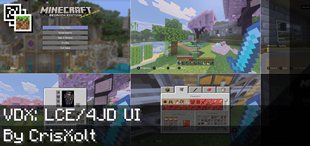
![VDX: LCE/4JD UI v3.2.9 [v26.10] screenshot active](https://media.forgecdn.net/attachments/1375/897/mcpedl-png.png)
Preface:
Warning: If you are using mobile device, make sure to set “File Storage Location” to “External” before importing this resource pack, otherwise, your save data may be lost in case the game future updates break modified UI data.
IMPORTANT NOTE: It is only viable to use it in 1080p resolution with GUI scale -1 (or 0 if screen safe area is set in 0.0), for 720p pixel height format I will bring it in the future.
Also, Ore UI is gradually replacing almost all of the JSON UI screens, so I recommend using the following mod at your own risk: “ForceCloseOreUI.” That said, only if you want to bring them back in current version.
And please, be sure to read carefully this post before downloading and using this resource pack, thank you!
Vanilla DX: LCE/4JD UI:
Before "Modified Vanilla: Console UI Pack".
Codename: Project 4JD UI
Is an "unofficial" testing/experimental resource pack that would change some UI designs, and the goal of this project is convert from default UI to high accuracy possible LCE/4JD UI RP for Bedrock Edition users, replacing some designs to look more similar!
For the time being, only an adaptive version will be available due to the modified UI limitations.
Features:
- Legacy Console Edition UI designs with 70% accurate.
- Main screens, menus and inventories have been modified, not all, but I will add more screens in future versions!
- Some UI customizations by "ui/_global_variables.json".
Upcoming features for future versions:
- Help sections.
- Credits screen.
- New font type.
- New storage management.
- Play Screen and Create World Screen.
Unsupported Screens due to Ore UI replacement (Hardcoded):
- Play Screen
- Settings/Options Screen
- Create World Screen with templates
- Disconnected
- Achievements
- In bed/Sleeping
- You died!
- Permission List Screen
Supported Languages:
- English (en_US and en_UK).
More full languages support is coming in near future updates.
Screenshots:


Known Issues:
- In Trade v2 screen, at the moment it is not supported for use on third-party servers, and when using gamepad, the accuracy is not 100%.
- At the moment, it is not recommended for use with another resource pack, much less when applied to a single world.
- And unfortunately, since the “Ore UI” (new UI engine) appears for some screens, it is impossible to modify it using resource packs. However, I have plans to make modifications using something external, for now I must make research about CSS, JS and HTML, I will let you know if something happens...
- Obviously, you can't use it with other resource packs that have modified UI. You will have to wait for me to make it compatible in a possible way.
Terms of Use:
You may:
- Make review about this pack, as long as you credit me as “@CrisXolt”. And put original download link in description (This CurseForge/MCPEDL forum post).
You may not:
- Make customized APK/APPX and monetized content (pirate modifications), no one will have the permission.
- Use my modified JSON and UI4JD data files claiming this work as your, without permission of course. Specially do not modify/erase the text in the first line code in each .json file. (Example text: //File Made/Modified by @CrisXolt or “Some people who contributed”).
- Redistribute this resource pack made by me in another pages/app store, no one will have the permission.
- Do not use for third-party projects, much less to merge with "Concept Clients" resource packs, no one will have the permission.
And how do I deactivate this resource pack?
If this is your first time experimenting with the UI, just go to "Help & Options" -> "Settings" -> "Graphics" and click the button where it says: "Resource Packs".

And then this screen comes out and you can deactivate this. That's all! ;D
Related Projects:
Console Aspects: Made by AgentMindStorm, a Bedrock Edition resource pack for enthusiasts who want more experience!
Legacy4J: Made by WilyIcaro, a mod for the Java edition that not only changes the interface, but also entire aspects of the game!
Special Thanks:
AgentMindStorm, and LupasPAH for custom JSON UI data assets!
Final Note:
Those default JSON UI data, and also, LCE UI designs is made originally by Mojang, Microsoft and 4J Studios, UI design re-make as JSON UI data are modified by me for entertainment purposes.
Just enjoy and good luck! ;D
The Ultimate Guide to VDX: LCE/4JD UI v3.2.9 [v26.10]
If you are exploring the vast world of Minecraft modifications, VDX: LCE/4JD UI v3.2.9 [v26.10] by CrisXolt is a standout texture that deserves your attention. With over 157,227 downloads, it has become a staple for players looking to enhance their experience. As the creator describes it, this project is "Convert from Bedrock Edition UI to Legacy Console UI!". Whether you are a veteran builder constructing massive cities, or simply a casual player looking to upgrade your survival world, this guide will provide you with all the essential details on how VDX: LCE/4JD UI v3.2.9 [v26.10] alters the game.
What Makes It Special?
Unlike standard textures that simply alter superficial elements, VDX: LCE/4JD UI v3.2.9 [v26.10] introduces a wide array of visual and mechanical features designed to seamlessly blend into the vanilla aesthetic. CrisXolt has clearly spent significant time refining the project to ensure that every aspect feels polished and responsive for version 1.21.
Installation Guide
Getting VDX: LCE/4JD UI v3.2.9 [v26.10] up and running is straightforward. Follow these step-by-step instructions:
- Verify Your Version: Ensure your Minecraft launcher is set to version 1.21.
- Install Mod Loader (if required): If this is a mod, download the compatible loader (Forge, Fabric, NeoForge).
- Download the File: Click the secure download button above to retrieve the official file from CurseForge.
- Move the File: Place the downloaded file into your `mods`, `shaderpacks`, or `resourcepacks` folder depending on the texture type.
- Launch and Enjoy: Open Minecraft, navigate to the respective settings menu, and activate VDX: LCE/4JD UI v3.2.9 [v26.10].
Compatibility & Performance
Compatibility is robust. VDX: LCE/4JD UI v3.2.9 [v26.10] is designed specifically for version 1.21, taking full advantage of the latest engine optimizations. During typical gameplay, this addition maintains a stable frame rate, though lower-end laptops might experience slight stuttering. We recommend pairing this with performance boosters like Sodium or Iris to guarantee a silky-smooth experience.