PiglixMCMods LogoPiglixMCMods
HomeShadersTexturesModsLow-End ShadersRTX ShadersSavedGuidesAbout
GET IT ONGoogle Play

Popular Collections

📱 Performance HubBest Low-End ShadersMCPE Performance Mods
✨ Realism & RTXRealistic RTX ShadersRTX Texture Packs for MCPE
🤖 Platform CompatibilityMinecraft PE Shaders 1.21Shaders for Android & iOS
⚔️ Gameplay VibeTop PvP Texture PacksMedieval Texture Packs
🤝 Community & SocialsYouTubeInstagram
Get the Android App — Free on Play Store
HomeGuidesAbout UsSponsor & PartnerContactPrivacy PolicyTerms & ConditionsDisclaimer
Minecraft>Textures>The Ty-el's Vietnamese Language Pack
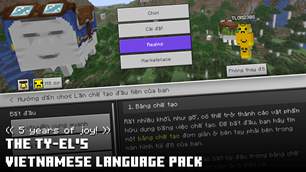
The Ty-el's Vietnamese Language Pack logo

The Ty-el's Vietnamese Language Pack

By👤tlgm2308

Adds Vietnamese language support to Minecraft Bedrock, with optional improved Unicode font supports.

Why The Ty-el's Vietnamese Language Pack is a top-tier texture pack mod for Minecraft 1.21.132

Developed by the talented creator tlgm2308, The Ty-el's Vietnamese Language Pack stands out as a highly recommended selection for your Minecraft client. It is fully optimized, compatibility-tested, and brings a major upgrade to the gameplay experience in Minecraft version 1.21.132.

⚙️ Quick Resource Specs

Mod Creatortlgm2308
Latest Version1.21.132
Supported Game Versions1.21.132, 1.21.131, 1.21.130
File Size967.11 KB
Last UpdatedUpdated: June 17, 2026
Total Downloads1,693,664 downloads
The Ty-el's Vietnamese Language Pack screenshot active
If you want to elevate your Minecraft gameplay, The Ty-el's Vietnamese Language Pack is a fantastic choice. Developed by tlgm2308, this textures offers a fresh way to customize your virtual world. It is fully compatible with Minecraft 1.21.132 and is highly rated by the community.

The Ty-el's Vietnamese Language Pack is a little yet helpful resource pack that adds Vietnamese Language support to Minecraft Bedrock. This pack also adds proper supports of the vanilla "Mojangles" (or MinecraftSeven) to make it compatible with Vietnamese characters too. Most translations are in parity with Minecraft: Java Edition.


Credits: @tlgm2308 (X/Twitter), @fromgate (X/Twitter, creator of the original Minecraft Unicode font pack, remastered by tlgm2308), @CrisXolt (VDX UI translation supports), @ZouChenyunfei (X/Twitter, Custom Pack Info in Pack Settings Screen)


Preview Video

(Some translations may differ in the future)


Features

- 17,000+ "translatable translations" are translated and matches Java Edition of Minecraft's Vietnamese language with more than 95% accuracy!
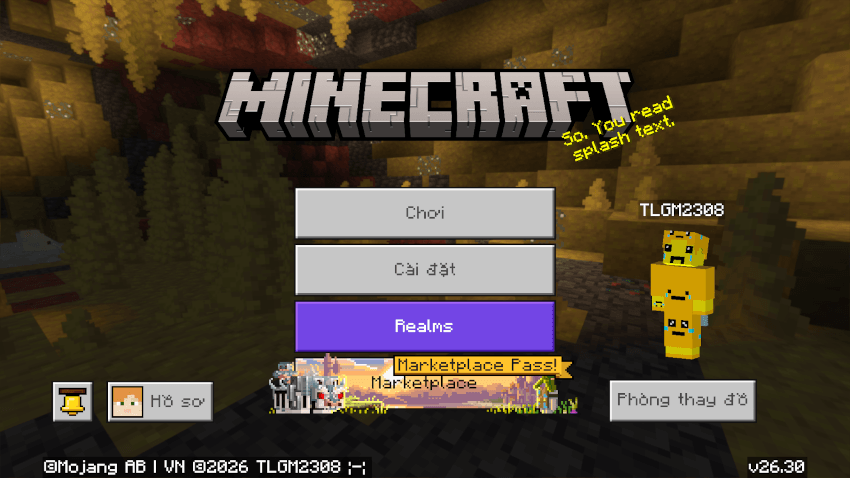
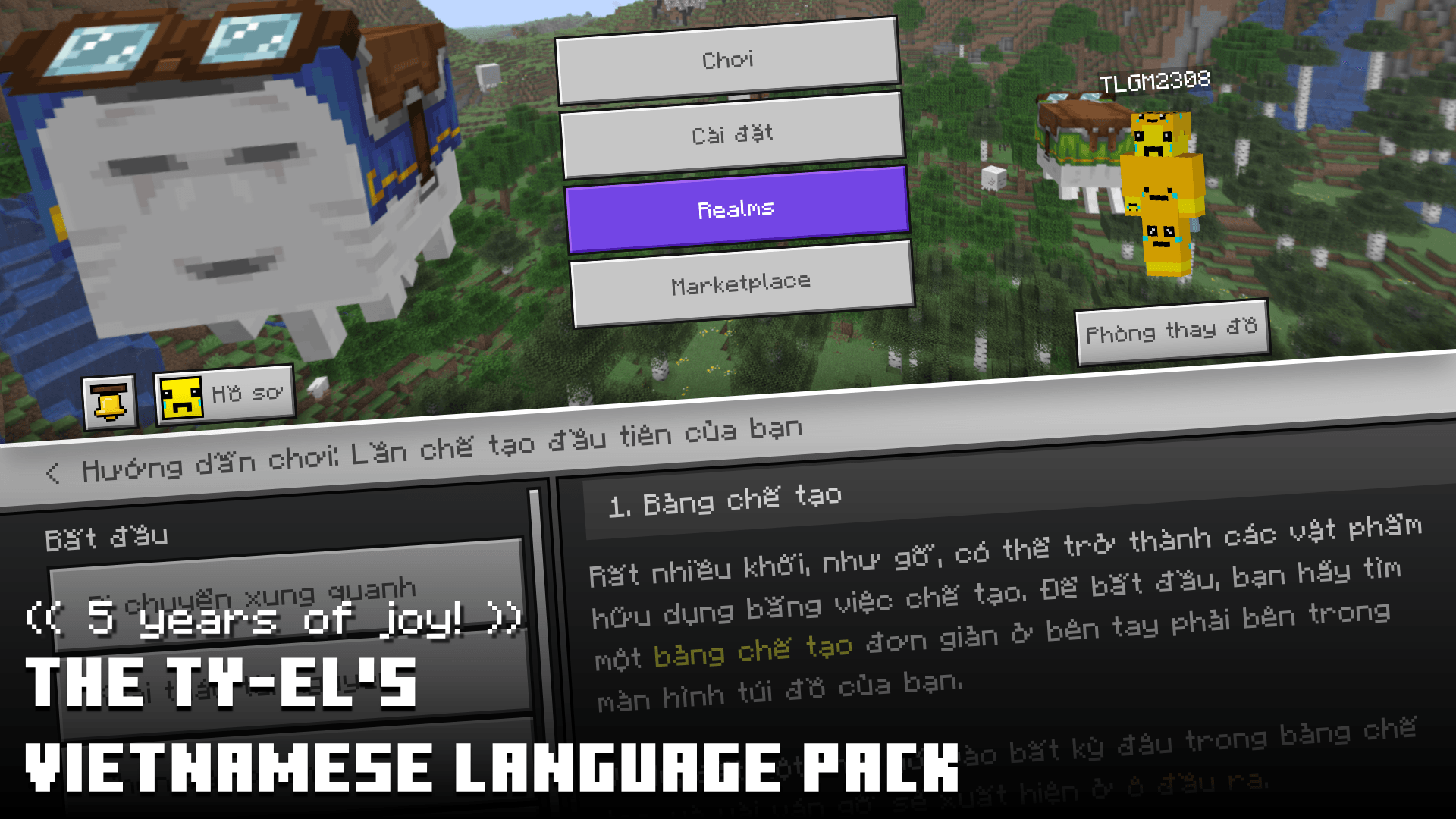
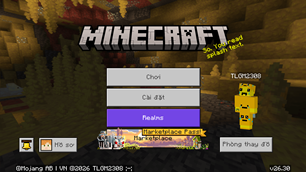
Start Screen

Start screen


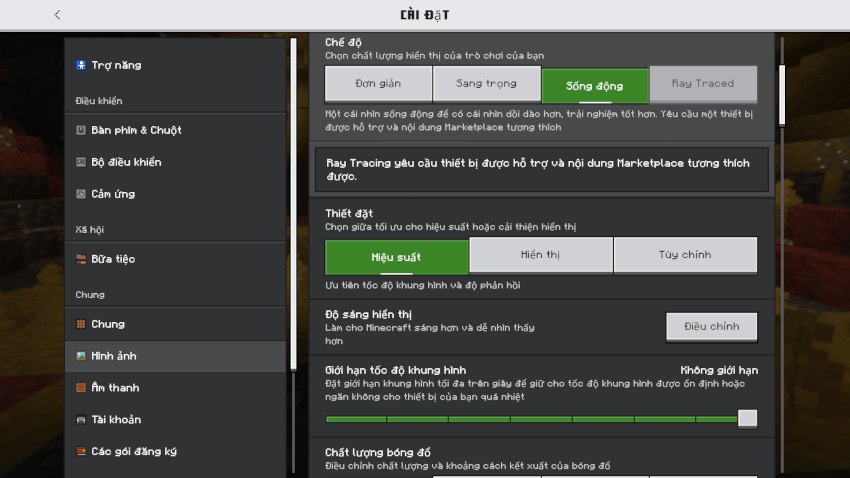
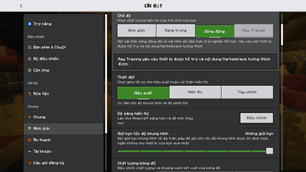
Video Settings

Video Settings screen


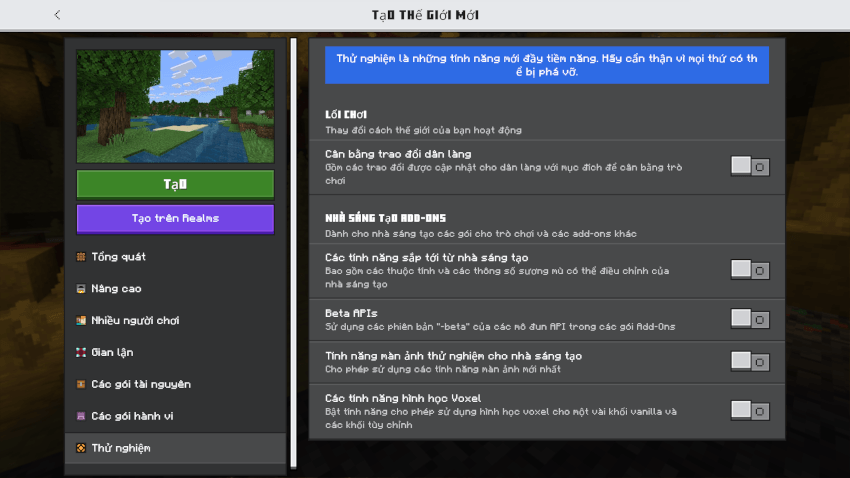
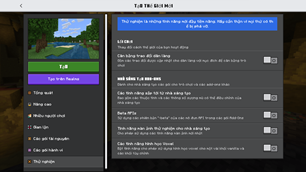
World Settings/Experiments

Create New World/Experiments screen


Update World

Update World screen


Achievements/All Tab screen (Please note that achievements are untranslatable)


Loading screen with random loading messages translated
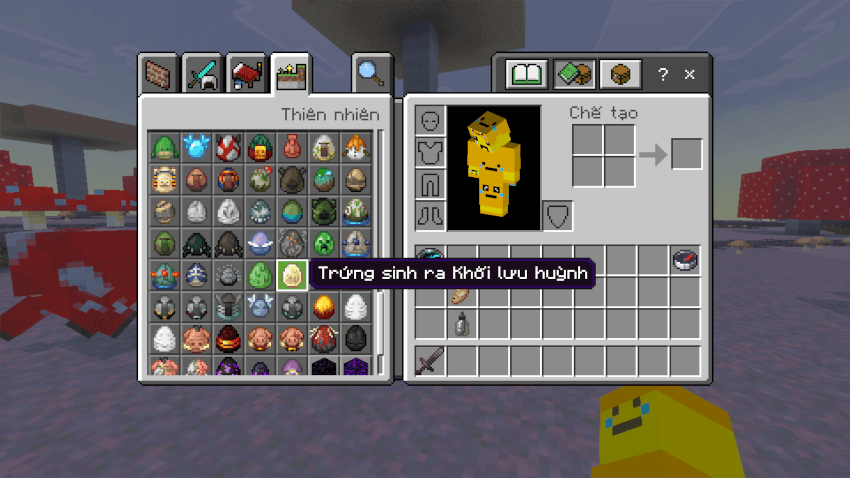
 

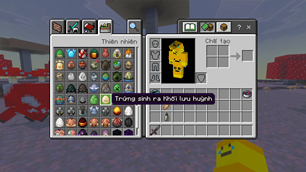
Inventory with Sulfur Cube Spawn Egg item name
Inventory with Sulfur Cube Spawn Egg item name


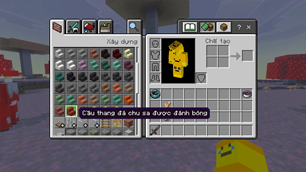
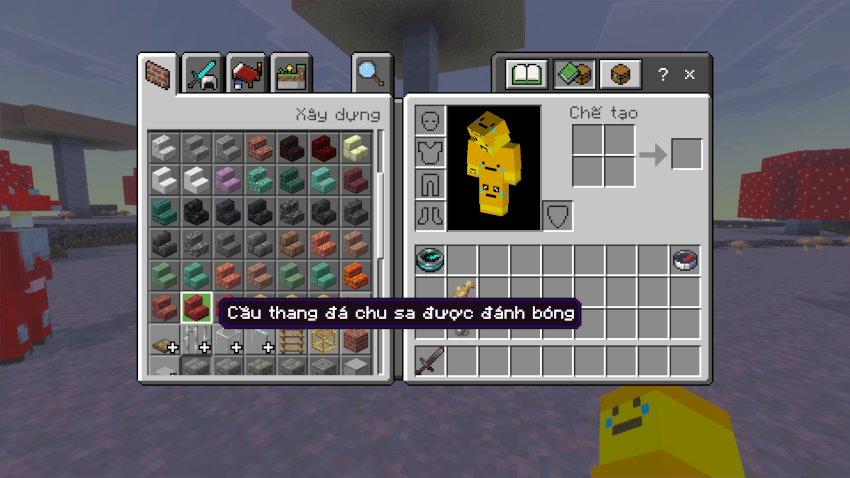
Inventory with Polished Cinnabar Stairs item name
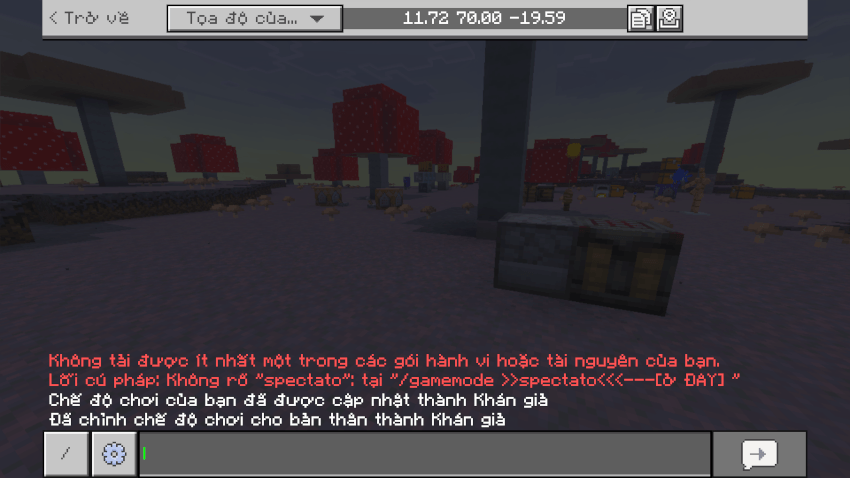
Inventory with Polished Cinnabar Stairs item name


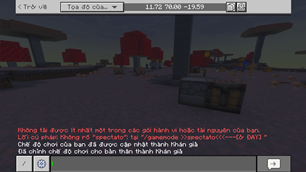
Chat Screen

Chat screen, with message samples


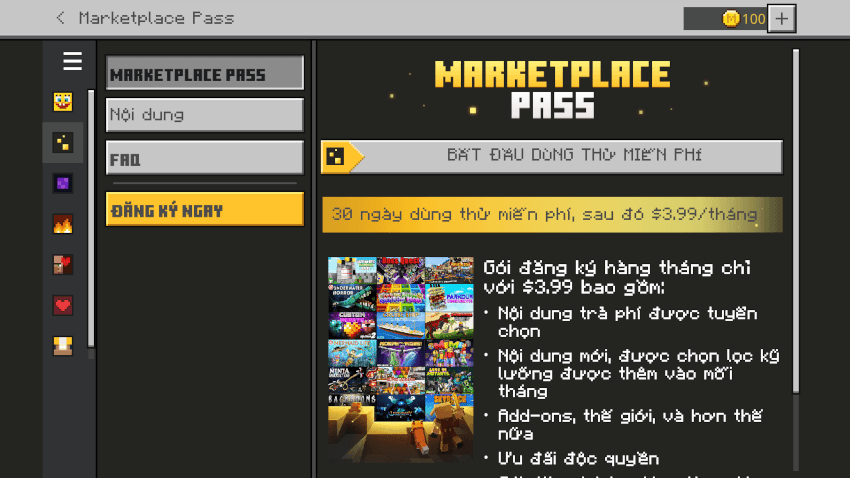
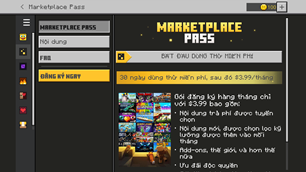
Marketplace Pass screen

Marketplace Pass/Home screen


- Fully translated How to Play sections

How To Play/Inventory


How To Play/Encyclopedia/Trading


- Supports Chemistry Mode
(can be enabled by turning on Education Edition in World Settings)

Material Reducer screen


Lab Table screen with "Bleach" item name


- Supports Editor Mode

To be able to apply Vietnamese in Editor Mode, first in Minecraft Preview, activate the pack and set language to Vietnamese first, then open Minecraft Editor, go to world settings, activate the pack through World Resource Packs and enter the world. The game language will automatically change to Vietnamese as soon as the game load the world.
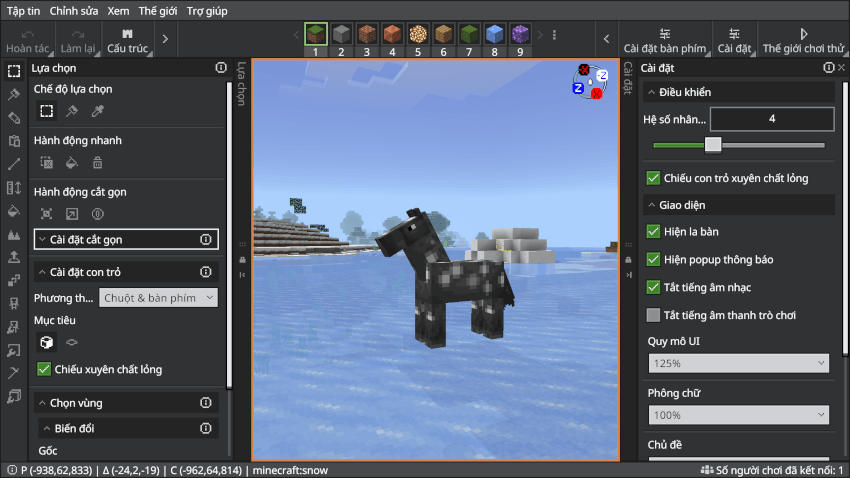
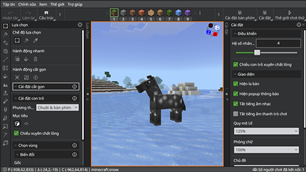
Editor Mode with Selection Pane

Selection Pane


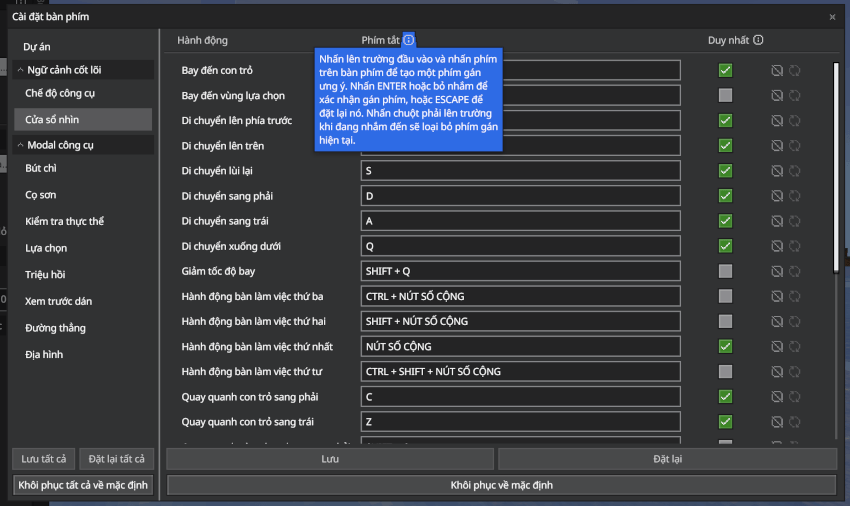
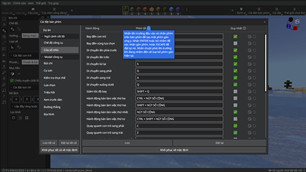
Editor Mode/Keyboard Settings

Keyboard Settings Dialog


- Text-to-Speech supports!


And more!


Things that can't be translated:

- Achievements

- Marketplace Contents

- Realms/Realms Plus/Marketplace Pass terms, EULA, purchase info

- Credits, Ending Messages

- Add-Ons & custom translations in other packs (some might be supported out-of-the-box)


This pack follows Minecraft translating rules, which means, special names like Creeper, Redstone, Realm(s), Ghast, Piglin... will not be translated, and Minecraft Java Translation Project on Crowdin, but there might be some exceptions.


Fonts

This pack comes with 4 variations of font types (4 subpacks) you can edit it in pack settings. If you don't like custom fonts from this pack, you can always change subpack settings to "none".

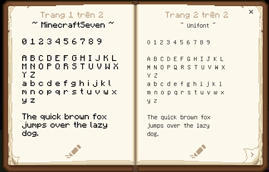
  • MinecraftSeven (left page) and Unifont (right page)
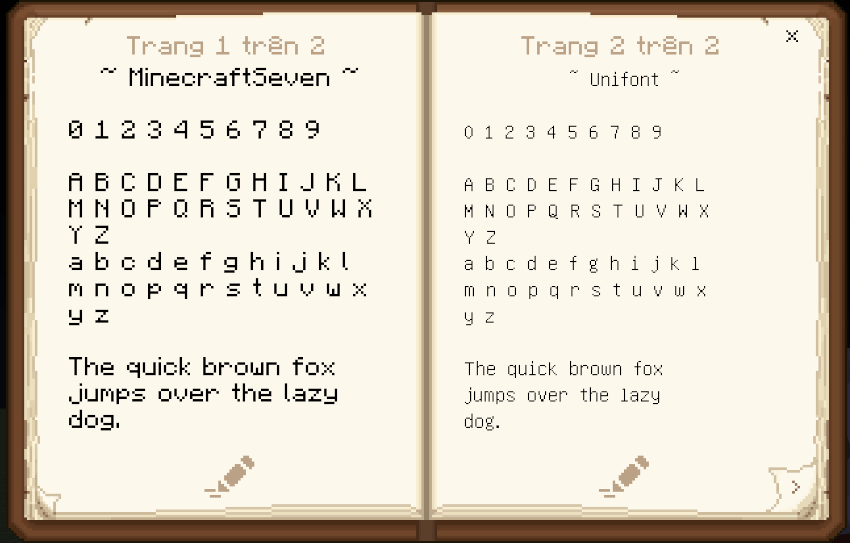
Fonts Comparison

MinecraftSeven was made by @fromgate and remastered by tlgm2308, to keep your Minecraft experiences nostalgic with some small changes to how texts were rendered.

  • MinecraftSeven (Smooth Variant)

This font is the smoothed version of MinecraftSeven, very ideal if you are using high-resolution texture packs or want a "cleaner" PvP experiences.

How To Play/Build a Shelter


How To Play/Encyclopedia/Banners


  • None (for custom font pack purposes)


How to change fonts (Restart game is required!)

Step 1: Press Pack Settings ⚙ button next to the Deactivate button

Where's the Pack Settings button?


Step 2: Change pack settings by swiping the slider

Choose "MinecraftSeven" to apply MinecraftSeven font (default subpack)


Choose "MinecraftSeven (Smooth Variant)" to apply MinecraftSeven font (Smooth Variant)


Choose "Unifont + Noto Sans" to apply Unifont + Noto Sans


Choose "None" to ignore fonts from this pack, and you can place your own custom font packs at the top of Ty-el Vietnamese


Step 3: Exit Settings and Restart game!


Known Issues

  • MinecraftSeven (both normal and smooth variants) font: Unicode characters may get "smoother", bolder or distorted than normal, this can be fixed easily by changing game's GUI scale or switch back to "Unifont + Noto Sans" or "None" font. This is due to some screen's resolutions don't support custom fonts properly.
  • When using MinecraftSeven font (or Smooth) subpack, you may see font in chat screen (or chat in HUD) sometimes underlined or randomly bolder. To fix it, try changing line spacing to ×1.0, and/or change Chat Font to "Mojangles".
  • Contents (except Realms Plus) in Marketplace/My Content section and other similar sections may not load, that's a Minecraft bug. To be able to view them, please change the game language to any other Vanilla languages. If you are done with that, to continue using the pack, just change the game language back to Vietnamese again.


Creator's Notes

- You can use and edit my pack, but only for personal uses. Usages in modified APK/APPX/custom app packages,... are prohibited! Any re-uploads contain the original language file but got modified are also prohibited!


- For content creators (YouTube, Facebook, X/Twitter...), if you make contents about this pack, make sure you credit me or leave valid attribution in your description.

- This pack currently supports both Stable and Preview/Beta version of Minecraft Bedrock 1.20.80 or higher. (Subject to change in the future)

- Original translations and texts are from Microsoft and Mojang, AB. All rights reserved!

- If you found anything I translated incorrect or not translated properly, please contact me or comment in this submission.


Attribution

  • Noto Sans (/font/NotoSans/NotoSans-Regular.ttf):
    Noto Sans is licensed under the SIL Open Font License, Version 1.1. The copy of this license can be found in "/font/NotoSans/LICENSE.txt", or at http://scripts.sil.org/OFL. Noto is a trademark of Google LLC.


Installation

  1. Open the ".mcpack" file you just downloaded to import it to Minecraft.
  2. After the game successfully imported the pack, open Settings.
  3. Go to Global Resources, activate the pack. You can also change font settings in Pack Settings. Exit Settings.
  4. Exit and Restart Minecraft.
  5. Open Settings again, go to "Language" and select "Tiếng Việt (Việt Nam)"

If you update this pack, make sure you remove this old pack before updating to the latest version.

The Ultimate Guide to The Ty-el's Vietnamese Language Pack

If you are exploring the vast world of Minecraft modifications, The Ty-el's Vietnamese Language Pack by tlgm2308 is a standout texture that deserves your attention. With over 1,693,664 downloads, it has become a staple for players looking to enhance their experience. As the creator describes it, this project is "Adds Vietnamese language support to Minecraft Bedrock, with optional improved Unicode font supports.". Whether you are a veteran builder constructing massive cities, or simply a casual player looking to upgrade your survival world, this guide will provide you with all the essential details on how The Ty-el's Vietnamese Language Pack alters the game.

What Makes It Special?

Unlike standard textures that simply alter superficial elements, The Ty-el's Vietnamese Language Pack introduces a wide array of visual and mechanical features designed to seamlessly blend into the vanilla aesthetic. tlgm2308 has clearly spent significant time refining the project to ensure that every aspect feels polished and responsive for version 1.21.132.

Installation Guide

Getting The Ty-el's Vietnamese Language Pack up and running is straightforward. Follow these step-by-step instructions:

  1. Verify Your Version: Ensure your Minecraft launcher is set to version 1.21.132.
  2. Install Mod Loader (if required): If this is a mod, download the compatible loader (Forge, Fabric, NeoForge).
  3. Download the File: Click the secure download button above to retrieve the official file from CurseForge.
  4. Move the File: Place the downloaded file into your `mods`, `shaderpacks`, or `resourcepacks` folder depending on the texture type.
  5. Launch and Enjoy: Open Minecraft, navigate to the respective settings menu, and activate The Ty-el's Vietnamese Language Pack.

Compatibility & Performance

Compatibility is robust. The Ty-el's Vietnamese Language Pack is designed specifically for version 1.21.132, taking full advantage of the latest engine optimizations. During typical gameplay, this addition maintains a stable frame rate, though lower-end laptops might experience slight stuttering. We recommend pairing this with performance boosters like Sodium or Iris to guarantee a silky-smooth experience.


Details

Downloads:1,693,664
Created:1 year ago
Updated:1 month ago
Project ID:1091897
License:All Rights Reserved
Environment:Client

Game Versions

1.21.1321.21.1311.21.130

🤝 Join Community for Support

Need help installing this resource or want to see more showcases? Join our community!

Subscribe on YouTubeFollow on Instagram

The Ty-el's Vietnamese Language Pack

Screenshot 0
Screenshot 1
Screenshot 2
Screenshot 3
Screenshot 4
Screenshot 5
Screenshot 6
Screenshot 7
Screenshot 8
Screenshot 9
Screenshot 10
Screenshot 11
T
tlgm2308
TEXTURES CREATOR
Downloads1.7M
Version1.21.132
TypeTEXTURES
File Size967.11 KB

About This textures

Adds Vietnamese language support to Minecraft Bedrock, with optional improved Unicode font supports.

The Ty-el's Vietnamese Language Pack is a little yet helpful resource pack that adds Vietnamese Language support to Minecraft Bedrock. This pack also adds proper supports of the vanilla "Mojangles" (or MinecraftSeven) to make it compatible with Vietnamese characters too. Most translations are in parity with Minecraft: Java Edition.


Credits: @tlgm2308 (X/Twitter), @fromgate (X/Twitter, creator of the original Minecraft Unicode font pack, remastered by tlgm2308), @CrisXolt (VDX UI translation supports), @ZouChenyunfei (X/Twitter, Custom Pack Info in Pack Settings Screen)


Preview Video

(Some translations may differ in the future)


Features

- 17,000+ "translatable translations" are translated and matches Java Edition of Minecraft's Vietnamese language with more than 95% accuracy!

Start Screen

Start screen


Video Settings

Video Settings screen


World Settings/Experiments

Create New World/Experiments screen


Update World

Update World screen


Achievements/All Tab screen (Please note that achievements are untranslatable)


Loading screen with random loading messages translated


Inventory with Sulfur Cube Spawn Egg item name

Inventory with Sulfur Cube Spawn Egg item name


Inventory with Polished Cinnabar Stairs item name

Inventory with Polished Cinnabar Stairs item name


Chat Screen

Chat screen, with message samples


Marketplace Pass screen

Marketplace Pass/Home screen


- Fully translated How to Play sections

How To Play/Inventory


How To Play/Encyclopedia/Trading


- Supports Chemistry Mode
(can be enabled by turning on Education Edition in World Settings)

Material Reducer screen


Lab Table screen with "Bleach" item name


- Supports Editor Mode

To be able to apply Vietnamese in Editor Mode, first in Minecraft Preview, activate the pack and set language to Vietnamese first, then open Minecraft Editor, go to world settings, activate the pack through World Resource Packs and enter the world. The game language will automatically change to Vietnamese as soon as the game load the world.

Editor Mode with Selection Pane

Selection Pane


Editor Mode/Keyboard Settings

Keyboard Settings Dialog


- Text-to-Speech supports!


And more!


Things that can't be translated:

- Achievements

- Marketplace Contents

- Realms/Realms Plus/Marketplace Pass terms, EULA, purchase info

- Credits, Ending Messages

- Add-Ons & custom translations in other packs (some might be supported out-of-the-box)


This pack follows Minecraft translating rules, which means, special names like Creeper, Redstone, Realm(s), Ghast, Piglin... will not be translated, and Minecraft Java Translation Project on Crowdin, but there might be some exceptions.


Fonts

This pack comes with 4 variations of font types (4 subpacks) you can edit it in pack settings. If you don't like custom fonts from this pack, you can always change subpack settings to "none".

  • MinecraftSeven (left page) and Unifont (right page)

Fonts Comparison

MinecraftSeven was made by @fromgate and remastered by tlgm2308, to keep your Minecraft experiences nostalgic with some small changes to how texts were rendered.

  • MinecraftSeven (Smooth Variant)

This font is the smoothed version of MinecraftSeven, very ideal if you are using high-resolution texture packs or want a "cleaner" PvP experiences.

How To Play/Build a Shelter


How To Play/Encyclopedia/Banners


  • None (for custom font pack purposes)


How to change fonts (Restart game is required!)

Step 1: Press Pack Settings ⚙ button next to the Deactivate button

Where's the Pack Settings button?


Step 2: Change pack settings by swiping the slider

Choose "MinecraftSeven" to apply MinecraftSeven font (default subpack)


Choose "MinecraftSeven (Smooth Variant)" to apply MinecraftSeven font (Smooth Variant)


Choose "Unifont + Noto Sans" to apply Unifont + Noto Sans


Choose "None" to ignore fonts from this pack, and you can place your own custom font packs at the top of Ty-el Vietnamese


Step 3: Exit Settings and Restart game!


Known Issues

  • MinecraftSeven (both normal and smooth variants) font: Unicode characters may get "smoother", bolder or distorted than normal, this can be fixed easily by changing game's GUI scale or switch back to "Unifont + Noto Sans" or "None" font. This is due to some screen's resolutions don't support custom fonts properly.
  • When using MinecraftSeven font (or Smooth) subpack, you may see font in chat screen (or chat in HUD) sometimes underlined or randomly bolder. To fix it, try changing line spacing to ×1.0, and/or change Chat Font to "Mojangles".
  • Contents (except Realms Plus) in Marketplace/My Content section and other similar sections may not load, that's a Minecraft bug. To be able to view them, please change the game language to any other Vanilla languages. If you are done with that, to continue using the pack, just change the game language back to Vietnamese again.


Creator's Notes

- You can use and edit my pack, but only for personal uses. Usages in modified APK/APPX/custom app packages,... are prohibited! Any re-uploads contain the original language file but got modified are also prohibited!


- For content creators (YouTube, Facebook, X/Twitter...), if you make contents about this pack, make sure you credit me or leave valid attribution in your description.

- This pack currently supports both Stable and Preview/Beta version of Minecraft Bedrock 1.20.80 or higher. (Subject to change in the future)

- Original translations and texts are from Microsoft and Mojang, AB. All rights reserved!

- If you found anything I translated incorrect or not translated properly, please contact me or comment in this submission.


Attribution

  • Noto Sans (/font/NotoSans/NotoSans-Regular.ttf):
    Noto Sans is licensed under the SIL Open Font License, Version 1.1. The copy of this license can be found in "/font/NotoSans/LICENSE.txt", or at http://scripts.sil.org/OFL. Noto is a trademark of Google LLC.


Installation

  1. Open the ".mcpack" file you just downloaded to import it to Minecraft.
  2. After the game successfully imported the pack, open Settings.
  3. Go to Global Resources, activate the pack. You can also change font settings in Pack Settings. Exit Settings.
  4. Exit and Restart Minecraft.
  5. Open Settings again, go to "Language" and select "Tiếng Việt (Việt Nam)"

If you update this pack, make sure you remove this old pack before updating to the latest version.

📌Supported Minecraft Versions: 1.21.132, 1.21.131, 1.21.130

How to Install

1. Download the resource pack .zip file. 2. Open Minecraft and go to Options > Resource Packs. 3. Drag and drop the downloaded file into the list and activate it.