

Why Crash Assistant is a top-tier mod mod for Minecraft 1.21.5
Shows a GUI after Minecraft crashes, immediately showing and analyzing all affected logs.
⚙️ Quick Resource Specs
| Mod Creator | KostromDan |
| Latest Version | 1.21.5 |
| Supported Game Versions | 1.21.5, 1.21.4, 1.21.3, 1.21.2, 1.21.1 |
| File Size | 647.87 KB |
| Last Updated | |
| Total Downloads | 59,087,656 downloads |
Shows a GUI after Minecraft crashes, immediately displaying all affected game/launcher logs, crash reports, or hs_err files. Provides a one-click solution to upload them, copy the link, and perform other actions for easier reporting, debugging, and troubleshooting. Analyzes logs for many known crash reasons. Provides many useful analysis tools. Warns if Minecraft is running on an integrated GPU when a dedicated one is available. Includes auto-fixes for many common issues.
Mod is client-only. On a server, it will do nothing.
If you have any questions, feel free to join my Discord server: https://discord.gg/dV8WFrJZK6
Features:
GUI:
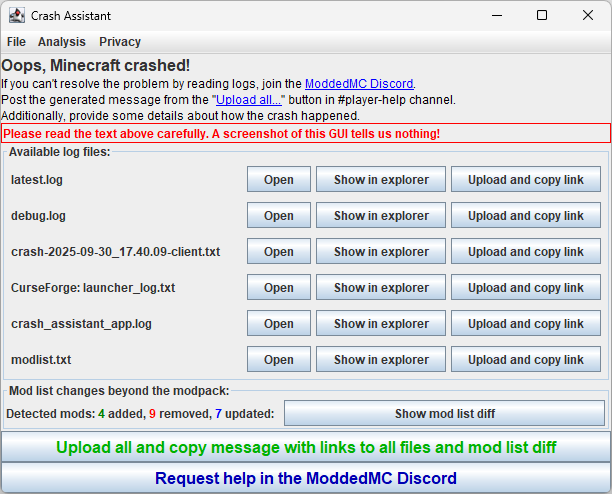
Supports drag&drop. You can move files directly from the GUI to wherever you want, or drag and drop all logs by dragging them from the “Available log files:” label.
Log Analysis:
Analyzes logs for many known reasons for crashes. If a known issue is detected, it displays a dialog with a problem description and a detailed solution.
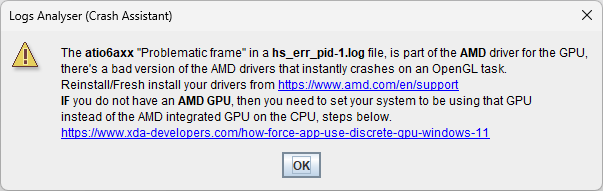
Supported analysis:
hs_err (JVM Crash):
AlLibAlcCleanup(Some RAM allocation-related cursed issue)atio6axx.dll(AMD driver issue)glfw.dll(Generic GPU driver issue)ig7icd64.dll(Old Intel integrated GPU driver issue)InsufficientMemory(System is out of physical RAM or swap space)JavaTooHigh(e.g., Spark mod crashing on Java ≥ 22)jemalloc.dll(Issue with the jemalloc memory allocator)jvm.dll(Potential hardware issue or a bug in the JVM itself)libglfw.so/libopenal.so(Common Linux library problems)libGLProgrammability.dylib(Incompatible shader pack on macOS)~StubRoutines::SafeFetch32(macOS on Apple Silicon with an incorrect JDK)nglMultiDrawElementsBaseVertex/0x0000(GPU driver issue)nvoglv64.dll(Nvidia driver issue)
log / crash-report:
ConnectorIncompatibleFabricMods(Detects incompatible Fabric mods like Sodium/Iris when using Sinytra Connector)Create6Addons(Incompatibility between Create versions and its addons, suggests one button to find all incompatible mods, just by one click)CtovWithoutLithostitched(ChoiceTheorem's Overhauled Village mod missing a required dependency)CurseForgeCorrupted(Corrupted Minecraft/Loader installation from the CurseForge launcher)DiskSpaceEnded(System has run out of disk space)DuplicatedMods(Multiple versions of the same mod are installed)EpicFightAddons(Incompatibility between Epic Fight versions and its addons, suggests one button to find all incompatible mods, just by one click)FeatureOrderCycle(Circular dependency in world generation features)FerriteCoreNeighborTable(Detects when a mod improperly accesses FerriteCore's neighbor table, provides a temporary config workaround)GeckoLibOculusCompat(Warns that GeckoLib Oculus Compat mod is no longer needed on Minecraft 1.20.1+ and causes crashes)GroovyModLoaderIPv6(GML failed to download mappings due to IPv6 issues, includes Auto-Fix to fix the issue just by one click or to find all mods relying on GML)KubeJSDataPack(Error while loading a datapack with KubeJS)LanguageProviderMismatch(Mod requires a different version of Forge/NeoForge)LegacyTooManyIds(Exceeded the block/item ID limit on old Minecraft versions like 1.12.2)MixinApply(Detects a wide range of crashes caused by Mixin conflicts or errors, includes missing class detection and Auto-Fix to find mods relying on the missing class)MissingEmbeddiumForOculus(Oculus mod is installed without its required dependency, Embeddium)MissingIndium(A mod requires Indium for Fabric Renderer API compatibility but it's not installed)MissingUnsupportedDependencies(General dependency conflicts detected by Forge/NeoForge)ModernFixWatchDog(Integrated server has deadlocked)NeoForgeVersion1_20_1(Notifies that Neo on 1.20.1 is abandoned and causing many crashes and switching to Forge is an official recommendation from Neo on that version.)ModuleFind/ModuleResolution(Java module system errors, often due to dependency conflicts, immediately identifies which mod is causing the issue, without our mod binary search was needed to find this)Optifine(Warns that OptiFine is known to cause many incompatibility issues and suggests modern alternatives)OutOfMemoryError(Minecraft ran out of allocated RAM)ResourceLocationException(A resource name contains invalid characters, often due to non-English system settings)Rubidium(Warns that Rubidium is abandoned and causes issues, suggests Embeddium)ServerConfigCorrupted(A server-side config file is malformed)UnsupportedClassVersion(A mod was compiled with a newer version of Java than the one being used)UsedByAnotherProcess(A file is locked by another program)Version1_21(Warns that Minecraft 1.21 is outdated and causing manny issues; suggests switching to 1.21.1)
win_event (Windows Event Log):
WasClosedByWindows(Game froze and was terminated by the OS, often from user input during loading)
Codex Logs Analyzer Integration:
- After uploading, every supported log is analyzed by
mclo.gs's Codex logs analyzer. Sometimes Codex messages can be unclear for average users. In such cases, a detailed message with a how-to-fix guide is displayed:- Erroring block/entity
This significantly reduces the load on modpack support, as a large percentage (more than 75%) of issues are common and easily solvable problems. You can blacklist any analysis in the config if desired.
Analysis Tools
Crash Assistant includes a suite of powerful analysis tools accessible from the GUI menu:
- Create/Epic Fight Addons Compatibility: Scans your mods to find addons that are incompatible with your installed version of Create or Epic Fight.
- MCreator Mod Detector: Lists all mods made with the MCreator tool.
- Package/Class Finder: Searches all mods to find which one contains a specific Java class or package.
- Jdeps Dependencies Analysis: Identifies which mods depend on a specific class or package, helping to debug
NoClassDefFoundErrorcrashes.
Integrated GPU Detection:
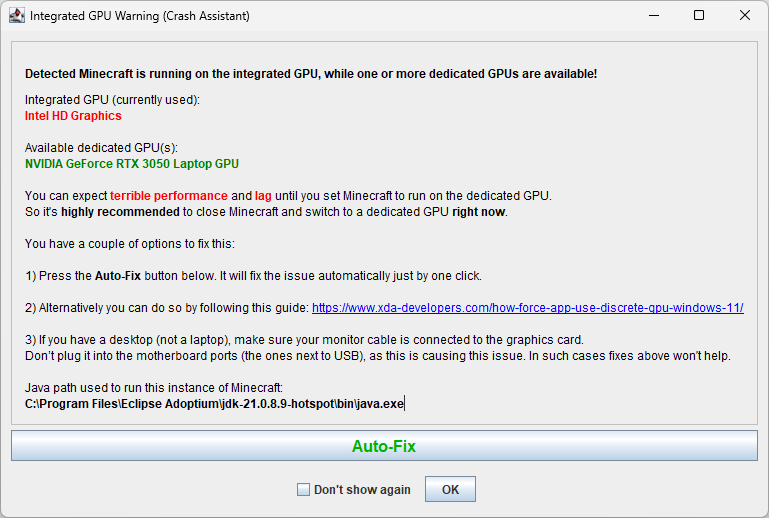
Checks if the game is running on an integrated GPU when a more powerful dedicated GPU is available and displays a warning. Includes a one-click Auto-Fix button to configure Windows to use the correct GPU for Java.
Intel Chip Bug Warning:
Detects if your CPU is among the Intel 13th/14th generation models known to have a critical stability bug. It checks your microcode version and provides a detailed warning and recommendations.
Compatibility:
The mod is designed for maximum compatibility and stability. It runs in an independent process that waits for the Minecraft JVM to stop. It loads extremely early as a Coremod (Forge) or LanguageAdapter (Fabric/Quilt), allowing it to catch even early startup crashes.
Upload all logs and copy link with one click:
You can upload all available logs with one click and get a neatly formatted message ready for pasting on GitHub or Discord. If you are a modpack creator, you will always know that all logs are current and contain all available info without needing to request additional files.
Button to join pre-configured Link:
Your modpack players can easily, with one click, find your Discord and request help right after a crash. This, combined with the exceptional ease of log uploading, significantly increases the probability of reporting individual crashes. For individual downloads or if not configured, it will direct users to the appropriate modloader's Discord server.
Modlist:
Saves the modpack's modlist every time the game is launched by the modpack creator. You can also manually save the modlist using the /crash_assistant modlist save command. It works differently for modpacks and individual downloads:
Modpacks:
The generated message includes a list of mods that the end user has added, removed, or updated compared to the official modpack list.
Individual downloads / modpack authors:
Tracks modlist changes since the last successful launch, which can be extremely useful if you hit the "update all" button or added problematic mods and forgot which ones.
Configuration:
Fully configurable: you can enable or disable any feature, change the Discord link, and customize the text of labels, buttons, and more.
Localization:
Fully localized. Currently supported languages:
- English
- German
- Russian
- Chinese
- Spanish
- Italian
There are no hardcoded strings (except for logging). You can change every visible string. For more localization info, or if you want to add a new language, read the lang README.
Crash Commands:
/crash_assistant crash has 3 options:
game- crashes Minecraft with a crash report.jvm- crashes the JVM with an hs_err_pid file.no_crash- applies additional arguments without crashing.
After the crash target, you can use additional arguments:
--withThreadDump- generates a thread dump in the log.--withHeapDump- generates a heap dump file.--GCBeforeHeapDump- performs garbage collection before the heap dump.
Problematic Mods Config:
Adds a config file, problematic_mods_config.json, that lets you mark mods as incompatible with your modpack. It has two modes: it can crash the game if an incompatible mod is detected or simply notify the user. The end user who added the mod will be notified with a pre-configured message explaining why it's incompatible and will be offered a button to remove it.
Partners
YourKit supports open-source projects with innovative and intelligent tools for monitoring and profiling Java and .NET applications. YourKit is the creator of YourKit Java Profiler, YourKit .NET Profiler, and YourKit YouMonitor.

Privacy
Logs are uploaded only when the user explicitly clicks the “Upload” button, and they are sent directly to mclo.gs, a log-sharing service operated by Aternos.
Before publication, mclo.gs automatically redacts sensitive data—such as access tokens, IP addresses, system usernames, etc—to keep the paste safe to share.
Complete information on retention periods, who can access the logs, and your GDPR rights is available in their privacy policy.
Because the mobile UI of mclo.gs can be inconvenient, Crash Assistant—by default—wraps the returned URL through gnomebot.dev (e.g. https://mclo.gs/X → https://gnomebot.dev/paste/mclogs/X). You can disable this behavior in settings. gnomebot.dev is an open-source online log viewer created by Latvian Modder; it fetches data from mclo.gs and displays it to the user with convenient formatting, caches the paste in RAM for five minutes after the last access, then discards it.
Crash Assistant itself is entirely client-side—it has no servers and never receives a copy of your logs.
This is a brief privacy description. The full privacy policy can be found in the Privacy menu within the Crash Assistant. Crash Assistant will prompt you to read and accept our privacy policy on your first log upload attempt.
The Ultimate Guide to Crash Assistant
If you are exploring the vast world of Minecraft modifications, Crash Assistant by KostromDan is a standout mod that deserves your attention. With over 59,087,656 downloads, it has become a staple for players looking to enhance their experience. As the creator describes it, this project is "Shows a GUI after Minecraft crashes, immediately showing and analyzing all affected logs.". Whether you are a veteran builder constructing massive cities, or simply a casual player looking to upgrade your survival world, this guide will provide you with all the essential details on how Crash Assistant alters the game.
What Makes It Special?
Unlike standard mods that simply alter superficial elements, Crash Assistant introduces a wide array of visual and mechanical features designed to seamlessly blend into the vanilla aesthetic. KostromDan has clearly spent significant time refining the project to ensure that every aspect feels polished and responsive for version 1.21.5.
Installation Guide
Getting Crash Assistant up and running is straightforward. Follow these step-by-step instructions:
- Verify Your Version: Ensure your Minecraft launcher is set to version 1.21.5.
- Install Mod Loader (if required): If this is a mod, download the compatible loader (Forge, Fabric, NeoForge).
- Download the File: Click the secure download button above to retrieve the official file from CurseForge.
- Move the File: Place the downloaded file into your `mods`, `shaderpacks`, or `resourcepacks` folder depending on the mod type.
- Launch and Enjoy: Open Minecraft, navigate to the respective settings menu, and activate Crash Assistant.
Compatibility & Performance
Compatibility is robust. Crash Assistant is designed specifically for version 1.21.5, taking full advantage of the latest engine optimizations. During typical gameplay, this addition maintains a stable frame rate, though lower-end laptops might experience slight stuttering. We recommend pairing this with performance boosters like Sodium or Iris to guarantee a silky-smooth experience.



