![[ Bedrock ] Human Player Mobs logo](https://media.forgecdn.net/avatars/1404/185/638910060580322310.png)
Why [ Bedrock ] Human Player Mobs is a top-tier texture pack mod for Minecraft 1.21
Developed by the talented creator CmdrMCNuggets, [ Bedrock ] Human Player Mobs stands out as a highly recommended selection for your Minecraft client. It is fully optimized, compatibility-tested, and brings a major upgrade to the gameplay experience in Minecraft version 1.21.
⚙️ Quick Resource Specs
| Mod Creator | CmdrMCNuggets |
| Latest Version | 1.21 |
| Supported Game Versions | Minecraft 1.21+ |
| File Size | 6.94 MB |
| Last Updated | |
| Total Downloads | 112,622 downloads |
![[ Bedrock ] Human Player Mobs screenshot active](https://media.forgecdn.net/attachments/1290/887/img_20240207_223106-png-png.png)
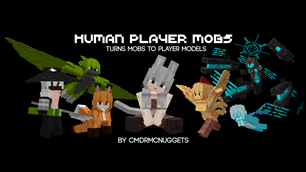
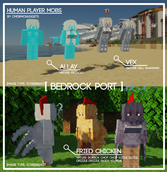
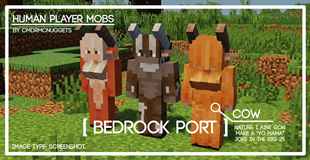
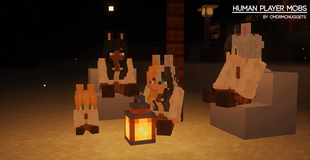
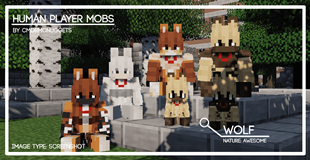
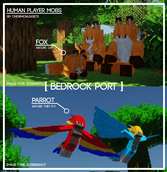
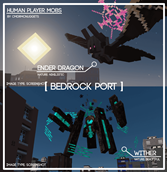
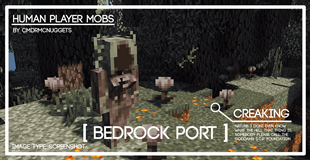
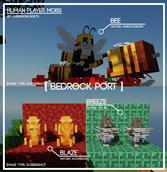
Pack Description: This resource pack turns normal vanilla mobs into player models with female and male variants, you get the point.
Some of the designs of the mobs might not look like what you'd expect for packs like these, cuz unlike most of these "girl packs", the ones here are more integrated to nature, they dont have names, they are blank slates, they are humanoid animals basically, creatures made to live in the world than sticking out, unless to go to my Patreon or Deviantart and look at my renders. The rest of the platforms i'm in covers different things, so i wont mention them here.
Another thing, to make this pack more immersive than the 2nd paragraph, both the original mobs and the player model mob spawn each other instead of one replacing each other.
If you enjoy this pack and wanna see more mobs, you can purchase the Full Version here for 3$:
If you wanna see 3d render art from me, or just want to leave a monthly tip as support, you can join in for 2$ monthly subscription

What the full version has: pet mobs, panda, aquatic mobs, skeleton dryad, rabbit, sheep
Instructions:
- To make a variant of a mob stick instead of changing for everytime to log in your minecraft world, craft a Name Tag using 1 paper and 1 iron ingot. Then go to the Anvil and rename them the following: male, female, mob, cold/warm male, cold/warm female, cold/warm mob. No captial letters. More Name Tag lists on here: https://bit.ly/47d5kbb
- To have the extra female part on the female models, go to Global Resources, tap on Human Player Mobs, the Setting icon should appear, tap on the Setting icon, and there should be a slider option that appear.
- To have the new humanoid model from Waifu Husbando Mobs, go to Global Resources, tap on Human Player Mobs, the Setting icon should appear, tap on the Setting icon, and there should be a slider option that appear. Please note that it's still on Beta phase, so you'll see both humanoid and player model spawning as some mobs havent been remodeled yet.
Remaining Plans for this pack:
- Compatability with Origin Animations - MCPEDL. I cannot make an Actions & Stuff compatability due to obfuscation of files, but Origin Animations is similar to Actions & Stuff.
- If 2nd plan fails, I'll be making a heavily modified Actions & Stuff v1.0.1, texture pack will be named "Better Legacy Actions", and that will be done before an Actions & Stuff update for Human Player Mobs. It will be 100% free. Downside is that i wont start until next year, too many plans.
- Add more mobs.
I'm supposed to move on from these, ive been doing this for 4 years, but i gotta finish developing my resource packs along while i work on other things such as art, animations, and other things. I'm a one-man studio
The Ultimate Guide to [ Bedrock ] Human Player Mobs
If you are exploring the vast world of Minecraft modifications, [ Bedrock ] Human Player Mobs by CmdrMCNuggets is a standout texture that deserves your attention. With over 112,622 downloads, it has become a staple for players looking to enhance their experience. As the creator describes it, this project is "[ Bedrock Port ] turns all mobs into human player models, also waifu stuff". Whether you are a veteran builder constructing massive cities, or simply a casual player looking to upgrade your survival world, this guide will provide you with all the essential details on how [ Bedrock ] Human Player Mobs alters the game.
What Makes It Special?
Unlike standard textures that simply alter superficial elements, [ Bedrock ] Human Player Mobs introduces a wide array of visual and mechanical features designed to seamlessly blend into the vanilla aesthetic. CmdrMCNuggets has clearly spent significant time refining the project to ensure that every aspect feels polished and responsive for version 1.21.
Installation Guide
Getting [ Bedrock ] Human Player Mobs up and running is straightforward. Follow these step-by-step instructions:
- Verify Your Version: Ensure your Minecraft launcher is set to version 1.21.
- Install Mod Loader (if required): If this is a mod, download the compatible loader (Forge, Fabric, NeoForge).
- Download the File: Click the secure download button above to retrieve the official file from CurseForge.
- Move the File: Place the downloaded file into your `mods`, `shaderpacks`, or `resourcepacks` folder depending on the texture type.
- Launch and Enjoy: Open Minecraft, navigate to the respective settings menu, and activate [ Bedrock ] Human Player Mobs.
Compatibility & Performance
Compatibility is robust. [ Bedrock ] Human Player Mobs is designed specifically for version 1.21, taking full advantage of the latest engine optimizations. During typical gameplay, this addition maintains a stable frame rate, though lower-end laptops might experience slight stuttering. We recommend pairing this with performance boosters like Sodium or Iris to guarantee a silky-smooth experience.