Why SG UI Pack - FPS Boost, Clean UI, PVP Resource Pack MCBE is a top-tier texture pack mod for Minecraft 1.21.132
Developed by the talented creator Sidga420, SG UI Pack - FPS Boost, Clean UI, PVP Resource Pack MCBE stands out as a highly recommended selection for your Minecraft client. It is fully optimized, compatibility-tested, and brings a major upgrade to the gameplay experience in Minecraft version 1.21.132.
⚙️ Quick Resource Specs
| Mod Creator | Sidga420 |
| Latest Version | 1.21.132 |
| Supported Game Versions | 1.21.132, 1.21.131, 1.21.130, 1.21.124, 1.21.123 |
| File Size | 2.33 MB |
| Last Updated | |
| Total Downloads | 18,384 downloads |
SG UI Pack
★Resource Pack Description:
This unique resource pack is designed for those who want to get the most out of their Minecraft Bedrock Edition while maintaining the classic look of the beloved game. With thoughtful design and a subtle balance between visuals and performance, this pack significantly improves gameplay comfort and ensures a stable gaming experience even on low-end devices.
⎯⎯⎯⎯⎯⎯⎯⎯⎯⎯
★Graphics Enhancements and FPS Boost
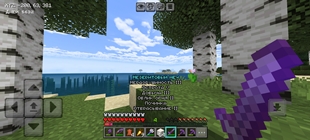
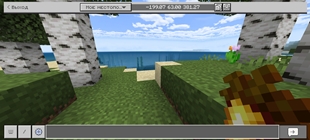
- Clear Water: Water clarity allows for deeper visibility and makes it easier to navigate underwater.
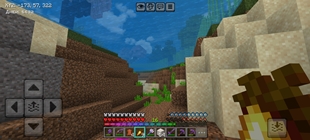
- Shortened Grass: Optimized grass reduces system load and reduces the likelihood of lag.
- Subtle Particles: Reduced rain, snow, removes all floating particles from nether biomes and other particles intensity. Helps improve performance and focus on gameplay.
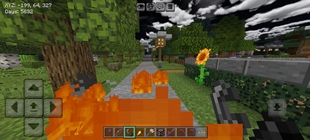
- Minimal Fire Overlays: Burning effects are minimally displayed, avoiding distraction. - Compact Shields: The reduced size of shields in first-person creates a feeling of greater freedom of action.
⎯⎯⎯⎯⎯⎯⎯⎯⎯⎯
▌ ⚡ Interface and Usability Optimization
▌ What benefits does the player receive?
- Colorful Sunflowers: The new flower design adds appeal to the landscapes.
- Updated Road Surfaces: Path textures are now more pleasing to the eye and look natural.
- Rainbow Experience Bar: The character level indicator has a pleasant rainbow hue.
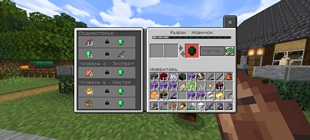
- Fast Trading System: Merchants unlock their entire range of goods immediately.
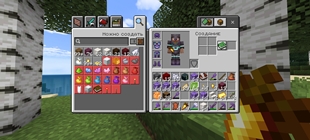
- Simple, Quick Crafting: Crafting items is now even faster and easier.
- Eliminated Information: Unnecessary hints and instructions have been removed, freeing up screen space.
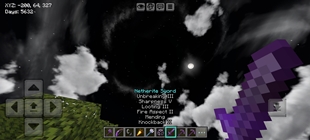
- Visible Active Slot Selector: The current tool selection is easily visible thanks to light blue indicators.
⎯⎯⎯⎯⎯⎯⎯⎯⎯⎯
✨ All Features:
📖 Colored particles at the enchantment table
📄 HD shield banners
👑 Golden crown instead of a helmet
💧 Transparent water
🌻Beautiful sunflowers
🌾 Short grass made even shorter
🌾 Tall grass made shorter
🍂 Path texture on all sides of the block
🔇 Quieter dispensers, droppers, minecarts, fire, and pistons
🎋 Varied stems
🎶 Music disc Redstone level preview
🧼 Visible sticky piston faces
🧭 Cardinal directions displayed on Lodestone
🔕- Subtle rain, snow, particles, and foliage
🔥 Nether fire
💼 Short shield
🎃 No pumpkin overlay
😶🌫 No vignette
🏳🌈 Rainbow XP bar
👨🏫 All villager trades unlocked
🕵 Quick crafting
❌ No game instructions
🟦 Light blue hotbar slot selection
🔊 Old damage sound
🧟♂ Minecraft Dungeons Creeper texture
🥕 Food saturation info
🈺 Minecraft Bedrock Edition title
⌨ Bold Russian and English fonts
🎚 Modified spyglass overlay
🔲 Outlines for loose snow, suspicious sand, and gravel
🌥 Beautiful sky
🛒 Semi-transparent item description icons
💾 Export and import buttons in the structure block
💻 Chat window no longer closes when taking damage
🔞 Chat profanity filter disabled
🎚 Screen dimming removed when opening chat
⭕️ On-screen touch indicator removed
❌ Screen dimming removed when opening chests, anvils, etc.
❌ Removed the dark background from titles and subtitles (/title).
✂️ Removed all floating biome particles in the Nether.
☘️ Removed all falling leaf particles.
🔘 Replaced the black background on item names and descriptions with a black text outline.
💭 Made glowing item frames invisible.
🍮 Removed the stands from dyes.
⏯ Added directional indicators for hoppers and observers.
🎚 Changed on-screen labels from "Position" and "Days passed" to "XYZ" and "Days".
❌ Removed the dark background from chat messages, coordinates, and the day counter.
❌ Removed padding in the settings menu.
🔥 Reduced the size of fire effects (both when burning and in general).
🔠 Increased chat message limit (up to 10,000 characters)
🔡 Increased character limit for item names (up to 500 characters)
🔤 Added the ability to name items and mobs using multiple lines.
★ Resource Pack Settings:
Three options are available in the resource pack settings:
1) Full functionality
2) Full functionality without bold text
3) Full functionality with
out bold text, old sounds, modified Creepers, and gold armor.
The Ultimate Guide to SG UI Pack - FPS Boost, Clean UI, PVP Resource Pack MCBE
If you are exploring the vast world of Minecraft modifications, SG UI Pack - FPS Boost, Clean UI, PVP Resource Pack MCBE by Sidga420 is a standout texture that deserves your attention. With over 18,384 downloads, it has become a staple for players looking to enhance their experience. As the creator describes it, this project is "Fast craft, structure export, clean UI, low fire, fewer particles, clean water". Whether you are a veteran builder constructing massive cities, or simply a casual player looking to upgrade your survival world, this guide will provide you with all the essential details on how SG UI Pack - FPS Boost, Clean UI, PVP Resource Pack MCBE alters the game.
What Makes It Special?
Unlike standard textures that simply alter superficial elements, SG UI Pack - FPS Boost, Clean UI, PVP Resource Pack MCBE introduces a wide array of visual and mechanical features designed to seamlessly blend into the vanilla aesthetic. Sidga420 has clearly spent significant time refining the project to ensure that every aspect feels polished and responsive for version 1.21.132.
Installation Guide
Getting SG UI Pack - FPS Boost, Clean UI, PVP Resource Pack MCBE up and running is straightforward. Follow these step-by-step instructions:
- Verify Your Version: Ensure your Minecraft launcher is set to version 1.21.132.
- Install Mod Loader (if required): If this is a mod, download the compatible loader (Forge, Fabric, NeoForge).
- Download the File: Click the secure download button above to retrieve the official file from CurseForge.
- Move the File: Place the downloaded file into your `mods`, `shaderpacks`, or `resourcepacks` folder depending on the texture type.
- Launch and Enjoy: Open Minecraft, navigate to the respective settings menu, and activate SG UI Pack - FPS Boost, Clean UI, PVP Resource Pack MCBE.
Compatibility & Performance
Compatibility is robust. SG UI Pack - FPS Boost, Clean UI, PVP Resource Pack MCBE is designed specifically for version 1.21.132, taking full advantage of the latest engine optimizations. During typical gameplay, this addition maintains a stable frame rate, though lower-end laptops might experience slight stuttering. We recommend pairing this with performance boosters like Sodium or Iris to guarantee a silky-smooth experience.