Why ProtectMyEyes Bedrock is a top-tier shader mod for Minecraft 1.21
Developed by the talented creator Jumao15071, ProtectMyEyes Bedrock stands out as a highly recommended selection for your Minecraft client. It is fully optimized, compatibility-tested, and brings a major upgrade to the gameplay experience in Minecraft version 1.21.
⚙️ Quick Resource Specs
| Mod Creator | Jumao15071 |
| Latest Version | 1.21 |
| Supported Game Versions | 1.21, 1.20 |
| File Size | 6.79 MB |
| Last Updated | |
| Total Downloads | 5,250 downloads |
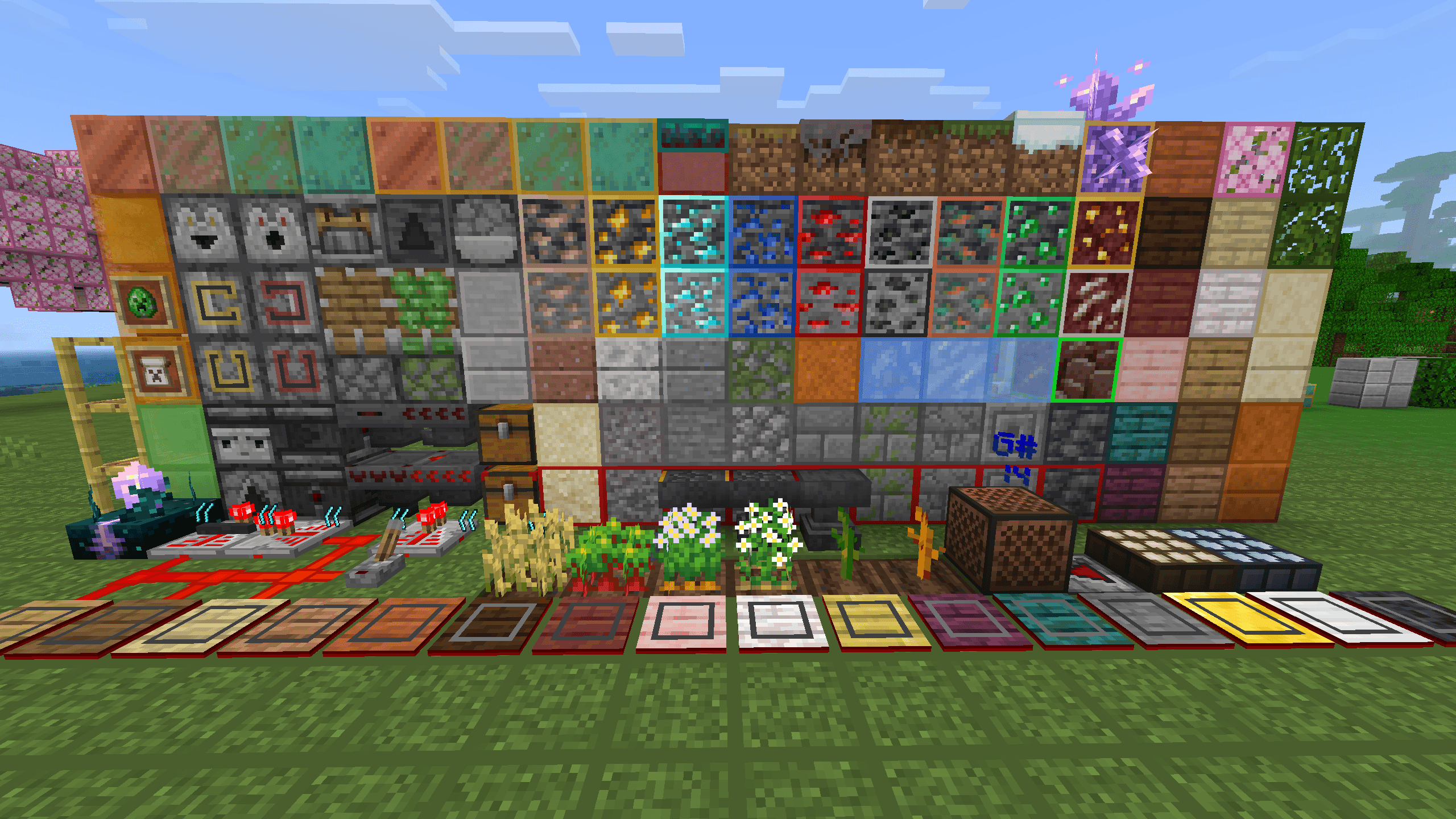
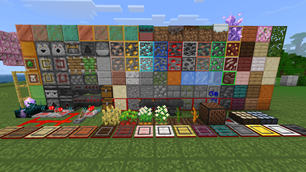
ProtectMyEyes is a comprehensive, all-in-one enhancement resource pack for Minecraft Bedrock Edition. Originally ported and evolved from the Java edition resource of the same name, it has been refined by multiple developers. It began as a simple grid-counting aid and has grown into a powerful toolkit packed with utilities, primarily focused on redstone engineering, visual clarity, and quality-of-life improvements.
https://www.bilibili.com/video/BV14Eu4ztEEU
Core Features:
1. Visual Outlines & Block Differentiation:
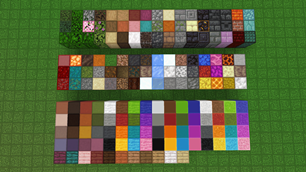
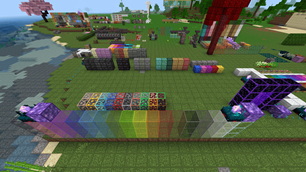
- Adds eye-friendly outlines to blocks for easier building and grid counting.
- Clearly distinguishes between similar blocks (e.g., polished vs. smooth slabs, various pressure plates, dispenser/dropper/furnace).
- Highlights block sides and bottoms (e.g., crafting tables, bookshelves, lecterns) for better spatial awareness.
2. Advanced Redstone & Technical Information:
- Displays redstone states: observer/facing, crafter/hopper power, comparator/repeater mode, note block pitch, sculk vibration trails, and more.
- Shows redstone signal strength when brushing redstone dust.
- Includes chunk border display and visual redstone signal overlay (with shader mods requirements for RenderDragon).
- Identifies anvil damage levels and daylight sensor states.
3. Visual Enhancements & Resource Clarity:
- Add white outline on targeted blocks for better visibility.
- Makes ores glow when using Vibrant Visuals or Ray Tracing.
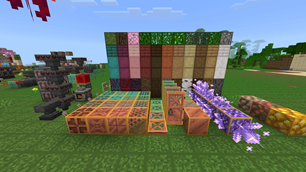
- Clearly shows crop growth stages (flowers at maturity), distinguishes melon/pumpkin stems, and identifies infested/suspicious blocks.
- Displays waxed states of copper blocks.
- Adds temporary spawn point particle markers for various mobs (e.g., fortress mobs on nether brick, guardians in water) in specific modes.
- Improves visibility of water, lava, and Nether fog.
4. User Interface (UI) & Quality of Life Improvements:
- Quick Crafting: One-click crafting in inventory, crafting table, stonecutter, and loom.
- Quick Transfer & Trading: Fast item transfer between containers and one-click villager trading with preview.
- Anvil Multiline Text: Enables text wrapping in anvils.
- Command & Chat Enhancements: Tab-completion for commands, click-to-insert, and command history cycling.
- Quick Settings Panel: Easy access to common settings and special toggles.
- Structure Import/Export: Enables structure block file handling on mobile.
- Fixed Translations & Multi-Language Support: Corrects in-game translations and adds Traditional Chinese variants.
- Various UI texture updates and fixes for NetEase edition.
5. Audio, Texture & Performance Optimizations:
- Sound Adjustments: Reduces loud sounds (pistons, gateways), adds/fixes sounds to match Java Edition (crit hits, creeper footsteps, block fixes), and improves zombie footstep audio.
- Texture Fixes: Corrects textures for light blocks, dragon fireballs, beds, and dyes to align with Java Edition.
- Performance: Adds TGA textures for better performance/distance clarity, reduces lag-inducing particles (beacon, death, growth), and removes portal particles.
- Visual Tweaks: Darker semi-transparent settings UI, Java-style TNT explosion particles, clearer wither health display, and transparent pumpkin/spyglass overlays.
Credits: A collaborative project by multiple community developers, including original Java edition work by @hsds, Bedrock port and integration by @Jumao, translation work, shader optimization, and specific feature contributions from @OEOTYAN, @Eletron, @Rainvay, @Lonel, @Yuanbao, @Wang2408, @Mintraspberry, and @FanfanFufu.
The Ultimate Guide to ProtectMyEyes Bedrock
If you are exploring the vast world of Minecraft modifications, ProtectMyEyes Bedrock by Jumao15071 is a standout shader that deserves your attention. With over 5,250 downloads, it has become a staple for players looking to enhance their experience. As the creator describes it, this project is "A functional resource pack that overlays grid lines on common blocks for easier visual counting, with integrated redstone display and UI features.". Whether you are a veteran builder constructing massive cities, or simply a casual player looking to upgrade your survival world, this guide will provide you with all the essential details on how ProtectMyEyes Bedrock alters the game.
What Makes It Special?
Unlike standard shaders that simply alter superficial elements, ProtectMyEyes Bedrock introduces a wide array of visual and mechanical features designed to seamlessly blend into the vanilla aesthetic. Jumao15071 has clearly spent significant time refining the project to ensure that every aspect feels polished and responsive for version 1.21.
Installation Guide
Getting ProtectMyEyes Bedrock up and running is straightforward. Follow these step-by-step instructions:
- Verify Your Version: Ensure your Minecraft launcher is set to version 1.21.
- Install Mod Loader (if required): If this is a mod, download the compatible loader (Forge, Fabric, NeoForge).
- Download the File: Click the secure download button above to retrieve the official file from CurseForge.
- Move the File: Place the downloaded file into your `mods`, `shaderpacks`, or `resourcepacks` folder depending on the shader type.
- Launch and Enjoy: Open Minecraft, navigate to the respective settings menu, and activate ProtectMyEyes Bedrock.
Compatibility & Performance
Compatibility is robust. ProtectMyEyes Bedrock is designed specifically for version 1.21, taking full advantage of the latest engine optimizations. During typical gameplay, this addition maintains a stable frame rate, though lower-end laptops might experience slight stuttering. We recommend pairing this with performance boosters like Sodium or Iris to guarantee a silky-smooth experience.