![Hide Armor - [Configurable] logo](https://media.forgecdn.net/avatars/1672/411/639063569833611773.jpg)
Why Hide Armor - [Configurable] is a top-tier texture pack mod for Minecraft 1.21.132
Developed by the talented creator Athan213, Hide Armor - [Configurable] stands out as a highly recommended selection for your Minecraft client. It is fully optimized, compatibility-tested, and brings a major upgrade to the gameplay experience in Minecraft version 1.21.132.
⚙️ Quick Resource Specs
| Mod Creator | Athan213 |
| Latest Version | 1.21.132 |
| Supported Game Versions | 1.21.132, 1.21.131, 1.21.130 |
| File Size | 89.43 KB |
| Last Updated | |
| Total Downloads | 21,725 downloads |
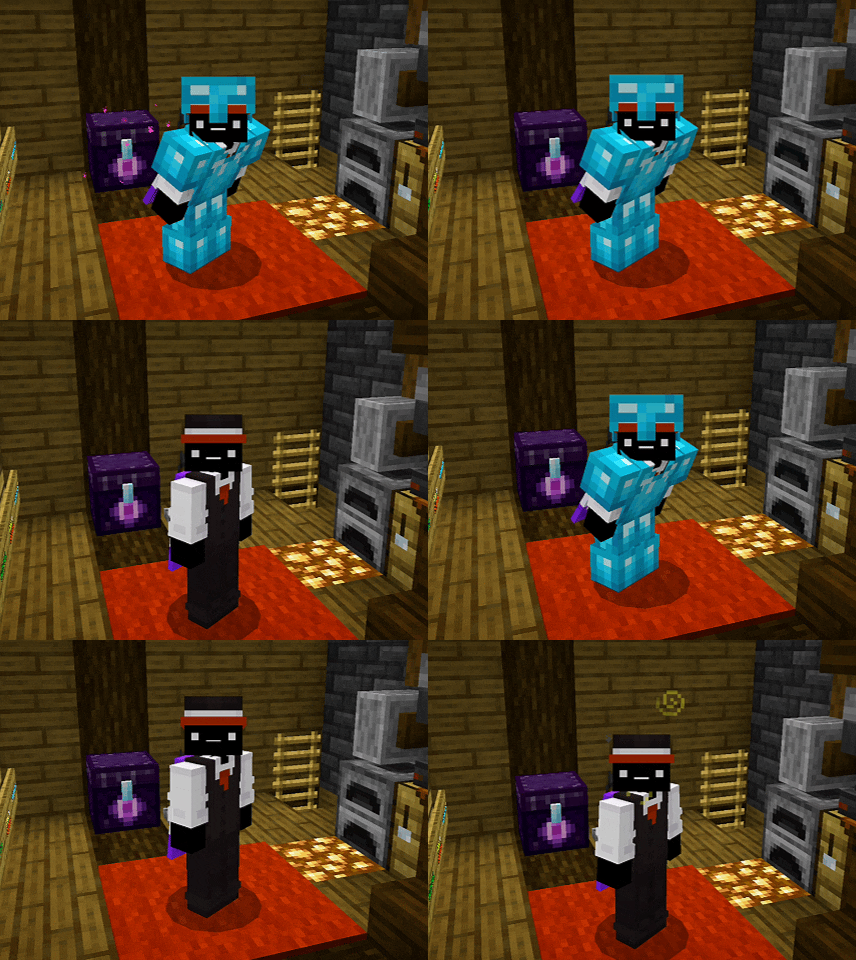
![Hide Armor - [Configurable] screenshot active](https://media.forgecdn.net/attachments/1527/288/inshot_20260209_051350385-jpg.jpg)
Hide Armor — v1.3.1
Hide Armor (v1.3) is a modern resource pack that allows you to hide armor visually while keeping all gameplay mechanics intact.
Designed for players who want a clean look without sacrificing protection, this pack introduces a full in-game configuration system.
Compatible with Minecraft 1.21.130+

Basic Information
Hide Armor
A lightweight and optimized texture pack that hides armor pieces individually, without affecting stats, enchantments, or effects.
Perfect for:
- Roleplay servers
- Cinematic content
- Skin showcases
- Thumbnails and screenshots
How it Works
By default, all armor becomes invisible while still being equipped.
You can still use the classic feature:
- Crouch preview can be enabled to temporarily reveal armor.
This allows quick previews without changing settings.
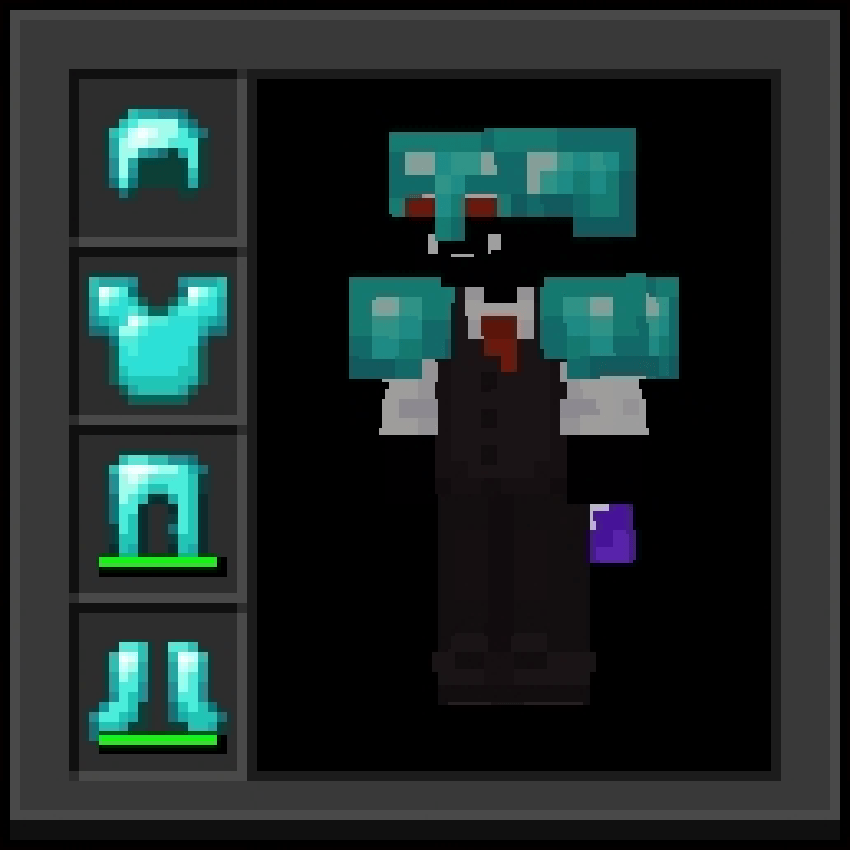
Configuration System
The pack includes a native configuration system, fully integrated into Minecraft's resource pack settings.
Now you can choose exactly which parts of the body remain visible:
- Head (Helmet)
- Chest (Chestplate)
- Left Arm
- Right Arm
- Left Leg
- Right Leg
- Elytra
- Shield
- Armor Trims
Each part can be toggled independently.
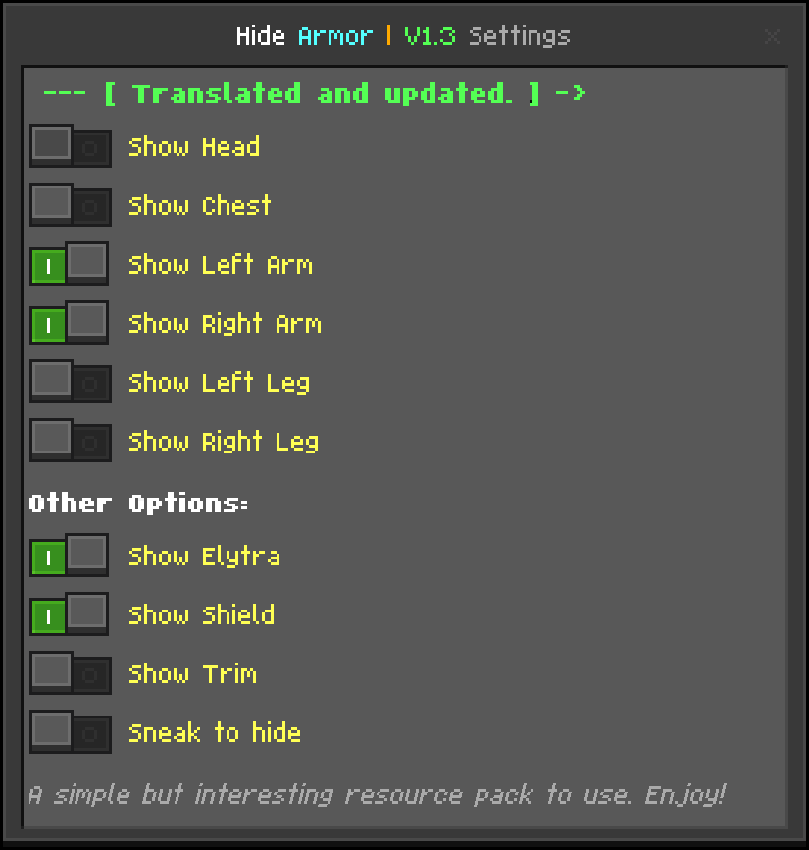
Settings System
No subpacks. No external files. No commands.
Everything is handled directly in the Resource Pack Settings menu:
- Show or hide armor per body part
- Toggle Elytra and Shield visibility
- Show or hide Armor Trims
- Configure crouch preview behavior
- Combine partial visibility with crouch preview
All changes apply instantly.
New in v1.3
Version 1.3 expands the customization system and improves compatibility with newer Minecraft versions.
- Rendering system adjusted for newer game versions, improving compatibility before and after the Tiny Takeover update (26.10).
- Shield visibility can now be controlled independently:
- Show the shield permanently through settings
- Or display it only while blocking
- Armor Trims can now be shown or hidden separately from the armor itself.
- Crouch preview behavior is now configurable:
- Enable crouching to temporarily reveal armor
- Or keep armor hidden even while sneaking
This update gives even more control over how your equipment appears in-game.
Versions & Migration
Legacy Version (v1.1)
The legacy version only supported full armor hiding and basic crouch preview.
It may be included separately for compatibility purposes.
Current Version (v1.3.x)
This version adds a complete settings system and granular visual control.
More flexible, more stable, and future-proof.
In v1.3.1, compatibility with Adaptive Cape v1.5 or later was added.
Also in v1.3.1, the resource pack import was fixed, allowing it to be installed and imported without problems.
Notes & Compatibility
Technical Notes
- This pack is purely visual.
- Does not affect gameplay balance.
- Fully compatible with multiplayer servers.
- Works with most modded armors that use standard rendering controllers.
Usage & Redistribution
Allowed
- Modify content for personal use only.
- Share the product with the Hide Armor official page link, along with the credits.
- Use in texture packs as long as the resource owner allows it.
Not Allowed
- Reuploading or redistributing the code itself without permission.
- Publishing modified versions of the resouce pack without permission.
- Reposting this project on other platforms instead of linking to the official page.
Credits
- If you use Hide Armor as a source of public content, giving credit to the original author is greatly appreciated.
- When sharing the resource pack, please link to the official project page instead of reuploading the files.
Languages & Credits
- 🇺🇸 English
- 🇧🇷 Português (BR)
- 🇵🇹 Português (PT)
- 🇪🇸 Español
- 🇫🇷 Français
- 🇷🇺 Русский
- 🇮🇩 Bahasa Indonesia
- 🇯🇵 日本語
- 🇰🇷 한국어
- 🇨🇳 中文
- If you want full visual control over your character while keeping your gear,
- Hide Armor v1.3 delivers exactly that.
- Hide Armor Developer: Athan213
Leave your feedback so that the Hide Armor can continue improving in the future ;)
The Ultimate Guide to Hide Armor - [Configurable]
If you are exploring the vast world of Minecraft modifications, Hide Armor - [Configurable] by Athan213 is a standout texture that deserves your attention. With over 21,725 downloads, it has become a staple for players looking to enhance their experience. As the creator describes it, this project is "Are you looking for a texture that hides the armor? Well, rest assured, because this texture that I bring will not only hide it, but also show it whenever you want!!!". Whether you are a veteran builder constructing massive cities, or simply a casual player looking to upgrade your survival world, this guide will provide you with all the essential details on how Hide Armor - [Configurable] alters the game.
What Makes It Special?
Unlike standard textures that simply alter superficial elements, Hide Armor - [Configurable] introduces a wide array of visual and mechanical features designed to seamlessly blend into the vanilla aesthetic. Athan213 has clearly spent significant time refining the project to ensure that every aspect feels polished and responsive for version 1.21.132.
Installation Guide
Getting Hide Armor - [Configurable] up and running is straightforward. Follow these step-by-step instructions:
- Verify Your Version: Ensure your Minecraft launcher is set to version 1.21.132.
- Install Mod Loader (if required): If this is a mod, download the compatible loader (Forge, Fabric, NeoForge).
- Download the File: Click the secure download button above to retrieve the official file from CurseForge.
- Move the File: Place the downloaded file into your `mods`, `shaderpacks`, or `resourcepacks` folder depending on the texture type.
- Launch and Enjoy: Open Minecraft, navigate to the respective settings menu, and activate Hide Armor - [Configurable].
Compatibility & Performance
Compatibility is robust. Hide Armor - [Configurable] is designed specifically for version 1.21.132, taking full advantage of the latest engine optimizations. During typical gameplay, this addition maintains a stable frame rate, though lower-end laptops might experience slight stuttering. We recommend pairing this with performance boosters like Sodium or Iris to guarantee a silky-smooth experience.