PiglixMCMods LogoPiglixMCMods
HomeShadersTexturesModsLow-End ShadersRTX ShadersSavedGuidesAbout
GET IT ONGoogle Play

Popular Collections

📱 Performance HubBest Low-End ShadersMCPE Performance Mods
✨ Realism & RTXRealistic RTX ShadersRTX Texture Packs for MCPE
🤖 Platform CompatibilityMinecraft PE Shaders 1.21Shaders for Android & iOS
⚔️ Gameplay VibeTop PvP Texture PacksMedieval Texture Packs
🤝 Community & SocialsYouTubeInstagram
Get the Android App — Free on Play Store
HomeGuidesAbout UsSponsor & PartnerContactPrivacy PolicyTerms & ConditionsDisclaimer
Minecraft>Shaders>X-Ray Texture Pack
X-Ray Texture Pack logo

X-Ray Texture Pack

By👤GAVTI

X-Ray Texture Pack by Gavti — Ultra clear ores, glowing visuals, dark caves & smooth FPS boost. Perfect for survival, mining and PvP players who want a stylish x-ray experience!

Why X-Ray Texture Pack is a top-tier shader mod for Minecraft 1.21

Developed by the talented creator GAVTI, X-Ray Texture Pack stands out as a highly recommended selection for your Minecraft client. It is fully optimized, compatibility-tested, and brings a major upgrade to the gameplay experience in Minecraft version 1.21.

⚙️ Quick Resource Specs

Mod CreatorGAVTI
Latest Version1.21
Supported Game VersionsMinecraft 1.21+
File Size166.68 KB
Last UpdatedUpdated: July 24, 2026
Total Downloads47,326 downloads
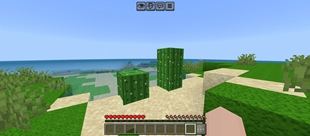
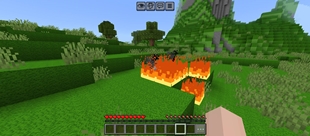
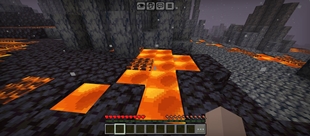
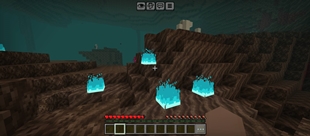
X-Ray Texture Pack screenshot active
Looking for the best shaders updates? X-Ray Texture Pack by GAVTI provides excellent features tailored for Minecraft 1.21 players. It stands out in the shaders category for its stability and beautiful execution.

⛏️ GAVTI X-RAY TEXTURE PACK ⛏️

Take your mining experience to the next level with the Gavti X-Ray Texture Pack. This pack is designed to provide a clean underground view while making valuable ores easy to spot from long distances. Whether you're searching for diamonds, ancient debris, redstone, gold, iron, emeralds, or other valuable resources, this pack helps you locate them quickly with bright glowing visuals.

✨ FEATURES

  • 🔹 Bright glowing ore textures.
  • 🔹 Easy visibility of valuable resources.
  • 🔹 Optimized underground exploration.
  • 🔹 Clear cave and mining visuals.
  • 🔹 Supports Overworld, Nether, and cave mining.
  • 🔹 Ancient Debris visibility improved.
  • 🔹 Redstone, Diamond, Gold, Iron, Emerald, Lapis, Coal, Copper, and other ores stand out clearly.
  • 🔹 Designed for smooth gameplay and resource hunting.
  • 🔹 Works great for survival worlds, SMPs, and private mining sessions.
  • 🔹 Lightweight and performance-friendly.

💎 ORE VISIBILITY

All important ores have been enhanced to stand out clearly against the environment. This allows players to quickly identify valuable resources while exploring caves, ravines, mountains, and underground mining areas.

Diamond Ore
Redstone Ore
Gold Ore
Iron Ore
Emerald Ore
Lapis Ore
Copper Ore
Coal Ore
Ancient Debris

🌈 RECOMMENDED SETTINGS

For the absolute best experience, enable Vibrant Visuals. This greatly improves ore appearance, lighting quality, glow effects, and overall visual clarity.

Using Vibrant Visuals is highly recommended if you want the pack to look exactly like the showcase screenshots.

🛠️ COMPATIBILITY

✔ Minecraft Bedrock Edition
✔ Survival Mode
✔ SMP Worlds
✔ Realms Compatible
✔ Underground Mining
✔ Cave Exploration
✔ Resource Collection

⚠️ DISCLAIMER

The preview images shown on this page have been AI enhanced to improve clarity and presentation quality. Actual in-game visuals may vary depending on your device, Minecraft version, graphics settings, render distance, and whether Vibrant Visuals is enabled.

📜 COPYRIGHT NOTICE

© Copyright Reserved by GAVTI.

This texture pack, its assets, textures, icons, previews, branding, and modifications are the intellectual property of GAVTI.

You may not re-upload, redistribute, modify and publish, rename, sell, include in paid projects, claim ownership, or share this pack on other websites, applications, videos, maps, or content packs without explicit permission from the creator.

If you wish to showcase this pack in a video, post, project, world, or resource collection, proper credit to @GAVTI must be clearly provided.

Thank you for supporting original creations from GAVTI.

The Ultimate Guide to X-Ray Texture Pack

If you are exploring the vast world of Minecraft modifications, X-Ray Texture Pack by GAVTI is a standout shader that deserves your attention. With over 47,326 downloads, it has become a staple for players looking to enhance their experience. As the creator describes it, this project is "X-Ray Texture Pack by Gavti — Ultra clear ores, glowing visuals, dark caves & smooth FPS boost. Perfect for survival, mining and PvP players who want a stylish x-ray experience!". Whether you are a veteran builder constructing massive cities, or simply a casual player looking to upgrade your survival world, this guide will provide you with all the essential details on how X-Ray Texture Pack alters the game.

What Makes It Special?

Unlike standard shaders that simply alter superficial elements, X-Ray Texture Pack digs deep into the game's engine to provide a cohesive, performance-focused experience. GAVTI has clearly spent significant time refining the project to ensure that every aspect feels polished and responsive for version 1.21.

Installation Guide

Getting X-Ray Texture Pack up and running is straightforward. Follow these step-by-step instructions:

  1. Verify Your Version: Ensure your Minecraft launcher is set to version 1.21.
  2. Install Mod Loader (if required): If this is a mod, download the compatible loader (Forge, Fabric, NeoForge).
  3. Download the File: Click the secure download button above to retrieve the official file from CurseForge.
  4. Move the File: Place the downloaded file into your `mods`, `shaderpacks`, or `resourcepacks` folder depending on the shader type.
  5. Launch and Enjoy: Open Minecraft, navigate to the respective settings menu, and activate X-Ray Texture Pack.

Compatibility & Performance

Compatibility is robust. X-Ray Texture Pack is designed specifically for version 1.21, taking full advantage of the latest engine optimizations. Since this is heavily focused on optimization, you can expect significant frame rate improvements on both low-end and high-end hardware.

Details

Downloads:47,326
Created:3 months ago
Updated:21 days ago
Project ID:1538035
License:All Rights Reserved
Environment:Client

🤝 Join Community for Support

Need help installing this resource or want to see more showcases? Join our community!

Subscribe on YouTubeFollow on Instagram

X-Ray Texture Pack

Screenshot 0
Screenshot 1
Screenshot 2
Screenshot 3
Screenshot 4
Screenshot 5
Screenshot 6
Screenshot 7
Screenshot 8
Screenshot 9
Screenshot 10
Screenshot 11
Screenshot 12
G
GAVTI
SHADERS CREATOR
Downloads47K
Version1.21
TypeSHADERS
File Size166.68 KB

About This shaders

X-Ray Texture Pack by Gavti — Ultra clear ores, glowing visuals, dark caves & smooth FPS boost. Perfect for survival, mining and PvP players who want a stylish x-ray experience!

⛏️ GAVTI X-RAY TEXTURE PACK ⛏️

Take your mining experience to the next level with the Gavti X-Ray Texture Pack. This pack is designed to provide a clean underground view while making valuable ores easy to spot from long distances. Whether you're searching for diamonds, ancient debris, redstone, gold, iron, emeralds, or other valuable resources, this pack helps you locate them quickly with bright glowing visuals.

✨ FEATURES

  • 🔹 Bright glowing ore textures.
  • 🔹 Easy visibility of valuable resources.
  • 🔹 Optimized underground exploration.
  • 🔹 Clear cave and mining visuals.
  • 🔹 Supports Overworld, Nether, and cave mining.
  • 🔹 Ancient Debris visibility improved.
  • 🔹 Redstone, Diamond, Gold, Iron, Emerald, Lapis, Coal, Copper, and other ores stand out clearly.
  • 🔹 Designed for smooth gameplay and resource hunting.
  • 🔹 Works great for survival worlds, SMPs, and private mining sessions.
  • 🔹 Lightweight and performance-friendly.

💎 ORE VISIBILITY

All important ores have been enhanced to stand out clearly against the environment. This allows players to quickly identify valuable resources while exploring caves, ravines, mountains, and underground mining areas.

Diamond Ore
Redstone Ore
Gold Ore
Iron Ore
Emerald Ore
Lapis Ore
Copper Ore
Coal Ore
Ancient Debris

🌈 RECOMMENDED SETTINGS

For the absolute best experience, enable Vibrant Visuals. This greatly improves ore appearance, lighting quality, glow effects, and overall visual clarity.

Using Vibrant Visuals is highly recommended if you want the pack to look exactly like the showcase screenshots.

🛠️ COMPATIBILITY

✔ Minecraft Bedrock Edition
✔ Survival Mode
✔ SMP Worlds
✔ Realms Compatible
✔ Underground Mining
✔ Cave Exploration
✔ Resource Collection

⚠️ DISCLAIMER

The preview images shown on this page have been AI enhanced to improve clarity and presentation quality. Actual in-game visuals may vary depending on your device, Minecraft version, graphics settings, render distance, and whether Vibrant Visuals is enabled.

📜 COPYRIGHT NOTICE

© Copyright Reserved by GAVTI.

This texture pack, its assets, textures, icons, previews, branding, and modifications are the intellectual property of GAVTI.

You may not re-upload, redistribute, modify and publish, rename, sell, include in paid projects, claim ownership, or share this pack on other websites, applications, videos, maps, or content packs without explicit permission from the creator.

If you wish to showcase this pack in a video, post, project, world, or resource collection, proper credit to @GAVTI must be clearly provided.

Thank you for supporting original creations from GAVTI.

📌Supported Minecraft Versions: Minecraft 1.21+

How to Install

1. Download Iris Shader Mod or OptiFine for Minecraft 1.21+. 2. Open Minecraft and go to Options > Video Settings > Shader Packs. 3. Tap 'Open Shader Folder' and place the downloaded .zip file inside.