PiglixMCMods LogoPiglixMCMods
HomeShadersTexturesModsLow-End ShadersRTX ShadersSavedGuidesAbout
GET IT ONGoogle Play

Popular Collections

📱 Performance HubBest Low-End ShadersMCPE Performance Mods
✨ Realism & RTXRealistic RTX ShadersRTX Texture Packs for MCPE
🤖 Platform CompatibilityMinecraft PE Shaders 1.21Shaders for Android & iOS
⚔️ Gameplay VibeTop PvP Texture PacksMedieval Texture Packs
🤝 Community & SocialsYouTubeInstagram
Get the Android App — Free on Play Store
HomeGuidesAbout UsSponsor & PartnerContactPrivacy PolicyTerms & ConditionsDisclaimer
Minecraft>Textures>Vanilla Optimizations | FPS Booster
Vanilla Optimizations | FPS Booster logo

Vanilla Optimizations | FPS Booster

By👤thingamasillywastaken

A working performance texture pack that balances between performance and visual clarity, recommended for low-end!

Why Vanilla Optimizations | FPS Booster is a top-tier texture pack mod for Minecraft 1.21.132

Developed by the talented creator thingamasillywastaken, Vanilla Optimizations | FPS Booster stands out as a highly recommended selection for your Minecraft client. It is fully optimized, compatibility-tested, and brings a major upgrade to the gameplay experience in Minecraft version 1.21.132.

⚙️ Quick Resource Specs

Mod Creatorthingamasillywastaken
Latest Version1.21.132
Supported Game Versions1.21.132, 1.21.131, 1.21.130, 1.21.124, 1.21.123
File Size730.82 KB
Last UpdatedUpdated: August 7, 2026
Total Downloads6,662 downloads
Vanilla Optimizations | FPS Booster screenshot active
Discover new possibilities in your world with Vanilla Optimizations | FPS Booster, a premium textures project created by thingamasillywastaken. Designed to run smoothly on Minecraft 1.21.132, this addition brings both quality improvements and immersive elements to your setup.

A lightweight texture pack that optimizes the game to run smoother, better, and cleaner. Optimizes particles, flipbooks, and many other blocks! Recommended for low-end devices or devices that struggle with GPU rendering!

Features :

  1. Disables most flipbook textures (Turns many moving/animated textures static)
  2. Simplifies heavyweight blocks that might be heavy for low-end devices (Optimizes water, glass, and ice)
  3. Fast loading screen (Fixes the stuck on loading screen bug when switching dimensions by removing the dimension switching screen)
  4. 2D spyglass (Keeps your custom spyglass item texture!)
  5. Optimizes how shadows and smoothening shadows renders (ambient occlusion for professionals)
  6. Optimized mip-mapping (Optimizes rendering far blocks)
  7. Reduced random block rotations (This disables random block rotations like grass blocks, netherrack, bedrock, and many more!)


Recommendations and notes:

You can edit this pack for personal uses, but don't steal or redistribute this pack! (Vanilla Optimizations is CurseForge and MCPEDL only.)

Recommended for low-end devices that lags in Vanilla Minecraft Bedrock! The 8x8 textures overhaul in Texture Overhaul subpack is recommended for low/mid-end devices that struggles with GPU rendering (textures rendering), if you want to put a texture pack like Bare Bones, just place them under Vanilla Optimizations!

If you want to use a No Fog texture pack, place them on top of Vanilla Optimizations so the No Fog works correctly!

You should play on the minimum settings that you can handle, like setting the render distance to 5 chunks. It'll help performance alot more than FPS Boosters can do!

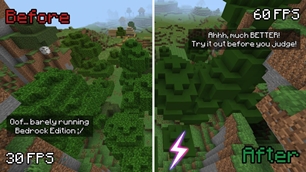
The thumbnail on top of the page (2nd image) is just clickbait lol but it may give different FPS depending on your device's capabilities.

Current version: v1.7.1

Q&A:

  1. Why is the file size over 500kB? Because of how much optimizations assets there are in each subpack. Don't worry, because a big file size doesn't automatically mean it hurts performance!
  2. How does it work? Vanilla Optimizations uses JSON to optimize how the game renders things, many of these are unnoticable.
  3. Is Vanilla Optimizations required for normal gameplay? No, you can choose to use this when you're lagging in the base game, or if you want simple looks.
  4. What Minecraft Bedrock version is this compatible with? Probably 1.21.50+
  5. Why not culling changes instead of texture simplification? Unlike Java Edition, where you can use mods, Bedrock Edition's vanilla client sided changes only come from texture packs. Texture Packs cannot change how the game decides to cull blocks, render, and many other advanced optimizations safely. Though I am planning to add some in the future.
  6. Is this compatible with other texture packs like Actions & Stuff? Yes, Vanilla Optimizations doesn't change entity animations anyway.

The Ultimate Guide to Vanilla Optimizations | FPS Booster

If you are exploring the vast world of Minecraft modifications, Vanilla Optimizations | FPS Booster by thingamasillywastaken is a standout texture that deserves your attention. With over 6,662 downloads, it has become a staple for players looking to enhance their experience. As the creator describes it, this project is "A working performance texture pack that balances between performance and visual clarity, recommended for low-end!". Whether you are a veteran builder constructing massive cities, or simply a casual player looking to upgrade your survival world, this guide will provide you with all the essential details on how Vanilla Optimizations | FPS Booster alters the game.

What Makes It Special?

Unlike standard textures that simply alter superficial elements, Vanilla Optimizations | FPS Booster digs deep into the game's engine to provide a cohesive, performance-focused experience. thingamasillywastaken has clearly spent significant time refining the project to ensure that every aspect feels polished and responsive for version 1.21.132.

Installation Guide

Getting Vanilla Optimizations | FPS Booster up and running is straightforward. Follow these step-by-step instructions:

  1. Verify Your Version: Ensure your Minecraft launcher is set to version 1.21.132.
  2. Install Mod Loader (if required): If this is a mod, download the compatible loader (Forge, Fabric, NeoForge).
  3. Download the File: Click the secure download button above to retrieve the official file from CurseForge.
  4. Move the File: Place the downloaded file into your `mods`, `shaderpacks`, or `resourcepacks` folder depending on the texture type.
  5. Launch and Enjoy: Open Minecraft, navigate to the respective settings menu, and activate Vanilla Optimizations | FPS Booster.

Compatibility & Performance

Compatibility is robust. Vanilla Optimizations | FPS Booster is designed specifically for version 1.21.132, taking full advantage of the latest engine optimizations. Since this is heavily focused on optimization, you can expect significant frame rate improvements on both low-end and high-end hardware.


Details

Downloads:6,662
Created:1 month ago
Updated:7 days ago
Project ID:1585562
License:All Rights Reserved
Environment:Client

Game Versions

1.21.1321.21.1311.21.1301.21.1241.21.1231.21.122

🤝 Join Community for Support

Need help installing this resource or want to see more showcases? Join our community!

Subscribe on YouTubeFollow on Instagram

Vanilla Optimizations | FPS Booster

Screenshot 0
Screenshot 1
Screenshot 2
T
thingamasillywastaken
TEXTURES CREATOR
Downloads7K
Version1.21.132
TypeTEXTURES
File Size730.82 KB

About This textures

A working performance texture pack that balances between performance and visual clarity, recommended for low-end!

A lightweight texture pack that optimizes the game to run smoother, better, and cleaner. Optimizes particles, flipbooks, and many other blocks! Recommended for low-end devices or devices that struggle with GPU rendering!

Features :

  1. Disables most flipbook textures (Turns many moving/animated textures static)
  2. Simplifies heavyweight blocks that might be heavy for low-end devices (Optimizes water, glass, and ice)
  3. Fast loading screen (Fixes the stuck on loading screen bug when switching dimensions by removing the dimension switching screen)
  4. 2D spyglass (Keeps your custom spyglass item texture!)
  5. Optimizes how shadows and smoothening shadows renders (ambient occlusion for professionals)
  6. Optimized mip-mapping (Optimizes rendering far blocks)
  7. Reduced random block rotations (This disables random block rotations like grass blocks, netherrack, bedrock, and many more!)


Recommendations and notes:

You can edit this pack for personal uses, but don't steal or redistribute this pack! (Vanilla Optimizations is CurseForge and MCPEDL only.)

Recommended for low-end devices that lags in Vanilla Minecraft Bedrock! The 8x8 textures overhaul in Texture Overhaul subpack is recommended for low/mid-end devices that struggles with GPU rendering (textures rendering), if you want to put a texture pack like Bare Bones, just place them under Vanilla Optimizations!

If you want to use a No Fog texture pack, place them on top of Vanilla Optimizations so the No Fog works correctly!

You should play on the minimum settings that you can handle, like setting the render distance to 5 chunks. It'll help performance alot more than FPS Boosters can do!

The thumbnail on top of the page (2nd image) is just clickbait lol but it may give different FPS depending on your device's capabilities.

Current version: v1.7.1

Q&A:

  1. Why is the file size over 500kB? Because of how much optimizations assets there are in each subpack. Don't worry, because a big file size doesn't automatically mean it hurts performance!
  2. How does it work? Vanilla Optimizations uses JSON to optimize how the game renders things, many of these are unnoticable.
  3. Is Vanilla Optimizations required for normal gameplay? No, you can choose to use this when you're lagging in the base game, or if you want simple looks.
  4. What Minecraft Bedrock version is this compatible with? Probably 1.21.50+
  5. Why not culling changes instead of texture simplification? Unlike Java Edition, where you can use mods, Bedrock Edition's vanilla client sided changes only come from texture packs. Texture Packs cannot change how the game decides to cull blocks, render, and many other advanced optimizations safely. Though I am planning to add some in the future.
  6. Is this compatible with other texture packs like Actions & Stuff? Yes, Vanilla Optimizations doesn't change entity animations anyway.
📌Supported Minecraft Versions: 1.21.132, 1.21.131, 1.21.130, 1.21.124, 1.21.123, 1.21.122

How to Install

1. Download the resource pack .zip file. 2. Open Minecraft and go to Options > Resource Packs. 3. Drag and drop the downloaded file into the list and activate it.