
Why GemVisuals PBR is a top-tier shader mod for Minecraft 1.21.111
Developed by the talented creator Arnondanon12, GemVisuals PBR stands out as a highly recommended selection for your Minecraft client. It is fully optimized, compatibility-tested, and brings a major upgrade to the gameplay experience in Minecraft version 1.21.111.
⚙️ Quick Resource Specs
| Mod Creator | Arnondanon12 |
| Latest Version | 1.21.111 |
| Supported Game Versions | 1.21.111 |
| File Size | 6.41 MB |
| Last Updated | |
| Total Downloads | 34 downloads |
GemVisuals PBR — Vanilla & RTX Ultra Experience 🔥
Welcome to GemVisuals PBR! This pack is designed to completely transform your Minecraft world, bringing next-level realism and immersive atmosphere to your gameplay. Whether you are playing on standard RenderDragon (Vibrant Visuals) or rocking a high-end ray-tracing setup, this pack has got you covered. Here is everything you need to know!
PART 1: Vibrant Visuals & RenderDragon Features (VV) 🌟
Even without a ray-tracing graphics card, GemVisuals PBR pushes the standard RenderDragon engine to its absolute limits.
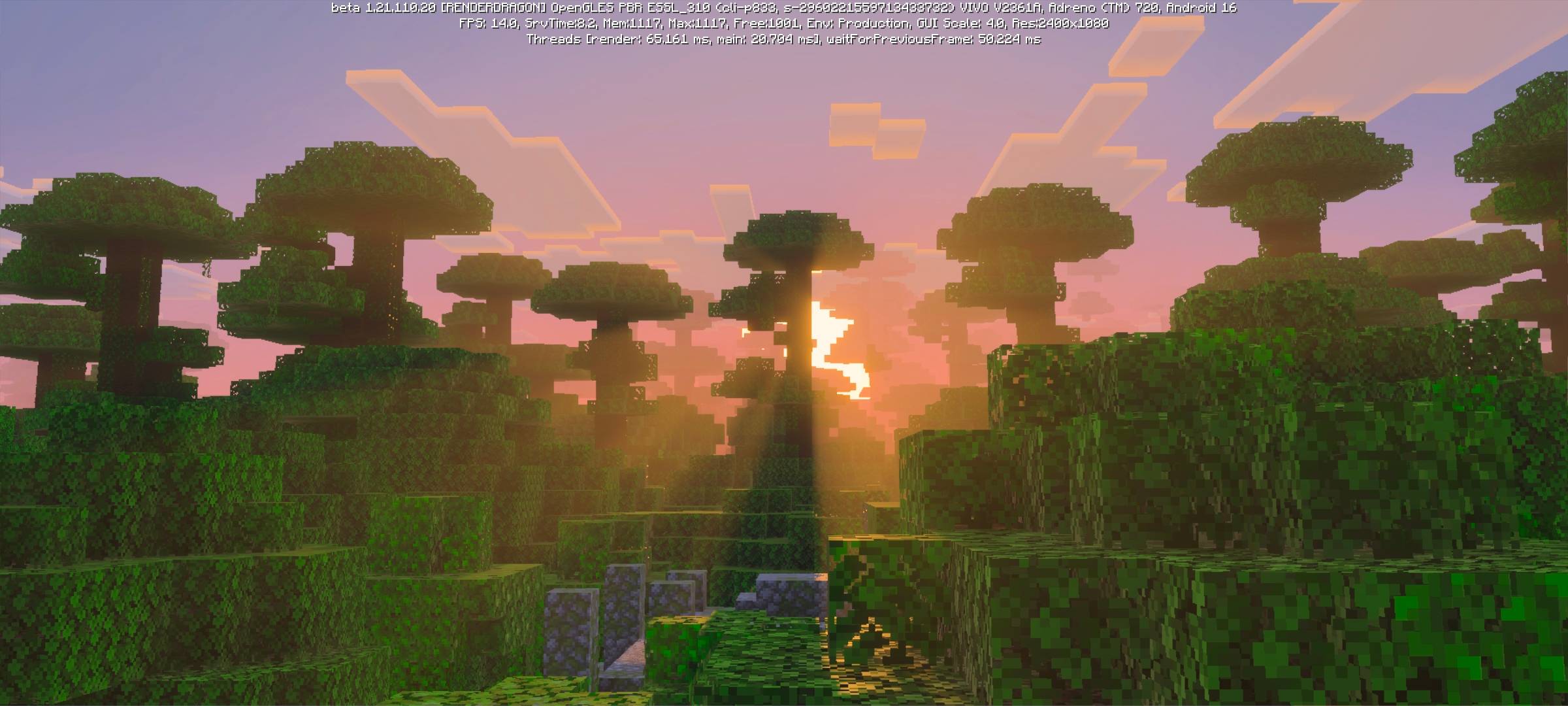
Breathtaking God Rays: The atmosphere hits different during golden hour. Beautiful, volumetric light beams naturally pierce through the terrain and trees. You can see this cinematic effect in 1000102515.jpg, where the sunset light seamlessly cuts through the jungle canopy.
Realistic Water & Reflections: Water behaves like a real fluid. The surface features dynamic, wavy 3D reflections that mirror the sun and sky (1000115681.jpg and 1000102511.jpg). Once you dive deep, gorgeous underwater god rays slice through the aquatic depths, keeping the immersion alive (1000115682.jpg).
Dynamic Point Lights (Beta Only!): Say goodbye to flat cave lighting! Vibrant colored torches now cast localized, realistic glow onto nearby blocks. Check out 1000102516.jpg and 1000102518.jpg to see red and green lights illuminating dark stone paths. (Note: Point lights are a work-in-progress feature and are only available on Minecraft Beta versions!)
PART 2: Ray-Tracing Evolution (RTX) 🌈
Ready to unlock the ultimate version of this pack? Turn on ray tracing and watch the environment morph into a fully path-traced masterpiece where every single photon is tracked in real time.
Atmospheric Fog & Precision Rays: RTX replaces standard horizons with a thick, realistic fog that scatters light dynamically. Volumetric god rays become pinpoint accurate. Look at 1000102593.png to see warm sunset fog wrap around hills, 1000102558.png for light shafts piercing foliage, and 1000102549.png to see how smoothly entities like villagers blend into the hazy distance.
True Physically Based Rendering (PBR): Blocks get actual physical depth, roughness, and metallic properties. In 1000102590.png, the wooden lever catches real-time reflections on its metallic base, while the wood has a matte texture. On the pathway in 1000102596.png, cobblestone reacts realistically to direct sunlight, creating a stunning 3D illusion on every ridge.
Dynamic Real-Time Lighting: Every light source emits physical photons that bounce off surfaces naturally. In 1000102595.png, you can see a hanging lantern casting a realistic amber glow that accurately illuminates the wooden planks and leaves soft, perfect shadows in the corners.
Crystal Clear Ray-Traced Water: Water gets true transparency and depth refraction. As shown in 1000102577.png, a beam of bright light cuts directly through the crystal surface, illuminating the detailed PBR riverbed underneath with perfect, crisp lighting edges.
Choose your mode, fire up your world, and experience Minecraft like never before! 🚀
The Ultimate Guide to GemVisuals PBR
If you are exploring the vast world of Minecraft modifications, GemVisuals PBR by Arnondanon12 is a standout shader that deserves your attention. With over 34 downloads, it has become a staple for players looking to enhance their experience. As the creator describes it, this project is "GemVisuals PBR transforms Minecraft! 🚀 Features Vibrant Visuals (VV) with cinematic god rays, realistic 3D water reflections, and beta colored point lights. Toggle RTX for full path-tracing, realistic fog, true PBR textures, and 3D lighting! 🔥". Whether you are a veteran builder constructing massive cities, or simply a casual player looking to upgrade your survival world, this guide will provide you with all the essential details on how GemVisuals PBR alters the game.
What Makes It Special?
Unlike standard shaders that simply alter superficial elements, GemVisuals PBR introduces a wide array of visual and mechanical features designed to seamlessly blend into the vanilla aesthetic. Arnondanon12 has clearly spent significant time refining the project to ensure that every aspect feels polished and responsive for version 1.21.111.
Installation Guide
Getting GemVisuals PBR up and running is straightforward. Follow these step-by-step instructions:
- Verify Your Version: Ensure your Minecraft launcher is set to version 1.21.111.
- Install Mod Loader (if required): If this is a mod, download the compatible loader (Forge, Fabric, NeoForge).
- Download the File: Click the secure download button above to retrieve the official file from CurseForge.
- Move the File: Place the downloaded file into your `mods`, `shaderpacks`, or `resourcepacks` folder depending on the shader type.
- Launch and Enjoy: Open Minecraft, navigate to the respective settings menu, and activate GemVisuals PBR.
Compatibility & Performance
Compatibility is robust. GemVisuals PBR is designed specifically for version 1.21.111, taking full advantage of the latest engine optimizations. During typical gameplay, this addition maintains a stable frame rate, though lower-end laptops might experience slight stuttering. We recommend pairing this with performance boosters like Sodium or Iris to guarantee a silky-smooth experience.


