Why Myloveee Skins Totem is a top-tier texture pack mod for Minecraft 1.21.132
Developed by the talented creator Myloveee, Myloveee Skins Totem stands out as a highly recommended selection for your Minecraft client. It is fully optimized, compatibility-tested, and brings a major upgrade to the gameplay experience in Minecraft version 1.21.132.
⚙️ Quick Resource Specs
| Mod Creator | Myloveee |
| Latest Version | 1.21.132 |
| Supported Game Versions | 1.21.132, 1.21.131, 1.21.130, 1.21.124 |
| File Size | 1.96 MB |
| Last Updated | |
| Total Downloads | 30,722 downloads |
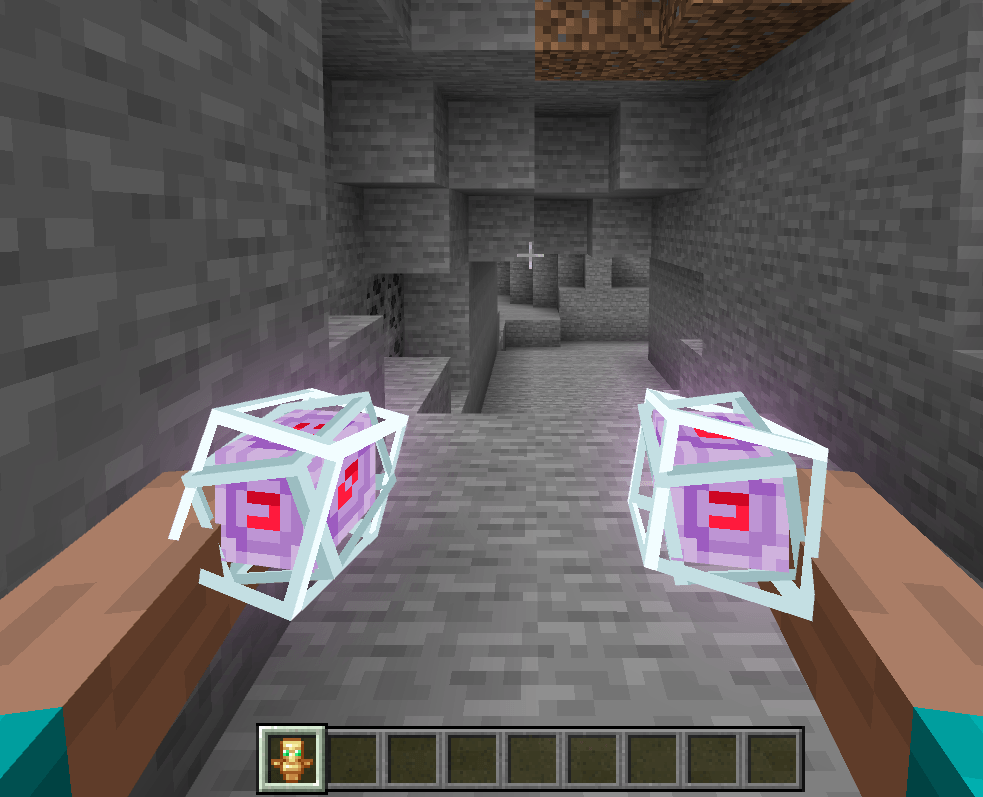
Myloveee Totem Skins — 24 Action & Stuff Variants
Tired of looking at the same old vanilla Totem of Undying every time you escape death? Give your ultimate lifesaver a massive glow-up that matches your epic combat animations!
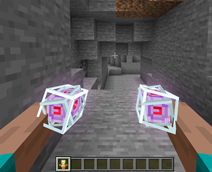
Myloveee Totem Skins brings 24 breathtaking, custom 3D animated skins to your Totem of Undying. Built to blend perfectly with the stylish aesthetic of the Action and Stuff framework, you can now hold mystical nether stars, ticking clocks, glowing campfires, or even cute little axolotls in a bucket instead of a boring golden doll!
Switch your totem's look instantly using the in-game settings wheel and match your totem to your current adventure style!
✨ Features
-
24 Stunning Totem Skins: Choose from an amazing lineup including Beacons, End Crystals, Ominous Bottles, Books, Enchanted Tomes, and more!
-
Action-Ready 3D Models: High-quality 3D models that look incredible and move fluidly with your custom first-person (FPV) and third-person animations.
-
Custom Pop-Up Effects: 19 out of the 24 skins include custom matching 2D icons that flash on your screen right when the totem breaks and saves your life!
-
Easy In-Game Swapping: No need to download 24 separate packs. Just click the gear icon (⚙️) in your pack settings and slide to choose your favorite variant!
-
Bedrock Ready: Fully optimized for Windows 10/11, Mobile (iOS/Android), Xbox, and Nintendo Switch.
📦 What's Inside? (All 24 Variants)
-
Mystical & Magic: Nether Star, Beacon, End Crystal, Dragon Breath.
-
Survival Gear: Clock, Compass, Recovery Compass, Campfire, Soul Campfire.
-
Blocks & Items: Enchanting Table, Ominous Bottle, Trial Key, Ominous Trial Key, Copper Golem Statue.
-
Cute & Quirky Buckets: Pufferfish Bucket, Axolotl Bucket, Sulfur Cube Bucket, Honey Bottle.
-
Tomes & Knowledge: Book, Book and Quill, Enchanted Book.
-
Nature & Magic Spawn: Spore Blossom, Cactus Flower, Witch Spawn Egg.
🛠️ How to Use & Requirements
⚠️ IMPORTANT REQUIREMENT: This pack is an add-on designed to complement the Action and Stuff animation pack.
To make the custom models and scaling display correctly, you must install Action and Stuff FIRST. In your Global Resources list, place Action and Stuff at the bottom and this pack directly on top of it!
-
Download & Import: Download the
.mcpackfile and open it to auto-import into Minecraft Bedrock. -
Activate: Go to
Settings>Global Resourcesand activate the pack. -
Pick Your Skin: Click on Myloveee Totem Skins in your active list, click the Gear Icon (⚙️), slide the bar to your preferred totem, and confirm!
📜 Credits & Disclaimer
-
Pack Creator: Myloveee
-
Base Framework: Huge credit to the creators of the Action and Stuff pack for the incredible animation systems, core geometry, and styling that inspired this variant addon.
-
Disclaimer: This pack is designed as a complementary expansion for Action and Stuff. Please respect the original creators' guidelines regarding modification and sharing.
The Ultimate Guide to Myloveee Skins Totem
If you are exploring the vast world of Minecraft modifications, Myloveee Skins Totem by Myloveee is a standout texture that deserves your attention. With over 30,722 downloads, it has become a staple for players looking to enhance their experience. As the creator describes it, this project is "Myloveee Totem Skins — 24 Action & Stuff Variants Tired of looking at the same old vanilla Totem of Undying every time you escape death? Give your ultimate lifesaver a massive glow-up that matches your epic combat animations!". Whether you are a veteran builder constructing massive cities, or simply a casual player looking to upgrade your survival world, this guide will provide you with all the essential details on how Myloveee Skins Totem alters the game.
What Makes It Special?
Unlike standard textures that simply alter superficial elements, Myloveee Skins Totem introduces a wide array of visual and mechanical features designed to seamlessly blend into the vanilla aesthetic. Myloveee has clearly spent significant time refining the project to ensure that every aspect feels polished and responsive for version 1.21.132.
Installation Guide
Getting Myloveee Skins Totem up and running is straightforward. Follow these step-by-step instructions:
- Verify Your Version: Ensure your Minecraft launcher is set to version 1.21.132.
- Install Mod Loader (if required): If this is a mod, download the compatible loader (Forge, Fabric, NeoForge).
- Download the File: Click the secure download button above to retrieve the official file from CurseForge.
- Move the File: Place the downloaded file into your `mods`, `shaderpacks`, or `resourcepacks` folder depending on the texture type.
- Launch and Enjoy: Open Minecraft, navigate to the respective settings menu, and activate Myloveee Skins Totem.
Compatibility & Performance
Compatibility is robust. Myloveee Skins Totem is designed specifically for version 1.21.132, taking full advantage of the latest engine optimizations. During typical gameplay, this addition maintains a stable frame rate, though lower-end laptops might experience slight stuttering. We recommend pairing this with performance boosters like Sodium or Iris to guarantee a silky-smooth experience.