Why Overgrown leaves is a top-tier texture pack mod for Minecraft 1.21.100
Developed by the talented creator Baku_Studio, Overgrown leaves stands out as a highly recommended selection for your Minecraft client. It is fully optimized, compatibility-tested, and brings a major upgrade to the gameplay experience in Minecraft version 1.21.100.
⚙️ Quick Resource Specs
| Mod Creator | Baku_Studio |
| Latest Version | 1.21.100 |
| Supported Game Versions | 1.21.100 |
| File Size | 18.07 KB |
| Last Updated | |
| Total Downloads | 1,544 downloads |
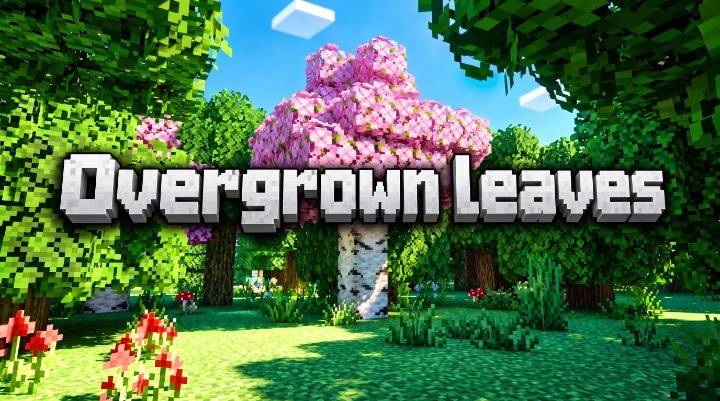
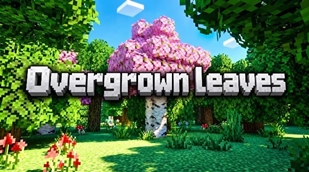
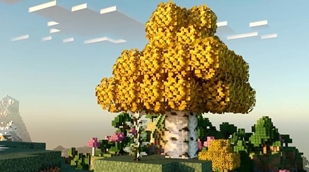
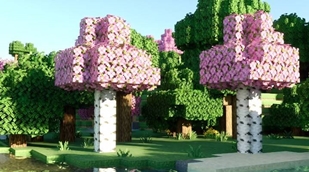
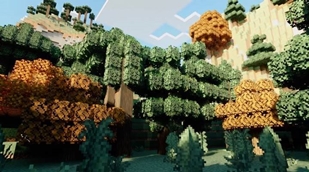
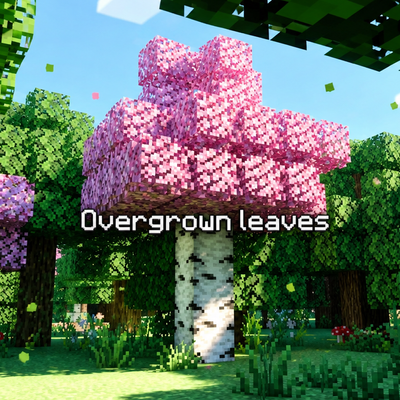
Overgrown Leaves by Baku_Studio reimagines Minecraft's foliage. Vanilla leaf blocks are clean, uniform little cubes — tidy, but not very "alive." This pack replaces that tidiness with something closer to how real canopies look: dense, ragged, irregular clusters of leaves with torn silhouettes and gaps of open sky peeking through, so every tree in every biome reads as thicker, wilder, and more overgrown.
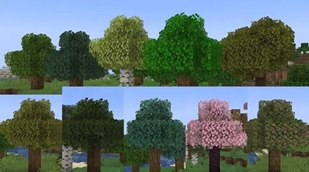
Every vanilla wood type is covered — oak, spruce, birch, jungle, acacia, dark oak, mangrove, cherry blossom, azalea (plain and flowering), and pale oak — along with the legacy leaves/leaves2 block groups used internally by the game. Each species keeps its own distinct foliage color (spruce stays dark and cool, birch stays light and yellow-green, cherry stays soft pink, azalea-flowered leans warm pink-green, and so on), just rendered with a bushier, hand-tuned alpha-cutout pattern instead of the flat vanilla square. Because the change lives in the texture itself, it applies consistently everywhere the block appears — full daylight, torchlight, moonlight, deep cave darkness, every biome's foliage tint — with zero extra setup. There's nothing to toggle per-dimension: it's simply how the leaf texture is drawn from now on.
A quick, honest note on scope: the Nether and the End don't contain any vanilla "leaves" blocks (Crimson/Warped fungi and Chorus Plants use entirely different block types), so there's nothing for a leaves-focused pack to change there by default — this pack is built for the Overworld's trees, where leaves actually exist.
Two ways to install it, matched to your renderer:
- Shape edition — uses Bedrock's
chorus_flowerblockshape trick to physically break the leaf block's silhouette so clumps visibly poke past the cube's edges in 3D. This gives the deepest, most dramatic "wild growth" look, but it's a legacy render path that isn't supported by Vibrant Visuals / RTX path tracing and will visibly glitch if ray tracing is on. Use this only with the classic (non-RTX) renderer. - RTX-Safe edition — keeps the block a normal cube and does all the work through the texture alone (plus, in the experimental PBR variant, a gently smoothed normal/roughness map for a hint of extra depth under Vibrant Visuals). This is the one to use whenever ray tracing is enabled, and it's guaranteed not to fight with the renderer.
An optional companion behavior pack adds ambient falling-leaf particles: stand near or under a tree and small, species-colored leaf sprites drift down and fade out, purely through vanilla /function and /particle commands — no scripting API, no experimental toggles, so it's safe to enable alongside either edition above.
Performance & compatibility: built and tested against min_engine_version 1.21.0, so it loads cleanly from Bedrock 1.21.1.100 all the way through 1.26+ and beyond. The resource packs are texture/shape-only (a few KB of PNGs and JSON), so there's no meaningful performance cost; the optional particle behavior pack runs a lightweight, throttled check a few times a second rather than every tick, keeping the ambient effect cheap even in busy worlds.
Why two editions instead of one? Bedrock's ray-traced renderer builds its own mesh from block data and doesn't reliably support the same legacy blockshape overrides the classic renderer does. Rather than ship one pack that looks great half the time and shatters into glitchy fragments the other half, Overgrown Leaves ships the right version for the right renderer, so it looks intentional and correct no matter how you play.
3. Credits
- Shader / Pack name: Overgrown Leaves
- Author: Baku_Studio
- Technique credit: the "leaves poking past the block edge" effect uses Bedrock's built-in
chorus_flowerblockshape override, a long-standing community technique for reshaping vanilla blocks viablocks.json— not a new engine feature invented by this pack. - Engine / platform: Mojang / Minecraft Bedrock Edition (all textures and geometry hooks are third-party additions layered on top of vanilla assets the player already owns).
- PBR support: built against Bedrock's
minecraft:texture_set/ Vibrant Visuals PBR pipeline (color + normal + metalness-emissive-roughness maps).
The Ultimate Guide to Overgrown leaves
If you are exploring the vast world of Minecraft modifications, Overgrown leaves by Baku_Studio is a standout texture that deserves your attention. With over 1,544 downloads, it has become a staple for players looking to enhance their experience. As the creator describes it, this project is "Overgrown Leaves thickens up every tree in the game — oak to cherry blossom, mangrove to pale oak — with dense, torn-edge foliage for a wild, jungle-like canopy. Built for Bedrock 1.21.1.100–1.26+, safe with Vibrant Visuals/RTX.". Whether you are a veteran builder constructing massive cities, or simply a casual player looking to upgrade your survival world, this guide will provide you with all the essential details on how Overgrown leaves alters the game.
What Makes It Special?
Unlike standard textures that simply alter superficial elements, Overgrown leaves introduces a wide array of visual and mechanical features designed to seamlessly blend into the vanilla aesthetic. Baku_Studio has clearly spent significant time refining the project to ensure that every aspect feels polished and responsive for version 1.21.100.
Installation Guide
Getting Overgrown leaves up and running is straightforward. Follow these step-by-step instructions:
- Verify Your Version: Ensure your Minecraft launcher is set to version 1.21.100.
- Install Mod Loader (if required): If this is a mod, download the compatible loader (Forge, Fabric, NeoForge).
- Download the File: Click the secure download button above to retrieve the official file from CurseForge.
- Move the File: Place the downloaded file into your `mods`, `shaderpacks`, or `resourcepacks` folder depending on the texture type.
- Launch and Enjoy: Open Minecraft, navigate to the respective settings menu, and activate Overgrown leaves.
Compatibility & Performance
Compatibility is robust. Overgrown leaves is designed specifically for version 1.21.100, taking full advantage of the latest engine optimizations. During typical gameplay, this addition maintains a stable frame rate, though lower-end laptops might experience slight stuttering. We recommend pairing this with performance boosters like Sodium or Iris to guarantee a silky-smooth experience.