Why Bone Shader is a top-tier shader mod for Minecraft 1.21.100
Developed by the talented creator lifeigniter, Bone Shader stands out as a highly recommended selection for your Minecraft client. It is fully optimized, compatibility-tested, and brings a major upgrade to the gameplay experience in Minecraft version 1.21.100.
⚙️ Quick Resource Specs
| Mod Creator | lifeigniter |
| Latest Version | 1.21.100 |
| Supported Game Versions | 1.21.100 |
| File Size | 75.86 KB |
| Last Updated | |
| Total Downloads | 338 downloads |
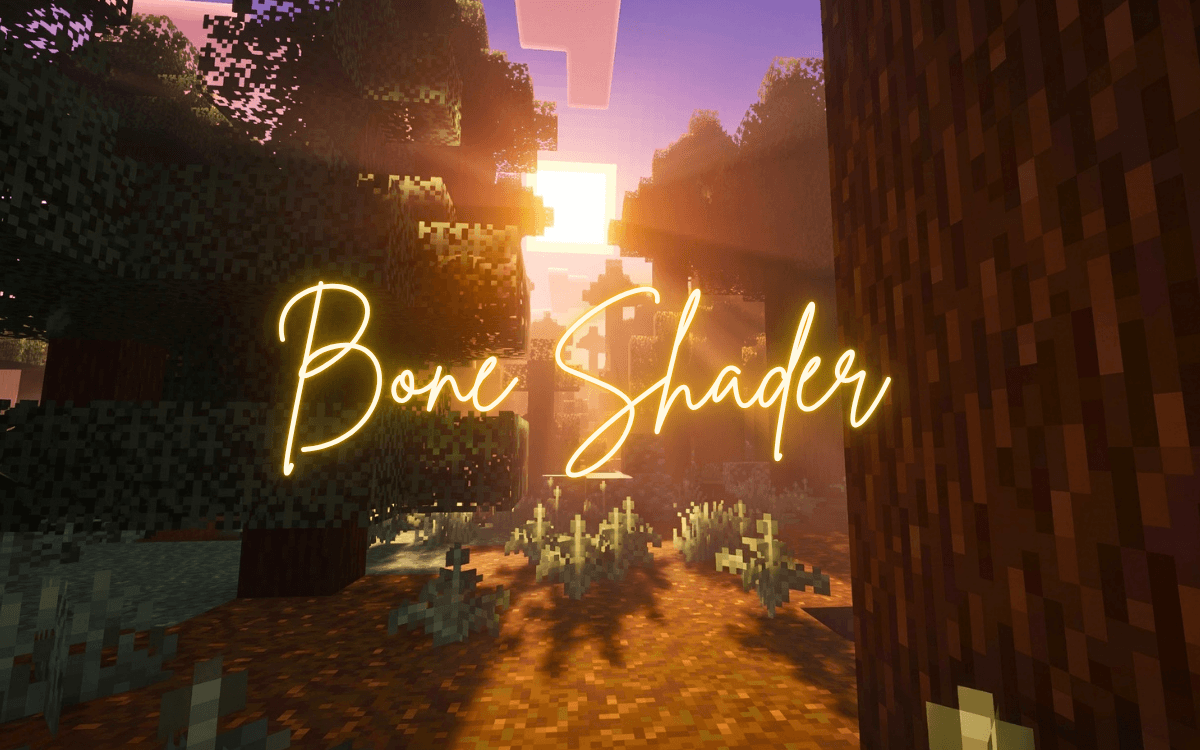
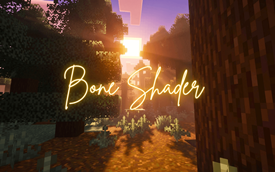
Bone Shader is a full atmosphere overhaul for Minecraft Bedrock Edition, built on Mojang's official Vibrant Visuals rendering system. It doesn't touch a single block texture — instead it rewrites how sky, fog, sunlight and colour behave in every biome, so the game feels like a different, more cinematic world while still looking unmistakably like Minecraft.
🌅 A sunset worth stopping for
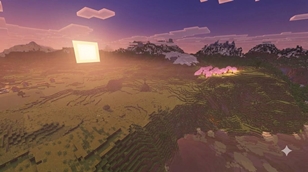
The centerpiece of this pack is its day-to-night transition. Watch the sky melt from deep purple overhead into rose-pink and warm peach near the horizon, with a glowing golden sun and soft volumetric light scattering through the clouds. Villages, plains and open fields turn into postcard scenes right as the sun goes down.
☀️ Clean, crisp daylight
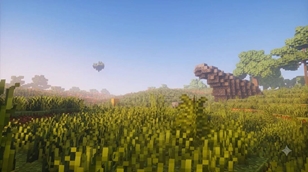
No washed-out haze here. Daytime skies are bright and clearly blue, with just enough soft atmospheric depth that distant terrain fades naturally instead of vanishing into thick fog.
🌙 A night you can actually see in
Deep navy skies and cool silver moonlight keep nights atmospheric without going pitch black. You'll still be able to read the landscape around you.
🌴 Every biome, its own mood
- Badlands glow with a warm terracotta haze and an orange horizon.
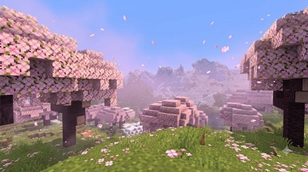
- Cherry Groves get a soft pink-lavender air that makes the blossoms pop against a bright blue sky.
- Jungles carry a gentle green mist by day and a mauve-pink dusk.
- Cold and snowy biomes take on a crisp, cool blue tint.
- Oceans and coral reefs look vivid underwater, with clear turquoise water that lets every piece of coral show its true colour.
- Caves (Dripstone, Lush, Deep Dark) are properly dark with a faint cool-blue murk, so torches and lava finally mean something again.
🔥 The Nether, reimagined
A deep, oppressive red haze blankets Nether Wastes, while Crimson Forest, Warped Forest, Soul Sand Valley and Basalt Deltas each carry their own distinct tint — crimson red, teal, ghostly cyan and ashen brown.
🌌 The End, made eerie
A near-black violet void with a faint lavender glow makes purpur End Cities and glowing end rods stand out like never before.
🗺️ Full coverage, no exceptions
Bone Shader overrides 89 biomes — every Overworld biome, every ocean variant, every cave type, all five Nether biomes, and The End. You'll never cross a biome border and fall back into the flat default look.
🎨 Pairs with any texture pack
Because Bone Shader only changes lighting, sky and fog — never textures — it looks fantastic with flat/minimalist packs, semi-realistic packs, or even default vanilla textures.
⚙️ Lightweight by design
Pure configuration, no extra textures, sounds or models. The whole pack is under 100 KB and loads instantly.
📋 Requirements
- Minecraft Bedrock / Pocket Edition 1.21.130 or newer
- A device with Vibrant Visuals support enabled
🔧 Installation
- Download and open the
.mcpackfile — it imports automatically. - Go to your world's Resource Packs settings and activate Bone Shader.
- Drag it to the top of your active pack list.
- Go to Settings → Video → Graphics Mode and enable Vibrant Visuals.
⚠️ Note: Fog colour is fixed per biome (it doesn't shift between day and night), kept intentionally light so nights don't look washed out.
Bone Shader is an independent, original creation and is not affiliated with or endorsed by Mojang or Microsoft.
Creator / Credits
- Created by: lifeigniter
- Framework used: Mojang's official Vibrant Visuals (PBR / deferred rendering) system for Bedrock
- Colour design: custom-built atmosphere, fog and lighting curves for every biome
The Ultimate Guide to Bone Shader
If you are exploring the vast world of Minecraft modifications, Bone Shader by lifeigniter is a standout shader that deserves your attention. With over 338 downloads, it has become a staple for players looking to enhance their experience. As the creator describes it, this project is "A vivid Vibrant Visuals shader that gives every biome its own sky, fog and light — bright crisp days, glowing purple-pink sunsets, deep Nether haze and a violet End void. Works with any texture pack.". Whether you are a veteran builder constructing massive cities, or simply a casual player looking to upgrade your survival world, this guide will provide you with all the essential details on how Bone Shader alters the game.
What Makes It Special?
Unlike standard shaders that simply alter superficial elements, Bone Shader introduces a wide array of visual and mechanical features designed to seamlessly blend into the vanilla aesthetic. lifeigniter has clearly spent significant time refining the project to ensure that every aspect feels polished and responsive for version 1.21.100.
Installation Guide
Getting Bone Shader up and running is straightforward. Follow these step-by-step instructions:
- Verify Your Version: Ensure your Minecraft launcher is set to version 1.21.100.
- Install Mod Loader (if required): If this is a mod, download the compatible loader (Forge, Fabric, NeoForge).
- Download the File: Click the secure download button above to retrieve the official file from CurseForge.
- Move the File: Place the downloaded file into your `mods`, `shaderpacks`, or `resourcepacks` folder depending on the shader type.
- Launch and Enjoy: Open Minecraft, navigate to the respective settings menu, and activate Bone Shader.
Compatibility & Performance
Compatibility is robust. Bone Shader is designed specifically for version 1.21.100, taking full advantage of the latest engine optimizations. During typical gameplay, this addition maintains a stable frame rate, though lower-end laptops might experience slight stuttering. We recommend pairing this with performance boosters like Sodium or Iris to guarantee a silky-smooth experience.