![Apex: Shader [Dream Edition] logo](https://media.forgecdn.net/avatars/2083/728/639264527751998887.png)
Why Apex: Shader [Dream Edition] is a top-tier shader mod for Minecraft 1.21
Developed by the talented creator ApexStudio, Apex: Shader [Dream Edition] stands out as a highly recommended selection for your Minecraft client. It is fully optimized, compatibility-tested, and brings a major upgrade to the gameplay experience in Minecraft version 1.21.
⚙️ Quick Resource Specs
| Mod Creator | ApexStudio |
| Latest Version | 1.21 |
| Supported Game Versions | Minecraft 1.21+ |
| File Size | 7.59 MB |
| Last Updated | |
| Total Downloads | 958 downloads |
![Apex: Shader [Dream Edition] screenshot active](https://media.forgecdn.net/attachments/1996/759/1000233971-gif.gif)
☁️ Apex: Shader [Dream Edition]
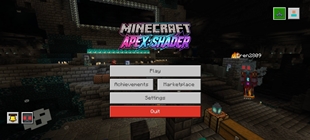
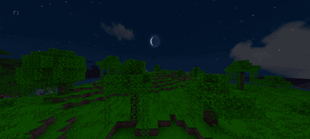
Transform your Minecraft Bedrock experience into a breathtaking, ethereal dreamscape! Apex: Shader brings a soft-fantasy atmosphere, natural movement, and clean visual clarity directly to Bedrock. Designed to be completely survival- and semi PvP-friendly, it enhances your world without cluttering your screen.
✨ Features Showcase
🍃 Living Nature & Foliage Animations
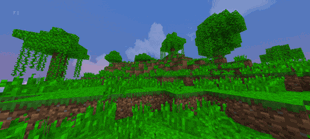
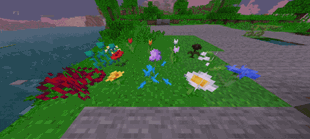
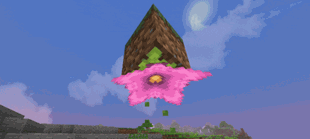
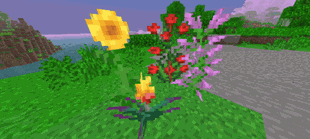
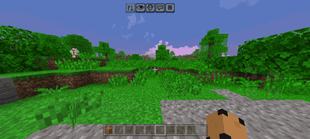
- Waving Flora: Smooth, natural wind animations on tree leaves, tall grass, vines, and flowers.
- Animated Crops: Wheat, farm fields gently sway with the breeze. (Will add other's in the future.)
🌌 Dream Atmosphere & Custom Sky
- Dreamy Lighting: Soft, vibrant tones that make every biome look like a fantasy realm.
- Custom Celestial Sky: High-resolution sun and moon with custom sky textures for day and night.
💎 Visual Clarity & Cave Exploration
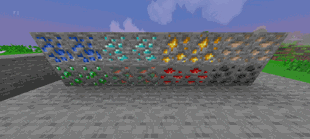
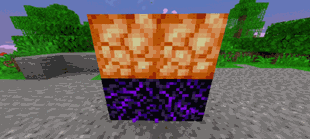
- Ore Glint: Sparkling glint effect on valuable ores to make them pop out.
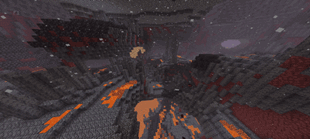
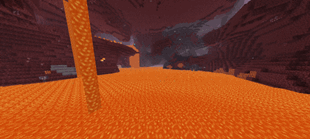
- Crystal-Clear Fluids: Ultra-transparent water and clean lava, giving you maximum visibility underwater and in the Nether.
⚔️ Quality of Life (QoL) Tweaks
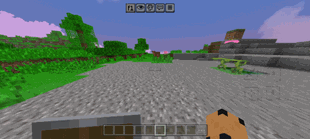
- Short Shield: A lowered, low-profile first-person shield model that stops blocking half your screen in combat.
- No Pumpkin Blur: The annoying black pumpkin overlay is completely removed, letting you wear carved pumpkins with full vision.
⚠️ Device Compatibility & Performance Warning
- Recommended: Mid-to-high-end mobile devices, Windows 10/11 PCs, and modern consoles.
- Low-End Devices: May experience frame drops, stutter, or crashes on low-spec phones or older hardware.
📱 How to Install on Bedrock (iOS / Android / Windows)
- Download the .mcpack file from the Files tab.
- Click/tap the downloaded file Minecraft Bedrock will launch and import it automatically.
- In Minecraft, go to Settings > Global Resources (or your specific World Settings > Resource Packs).
- Find Apex: Shader [Dream Edition], click Activate, and enjoy!
🚀 Initial Release (v1.0) & What's Next
This is my first public release! I'm actively optimizing performance and fine-tuning features across different Bedrock platforms (Mobile/PC).
Coming in future updates:
- Subpack settings to toggle specific animations on or off
- Custom weather tweaks (enhanced rain and fog)
- A dedicated lightweight / low-end performance version for a future update!
💬 Feedback & Suggestions
Found a bug, missing texture, or have a suggestion? Leave a comment. I'll read all your feedback to shape future updates. If you enjoy the pack, please hit the Follow and Favorite buttons to support continued development!
The Ultimate Guide to Apex: Shader [Dream Edition]
If you are exploring the vast world of Minecraft modifications, Apex: Shader [Dream Edition] by ApexStudio is a standout shader that deserves your attention. With over 958 downloads, it has become a staple for players looking to enhance their experience. As the creator describes it, this project is "Step into a vibrant, ethereal fantasy. Features lush waving foliage, sparkling ores, crystal-clear water & lava, custom skies, and clean QoL tweaks (short shield & no pumpkin blur).". Whether you are a veteran builder constructing massive cities, or simply a casual player looking to upgrade your survival world, this guide will provide you with all the essential details on how Apex: Shader [Dream Edition] alters the game.
What Makes It Special?
Unlike standard shaders that simply alter superficial elements, Apex: Shader [Dream Edition] introduces a wide array of visual and mechanical features designed to seamlessly blend into the vanilla aesthetic. ApexStudio has clearly spent significant time refining the project to ensure that every aspect feels polished and responsive for version 1.21.
Installation Guide
Getting Apex: Shader [Dream Edition] up and running is straightforward. Follow these step-by-step instructions:
- Verify Your Version: Ensure your Minecraft launcher is set to version 1.21.
- Install Mod Loader (if required): If this is a mod, download the compatible loader (Forge, Fabric, NeoForge).
- Download the File: Click the secure download button above to retrieve the official file from CurseForge.
- Move the File: Place the downloaded file into your `mods`, `shaderpacks`, or `resourcepacks` folder depending on the shader type.
- Launch and Enjoy: Open Minecraft, navigate to the respective settings menu, and activate Apex: Shader [Dream Edition].
Compatibility & Performance
Compatibility is robust. Apex: Shader [Dream Edition] is designed specifically for version 1.21, taking full advantage of the latest engine optimizations. During typical gameplay, this addition maintains a stable frame rate, though lower-end laptops might experience slight stuttering. We recommend pairing this with performance boosters like Sodium or Iris to guarantee a silky-smooth experience.