Why Ores Lite – Enhanced Ores & Resource Blocks is a top-tier texture pack mod for Minecraft 1.21
Developed by the talented creator QuartzShift, Ores Lite – Enhanced Ores & Resource Blocks stands out as a highly recommended selection for your Minecraft client. It is fully optimized, compatibility-tested, and brings a major upgrade to the gameplay experience in Minecraft version 1.21.
⚙️ Quick Resource Specs
| Mod Creator | QuartzShift |
| Latest Version | 1.21 |
| Supported Game Versions | Minecraft 1.21+ |
| File Size | 102.95 KB |
| Last Updated | |
| Total Downloads | 23 downloads |
Ore Lite — Enhanced Ores & Resource Blocks
Make mining more rewarding without losing Minecraft's classic look.
Ore Lite is a vanilla-inspired resource pack for Minecraft Bedrock Edition that gives ores, minerals, and resource blocks a more detailed appearance.
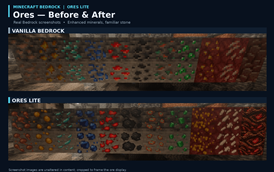
Instead of surrounding ores with bright, artificial outlines, Ore Lite enhances the minerals themselves. Discover sharper crystals, distinctive mineral deposits, improved contrast, and natural formations that fit into Minecraft's existing world.
Enhanced Ore Textures
Every major vanilla ore receives its own distinctive appearance.
- Diamond & Emerald: Detailed crystal formations with brighter mineral facets.
- Iron & Copper: Natural metallic deposits and richer coloring.
- Gold: Larger, more distinctive nuggets embedded in stone.
- Coal & Lapis: Chunkier mineral formations with improved definition.
- Redstone: Bright crimson deposits that stand out while mining.
- Nether Quartz & Gold: Enhanced mineral formations in netherrack.
- Ancient Debris: Unique fossilized patterns with a weathered, ancient appearance.
Stone and deepslate variants are included for all eight Overworld ores.
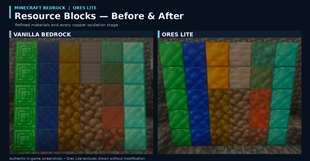
Refined Resource Blocks
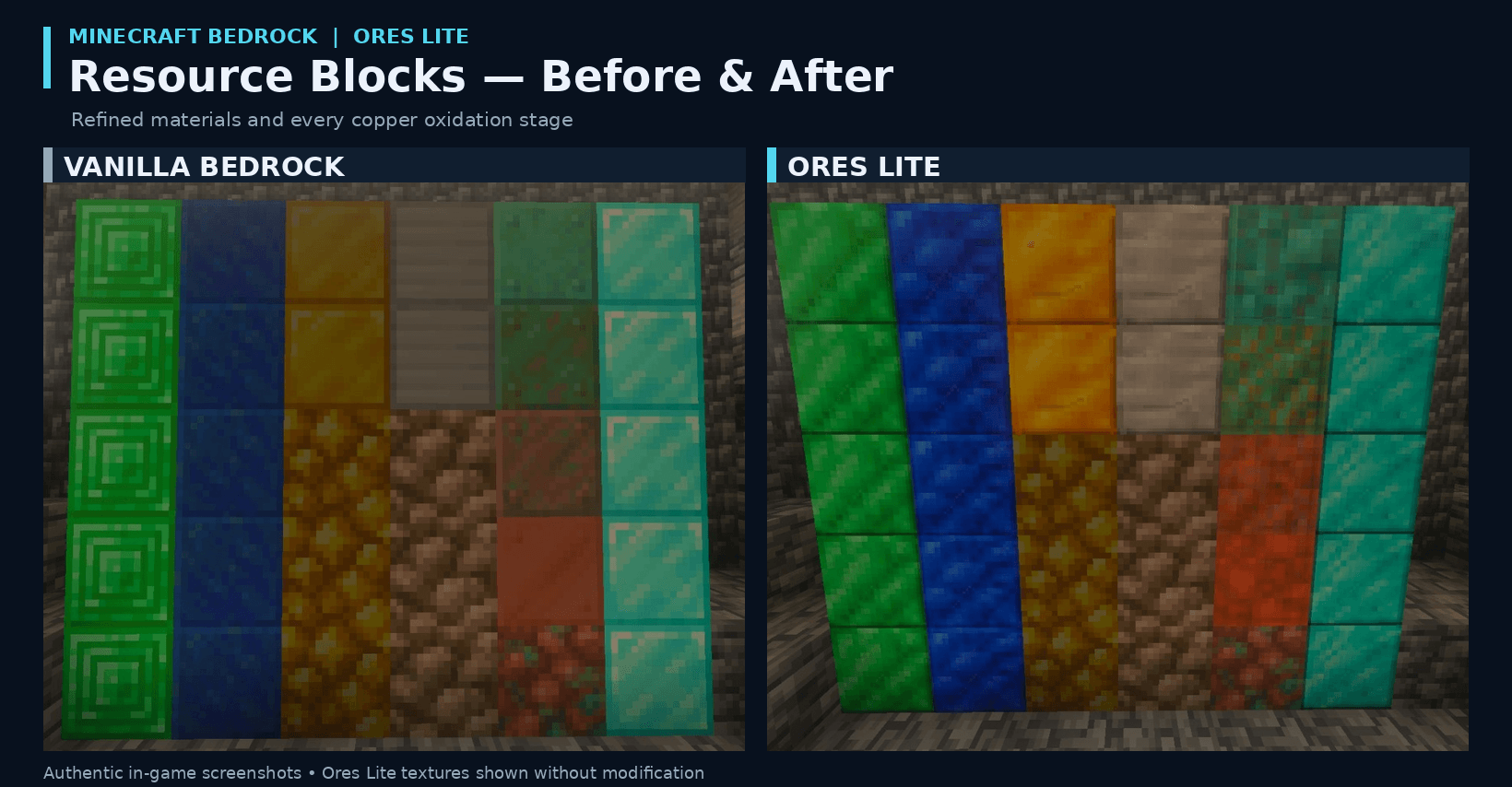
Ore Lite also improves Minecraft's valuable storage and building blocks.
Enjoy enhanced diamond, emerald, iron, gold, coal, lapis, netherite, and quartz blocks, along with all four stages of copper oxidation.
Each design retains its recognizable vanilla color scheme while introducing additional detail and texture.
Improved Item Icons
Minerals, ingots, gemstones, and other materials receive subtle visual refinements.
The icons retain their familiar Minecraft proportions, with adjusted highlights, shading, and colors.
Designed for Vanilla Minecraft
Ore Lite focuses on visual improvements without modifying Minecraft's gameplay.
Features:
- 64×64 ore and resource-block textures.
- Original 16×16-style stone, deepslate, and netherrack backgrounds.
- Distinct mineral designs rather than generic outlines.
- Stone, deepslate, and Nether ore support.
- Refined resource blocks and copper oxidation stages.
- Familiar 16×16 item icons.
- No behavior pack required.
- No shaders required.
Note: Ore Lite improves ore visibility through color and texture detail. It does not make ores emit light or provide X-ray functionality.
Installation
Download the resource pack and open the .mcpack file with Minecraft Bedrock Edition. Once imported, activate Ore Lite from your world's Resource Packs settings.
Place Ore Lite above other resource packs that modify the same textures.
Minecraft Edition: Bedrock
Block Resolution: 64×64
Item Resolution: 16×16
Pack Version: 1.0.0
The Ultimate Guide to Ores Lite – Enhanced Ores & Resource Blocks
If you are exploring the vast world of Minecraft modifications, Ores Lite – Enhanced Ores & Resource Blocks by QuartzShift is a standout texture that deserves your attention. With over 23 downloads, it has become a staple for players looking to enhance their experience. As the creator describes it, this project is "Discover detailed 64x ores, natural crystal formations, refined resource blocks, and subtle item improvements while preserving Minecraft's vanilla style.". Whether you are a veteran builder constructing massive cities, or simply a casual player looking to upgrade your survival world, this guide will provide you with all the essential details on how Ores Lite – Enhanced Ores & Resource Blocks alters the game.
What Makes It Special?
Unlike standard textures that simply alter superficial elements, Ores Lite – Enhanced Ores & Resource Blocks introduces a wide array of visual and mechanical features designed to seamlessly blend into the vanilla aesthetic. QuartzShift has clearly spent significant time refining the project to ensure that every aspect feels polished and responsive for version 1.21.
Installation Guide
Getting Ores Lite – Enhanced Ores & Resource Blocks up and running is straightforward. Follow these step-by-step instructions:
- Verify Your Version: Ensure your Minecraft launcher is set to version 1.21.
- Install Mod Loader (if required): If this is a mod, download the compatible loader (Forge, Fabric, NeoForge).
- Download the File: Click the secure download button above to retrieve the official file from CurseForge.
- Move the File: Place the downloaded file into your `mods`, `shaderpacks`, or `resourcepacks` folder depending on the texture type.
- Launch and Enjoy: Open Minecraft, navigate to the respective settings menu, and activate Ores Lite – Enhanced Ores & Resource Blocks.
Compatibility & Performance
Compatibility is robust. Ores Lite – Enhanced Ores & Resource Blocks is designed specifically for version 1.21, taking full advantage of the latest engine optimizations. During typical gameplay, this addition maintains a stable frame rate, though lower-end laptops might experience slight stuttering. We recommend pairing this with performance boosters like Sodium or Iris to guarantee a silky-smooth experience.