Why SlotFlow - Myloveee is a top-tier texture pack mod for Minecraft 1.21.132
Developed by the talented creator Myloveee, SlotFlow - Myloveee stands out as a highly recommended selection for your Minecraft client. It is fully optimized, compatibility-tested, and brings a major upgrade to the gameplay experience in Minecraft version 1.21.132.
⚙️ Quick Resource Specs
| Mod Creator | Myloveee |
| Latest Version | 1.21.132 |
| Supported Game Versions | 1.21.132, 1.21.131, 1.21.130 |
| File Size | 73.98 KB |
| Last Updated | |
| Total Downloads | 298 downloads |
SlotFlow
Smooth Hotbar Animation for Minecraft Bedrock Edition
SlotFlow is a lightweight Minecraft Bedrock resource pack designed to make hotbar interactions feel smoother, more fluid, and more responsive.
Instead of instantly jumping between selected slots, SlotFlow introduces directional sliding animations that smoothly transition the selection indicator from one slot to another. Subtle arrival effects add an extra touch of polish, creating a more refined gameplay experience.
✨ Features
-
Smooth Directional Sliding – Enjoy fluid left-to-right and right-to-left hotbar selection transitions.
-
Subtle Arrival Effect – Adds a small visual pop when the selection indicator reaches its destination.
-
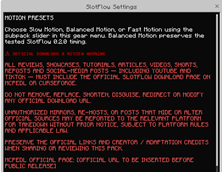
Three Animation Presets – Choose the animation style that suits your preference:
-
Slow Motion – Relaxed and softer transitions.
-
Balanced Motion – The default experience, balancing smoothness and responsiveness.
-
Fast Motion – Quicker transitions for a more responsive feel.
-
-
Clean and Lightweight – Designed to enhance the existing Minecraft HUD without unnecessarily changing its appearance.
-
Resource Pack Only – The standalone edition does not require a Behavior Pack or Script API.
🎮 Animation Presets
| Preset | Description |
|---|---|
| Slow Motion | Slower, more relaxed transitions. |
| Balanced Motion | A balanced animation experience. |
| Fast Motion | Faster and more responsive transitions. |
Select your preferred preset through the pack's available sub-pack options.
📦 Installation
-
Download the
.mcpackfile. -
Open it with Minecraft Bedrock Edition.
-
Wait for the import process to finish.
-
Open your world settings or global Resource Packs.
-
Activate SlotFlow.
-
Set SlotFlow as your preferred Resource Pack priority.
⚙️ Compatibility
-
Minecraft Bedrock Edition.
-
Resource Pack only.
-
No Behavior Pack required for the standalone edition.
-
Designed for keyboard, mouse, touchscreen, and controller-based hotbar interaction.
Actual compatibility may vary depending on the Minecraft version and platform.
💙 Credits & Acknowledgements
Bedrock Adaptation & Branding: Myloveee
Original project credits and permission information are provided in the included credits file.
Thank you for supporting SlotFlow!
⚠️ OFFICIAL DISTRIBUTION & REDISTRIBUTION POLICY
UNAUTHORIZED MODIFICATION OR REMOVAL OF OFFICIAL DOWNLOAD LINKS IS STRICTLY PROHIBITED.
All reviewers, content creators, showcase channels, redistributors, and individuals sharing SlotFlow through any platform—including YouTube, TikTok, social media, websites, blogs, and other distribution channels—MUST direct their audiences to the official download sources.
THE OFFICIAL DOWNLOAD LINKS MUST REMAIN INTACT AND UNMODIFIED.
Official distribution sources:
-
CURSEFORGE: [https://www.curseforge.com/members/myloveee/projects]
-
MCPEDL: [https://www.curseforge.com/members/myloveee/projects]
The following actions are strictly prohibited:
-
Replacing, removing, modifying, or disguising the official download links.
-
Reuploading or redistributing the pack through unauthorized download mirrors.
-
Claiming ownership of the original project or removing creator attribution.
-
Sharing modified download links that redirect users away from the official sources.
ENFORCEMENT NOTICE
Any unauthorized redistribution, link manipulation, or deliberate violation of this policy may result in a formal takedown request and a report to the relevant platform.
No exceptions are granted for reviews, showcases, promotional content, or personal redistribution.
RESPECT THE CREATOR. PRESERVE THE OFFICIAL LINKS. SUPPORT OFFICIAL DISTRIBUTION.
SlotFlow — Make Every Selection Feel Smooth.
The Ultimate Guide to SlotFlow - Myloveee
If you are exploring the vast world of Minecraft modifications, SlotFlow - Myloveee by Myloveee is a standout texture that deserves your attention. With over 298 downloads, it has become a staple for players looking to enhance their experience. As the creator describes it, this project is "A lightweight Minecraft Bedrock resource pack featuring smooth, directional hotbar sliding animations and subtle arrival effects. Includes Slow, Balanced, and Fast animation presets to customize your hotbar experience.". Whether you are a veteran builder constructing massive cities, or simply a casual player looking to upgrade your survival world, this guide will provide you with all the essential details on how SlotFlow - Myloveee alters the game.
What Makes It Special?
Unlike standard textures that simply alter superficial elements, SlotFlow - Myloveee introduces a wide array of visual and mechanical features designed to seamlessly blend into the vanilla aesthetic. Myloveee has clearly spent significant time refining the project to ensure that every aspect feels polished and responsive for version 1.21.132.
Installation Guide
Getting SlotFlow - Myloveee up and running is straightforward. Follow these step-by-step instructions:
- Verify Your Version: Ensure your Minecraft launcher is set to version 1.21.132.
- Install Mod Loader (if required): If this is a mod, download the compatible loader (Forge, Fabric, NeoForge).
- Download the File: Click the secure download button above to retrieve the official file from CurseForge.
- Move the File: Place the downloaded file into your `mods`, `shaderpacks`, or `resourcepacks` folder depending on the texture type.
- Launch and Enjoy: Open Minecraft, navigate to the respective settings menu, and activate SlotFlow - Myloveee.
Compatibility & Performance
Compatibility is robust. SlotFlow - Myloveee is designed specifically for version 1.21.132, taking full advantage of the latest engine optimizations. During typical gameplay, this addition maintains a stable frame rate, though lower-end laptops might experience slight stuttering. We recommend pairing this with performance boosters like Sodium or Iris to guarantee a silky-smooth experience.