

Why FoamFix is a top-tier mod mod for Minecraft 1.14
Simple, targetted optimizations for a popular block game
⚙️ Quick Resource Specs
| Mod Creator | asiekierka |
| Latest Version | 1.14 |
| Supported Game Versions | 1.14, 1.13, 1.12.2, 1.8.9, 1.7.10 |
| File Size | 61.58 KB |
| Last Updated | |
| Total Downloads | 111,679,592 downloads |
Quick PSA: There are no plans for a 1.14+ FoamFix update at this time, neither Forge nor Fabric.

FoamFix is a mod designed to optimize certain aspects of a modded Minecraft experience using simple, targeted optimizations.
Features
FoamFix focuses on the following aspects of modded Minecraft in particular:
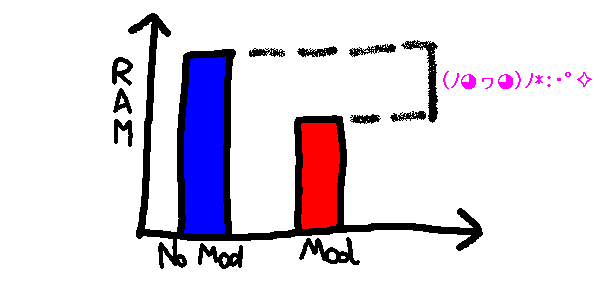
- Memory usage (in Minecraft 1.8+). This is the original reason FoamFix was made for, and the most important reason for it being adopted in modpacks today. Observations show that, on particularly heavy modpacks, Java heap usage (as measured on the main menu, after the game has finished loading, with VisualVM) can fall by as much as 50%!
- TPS usage, particularly on larger servers - ghost chunk-loading and network improvements will not help the single-player experience much, but can be incredibly beneficial when trying to scale up a multiplayer world.
There are also other, more minor optimizations, but they will probably not have a significant impact on your gameplay directly. Check your foamfix.cfg file for a complete list!
FAQ
- Q: I'm having performance issues, and removing FoamFix fixes them!
- A:Make sure you have updated to the latest version. It is impossible for me to test FoamFix on the thousands of computer hardware configurations out there with my own resources, and sometimes issues specific to some of them can occur. If you have updated to the latest version and are still experiencing issues, contact me!
- Q: Can I run FoamFix on the server/client side if it's not present on the client/server side?
- A: Yes.
- Q: Can I mix versions of FoamFix between the server and client side?
- A: Similarly, yes.
- Q: Why is there a FoamFix to 1.7.10?
- A: FoamFix primarily targets 1.8+ modded Minecraft. However, some of its later optimizations - particularly ghost chunkloading fixes - in combination with some abandoned bugfixing/optimization projects (BugfixMod, Minecraft Forkage) have led me to create an optimization mod under the same name for 1.7.10, which shares some of the functionality. As always, check foamfix.cfg to learn more!
- Q: Can you make a FoamFix for vanilla?
- A: Almost all of FoamFix focuses on optimizations particular to modded environments. Porting it to vanilla would have very few benefits, as vanilla by itself is more efficient than even Forge+FoamFix. If you're running a large vanilla server, it might be a better idea to use a dedicated solution for that.
- Q: Can you run FoamFix in a development environment?
- A: Yes, but you must manually deobfuscate it with BON2 or a similar tool.
Bug Reporting
Please try to reproduce the bug without FoamFix first - if it is still present without FoamFix, it is most likely not a FoamFix issue.
When you report a bug that only appears with FoamFix installed,
- Please ONLY report them here! This helps me keep track of existing issues.
- In particular, please do not report them to the other mod developers! If I get to the conclusion that the issue is caused by a different mod, I'll do my best to contact the other author myself and discuss the fix with them; however, unnecessary bug reports are a bit of a nuisance.
Additional Tips
(Note that this section will be rewritten as a more comprehensive optimization guide at some point)
- Enable alwaysSetupTerrainOffThread in forge.cfg. (Since 0.6.3, FoamFix will automatically do this for you on new instances!)
- If you're experiencing "ghost chunk loading"-related lag (a noticeable lag spike every ~30 seconds), a way to partially work around the problem is to increase the value of dormantChunkCacheSize in forgeChunkLoading.cfg.
- For some GPU/driver configurations (in particular, certain AMD driver/card pairs), disabling mipmaps (setting Mipmap Levels to 0) will boost FPS considerably. This is due to lag caused by animated texture updates being much higher with increasing amounts of textures to update, which scales linearly with the amount of mipmap levels.
- On dedicated servers, setting max-tick-time=0 can solve crashes related to "java.lang.Error: Watching server". Still looking into why this happens!
Common Crashes
- java.lang.NoSuchMethodError: net.minecraftforge.common.model.TRSRTransformation.isIdentity()Z on FoamFix 0.9.6+ - Update Forge to the latest recommended version, or downgrade FoamFix to 0.9.5.
- java.lang.IllegalArgumentException: Cannot set property [...], it is not an allowed value - The codepath causing this error mimics vanilla behaviour very closely, and should cause the same crash without FoamFix. Make sure it cannot be reproduced without FoamFix.
- If you're using SpongeForge alongside FoamFix (keep in mind that I do not support it), a common crash related to MixinMutableBlockPos can be fixed by disabling coremod.optimizedBlockPos in config/foamfix.cfg.
Support
- Please only use the GitHub issue tracker for bug reports. Makes it easier to keep track of them.
- Please note that "not supported" does not mean "won't work at all" - rather, it means "things can break and I might be unable to help you for various reasons". Be careful!
The following mods are not supported and I cannot guarantee satisfactory fixes related to interactions with them:
-
- FastCraft 2. The licensing is very strict and debugging impossible without relying on the developer as an oracle.
- NotEnoughIDs. Not maintained since September 2017.
- OptiFine. The licensing is very strict and debugging impossible without relying on the developer as an oracle.
- Sponge. Some of our engine changes conflict. (Note that, even if you have Sponge on the server side, using FoamFix on the client side while connecting to a Sponge server is supported!)
- TexFix.
- most other proprietary optimization mods. If I can't see the source code, I'm not likely to work on fixing it.
The Ultimate Guide to FoamFix
If you are exploring the vast world of Minecraft modifications, FoamFix by asiekierka is a standout mod that deserves your attention. With over 111,679,592 downloads, it has become a staple for players looking to enhance their experience. As the creator describes it, this project is "Simple, targetted optimizations for a popular block game". Whether you are a veteran builder constructing massive cities, or simply a casual player looking to upgrade your survival world, this guide will provide you with all the essential details on how FoamFix alters the game.
What Makes It Special?
Unlike standard mods that simply alter superficial elements, FoamFix digs deep into the game's engine to provide a cohesive, performance-focused experience. asiekierka has clearly spent significant time refining the project to ensure that every aspect feels polished and responsive for version 1.14.
Installation Guide
Getting FoamFix up and running is straightforward. Follow these step-by-step instructions:
- Verify Your Version: Ensure your Minecraft launcher is set to version 1.14.
- Install Mod Loader (if required): If this is a mod, download the compatible loader (Forge, Fabric, NeoForge).
- Download the File: Click the secure download button above to retrieve the official file from CurseForge.
- Move the File: Place the downloaded file into your `mods`, `shaderpacks`, or `resourcepacks` folder depending on the mod type.
- Launch and Enjoy: Open Minecraft, navigate to the respective settings menu, and activate FoamFix.
Compatibility & Performance
Compatibility is robust. FoamFix is designed specifically for version 1.14, taking full advantage of the latest engine optimizations. Since this is heavily focused on optimization, you can expect significant frame rate improvements on both low-end and high-end hardware.



