Why Apotheosis is a top-tier mod mod for Minecraft 1.21.1
All things that should have been.
⚙️ Quick Resource Specs
| Mod Creator | Shadows_of_Fire |
| Latest Version | 1.21.1 |
| Supported Game Versions | 1.21.1, 1.20.1, 1.16.5, 1.16.1 |
| File Size | 682.93 KB |
| Last Updated | |
| Total Downloads | 127,791,774 downloads |
About
Apotheosis® is a content mod that allows you to become stronger than ever before, while trying to stay true to vanilla mechanics at heart. Every feature is carefully put together to feel cohesive and complete.
Features range from simple changes, such as the addition of Potion Charms, to massive refactors of vanilla systems, such as Enchanting.
Content
Apotheosis is divided into different mods (or "modules"), each serving a single purpose to build up the complete Apotheosis experience. Each mod has their own CurseForge page which provides all the relevant information.
The individual mods are as follows:
- Apothic Attributes - The core of it all, this module provides new attributes and potion effects used by the rest of Apotheosis.
- Apothic Spawners - This module adds new functionality to Mob Spawners, allowing you to pick them up and modify them.
- Apothic Enchanting - The second-largest module; Apothic Enchanting provides many new enchantments and a full overhaul of Minecraft's Enchanting system.
- Apotheosis - The "adventure" module provides Affixes, Gems, World Tiers, and all manner of things needed to give yourself that feel of RPG-like progression without it taking over the game.
The Chronicle of Shadows
The content of this page is not all-inclusive. For detailed information, refer to the in-game guidebook, the Chronicle of Shadows. You can create one with a book and a gold ingot. Some modpacks may change or alter content, and content that is disabled will not be visible in the book. Alongside JEI, every bit of information is available in-game.

The sections beyond this one contain an overview of the content in Apotheosis (the Adventure Module). For the content in the other mods, refer to their CurseForge pages (linked above).
Affix Items
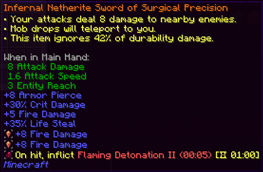
The main feature of Apotheosis is Affixes, a means of strengthening any item you may find (from vanilla or other mods). Affixes are applied to an item, much like Enchantments, but have very different rules. Each affix item has a Rarity, which controls what types of affixes it will receive and how strong they are. The individual affixes then provide different bonuses, from stat boosts to custom effects not found elsewhere. Affix Items may also have Sockets, but we'll get to that later.

Finding Affix Items
Affix Items can be found in many ways. They're located in loot chests, and will be dropped by random entities that spawn in your world. The rarity of the affix items you'll find will depend on your World Tier, a feature we'll explain a bit later.
Once you've found some affix items, you can break them down in the Salvaging Table to obtain Rarity Materials, a currency which will allow you to make your own affix items in the Reforging Table. Though you'll also need a couple Gems, which you can find from similar sources.
Gems and Sockets

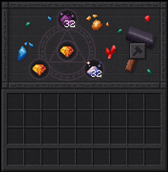
As we showed earlier, some Affix Items may have Sockets. Each socket lets you place a new Gem into your item, adding additional bonuses on top of those already provided by your affixes. Gems have specific bonuses for each type of item, so choose wisely.
Gems can be socketed into items by right-clicking the item while hovering it with the gem, or by using a smithing table. If you'd like to remove a socketed gem, you'll need a Sigil of Withdrawal. If you have an item which doesn't have sockets, but you would like it to, you can use the Sigil of Socketing.
Gems can also be converted into Gem Dust, a versatile crafting ingredient. Your first two dust will need to be created by having an anvil crush two gems, after that, you can use the Salvaging Table.
Like affix items, gems can be obtained in loot chests and from killing mobs. Slaying Invaders has a higher chance to drop gems. Certain gems can only be found in specific dimensions.
World Tiers
Apotheosis also adds World Tiers, a progression system for you, your gear, and your enemies. You can access the World Tier Selection screen by pushing the hotkey (default: CTRL+T).

There are five World Tiers in total, from lowest to highest difficulty:
- Haven - The start of your journey, and the easier tier.
- Frontier - The first tier of increased difficulty, where you'll start to see more affix items and stronger enemies.
- Ascent - For experienced adventurers, this tier has even stronger enemies still.
- Summit - Only available after slaying the Wither, Epic Gear is commonly found in this Tier.
- Pinnacle - The final and most difficult tier; but also the best source of Mythic items.
Progressing through the tiers requires that you complete the Unlock Criteria for each one; these get progressively more difficult, but are quite worthwhile.

Increasing your World Tier will allow you to get better loot, and will give you some direct bonuses, but will also increase the strength of every enemy in your world.

Apothic Enemies
Once you've progressed into World Tier: Frontier, you may notice a loud sound and a beam of light from the sky. This indicates that an Apothic Invader has spawned in your world. Invaders are enemies that have learned to wield Affixes themselves. They have customized stats, heavily enchanted gear, and a coveted Affix Item. When slain, they will always drop this item, alongside some extra bonuses.

You may also notice other empowered mobs, known as Apothic Elites. These guys don't have the same kind of theatrics when they spawn, but always come with the promise of additional loot.
Lastly, Apotheosis also has a system known as Augmentations, which may apply random bonuses to any mob that enters the world. Don't let your guard down!
Unlocking Your Full Potential
While Reforging provides a ton of power already, it's very random, and doesn't let you have total control over what you'd like. After all, this is Minecraft, and you should always be able to craft exactly what you want to make the perfect item.
Fortunately, we have a solution for that: the Augmenting Table. This powerful table allows you to upgrade and reroll individual affixes on an item, but at a high cost. Augmenting costs exorbitant sums of experience, and it also requires Sigils of Enhancement as fuel. But when you're at the end of the road, and you have near-infinite resources, this is where you'll come to perfect your build.

Malice
True perfection will still require a little luck. In your travels you may encounter the Sigil of Malice, an esoteric artifact which randomly changes an affix item. What exactly it does is a mystery.

For Developers
Apotheosis has a rich data-driven system, allowing customization of Affixes, Gems, Sockets, Tier Augments, and more (really, you name it, it's configurable, this mod is a datapack engine in disguise). The JSON Schema is perpetually a Work-In-Progress, but can be found here on GitHub. You can view the existing data files for any release by looking at the "Additional Files" tab on CurseForge, and downloading the Stock Datapack for that version.
For Mod Developers, Apotheosis is available on Shadows' Maven. There's not exactly a documented API, but you can implement a variety of content by working with Apotheosis's systems.
maven {
  // Shadows_of_Fire's Maven
  url "https://maven.shadowsoffire.dev/releases"
}

dependencies {
  implementation fg.deobf("dev.shadowsoffire:Placebo:${mcVersion}-${placeboVersion}")
  implementation fg.deobf("dev.shadowsoffire:ApothicAttributes:${mcVersion}-${apothAttribsVersion}")
  implementation fg.deobf("dev.shadowsoffire:ApothicSpawners:${mcVersion}-${apothSpawnersVersion}")
  implementation fg.deobf("dev.shadowsoffire:ApothicEnchanting:${mcVersion}-${apothEnchVersion}")
  implementation fg.deobf("dev.shadowsoffire:Apotheosis:${mcVersion}-${apothVersion}")
}
Dependencies
Apotheosis requires Placebo, Patchouli, Apothic Attributes, Apothic Spawners, and Apothic Enchanting. It is also recommended that you install Just Enough Items and Jade.
Note: Patchouli is "technically" optional, but the Chronicle of Shadows will be unavailable unless you install it.
Support Me


Contact
The Ultimate Guide to Apotheosis
If you are exploring the vast world of Minecraft modifications, Apotheosis by Shadows_of_Fire is a standout mod that deserves your attention. With over 127,791,774 downloads, it has become a staple for players looking to enhance their experience. As the creator describes it, this project is "All things that should have been.". Whether you are a veteran builder constructing massive cities, or simply a casual player looking to upgrade your survival world, this guide will provide you with all the essential details on how Apotheosis alters the game.
What Makes It Special?
Unlike standard mods that simply alter superficial elements, Apotheosis introduces a wide array of visual and mechanical features designed to seamlessly blend into the vanilla aesthetic. Shadows_of_Fire has clearly spent significant time refining the project to ensure that every aspect feels polished and responsive for version 1.21.1.
Installation Guide
Getting Apotheosis up and running is straightforward. Follow these step-by-step instructions:
- Verify Your Version: Ensure your Minecraft launcher is set to version 1.21.1.
- Install Mod Loader (if required): If this is a mod, download the compatible loader (Forge, Fabric, NeoForge).
- Download the File: Click the secure download button above to retrieve the official file from CurseForge.
- Move the File: Place the downloaded file into your `mods`, `shaderpacks`, or `resourcepacks` folder depending on the mod type.
- Launch and Enjoy: Open Minecraft, navigate to the respective settings menu, and activate Apotheosis.
Compatibility & Performance
Compatibility is robust. Apotheosis is designed specifically for version 1.21.1, taking full advantage of the latest engine optimizations. During typical gameplay, this addition maintains a stable frame rate, though lower-end laptops might experience slight stuttering. We recommend pairing this with performance boosters like Sodium or Iris to guarantee a silky-smooth experience.