Why Sodium is a top-tier mod mod for Minecraft 1.21.1
The fastest and most compatible rendering optimization mod for Minecraft. Now available for both NeoForge and Fabric!
⚙️ Quick Resource Specs
| Mod Creator | JellySquid |
| Latest Version | 1.21.1 |
| Supported Game Versions | 1.21.1 |
| File Size | 1.49 MB |
| Last Updated | |
| Total Downloads | 136,187,861 downloads |
Latest News (June 16, 2026) - Sodium 0.9.x is now available for Minecraft 26.2, with early support for Vulkan! The performance of the Vulkan backend is already in a good place (even faster than before on many devices), and we expect to be able to improve it even further with future updates.
This mod is the result of thousands of hours of development, and is made possible thanks to players like you. If you would like to show a token of your appreciation for my work, and help support the development of Sodium in the process, then consider buying me a coffee.


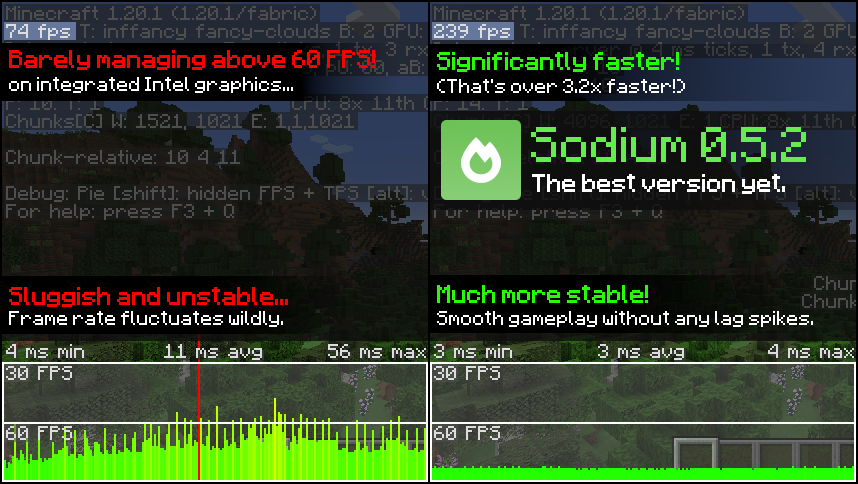
Sodium is a powerful optimization mod for the Minecraft client, which greatly improves frame rates and micro-stutter, while fixing many graphical issues in Minecraft.
Unlike other rendering-focused mods, it boasts wide compatibility with the wider modding ecosystem. And it does so without compromising on how the game looks, giving you that authentic block game feel.
And now, with the latest version of Sodium, you can use the same mod on all of your favorite platforms. Compared to older forks (Xenon, Embeddium, etc.,) you can turbo-charge your game to be as much as 23% faster than before![1]


📥 Installation Guide
Sodium is available for multiple mod loaders, but we recommend using Fabric Loader for the most simple and lightweight experience. If you are using a third-party launcher, it probably has built-in functionality to automatically install mod loaders. Once you have installed your mod loader, you can simply place Sodium into your mods folder like anything else.
Not sure if you installed the mod correctly? Check your Video Settings screen in Minecraft, which should show our new and improved user interface for changing settings.
Not sure how to configure the mod? Don't worry, you probably don't need to. By default, Sodium will enable all optimizations which are supported on your system, giving you the best experience possible. You should generally only change video settings related to performance and other advanced features if you are experiencing issues.
Need even more performance? By design, Sodium only optimizes the rendering code of Minecraft. You should also install our other mods, such as Lithium (for MC 1.15+) and Phosphor (for MC <1.19), to optimize the other parts of your game. This is done so that players can pick and choose which mods they want to use, but we generally recommend using our entire collection.
✅ Hardware Compatibility
We only provide official support for graphics cards which have up-to-date drivers that are compatible with OpenGL 4.5 or newer. Most graphics cards released in the past 12 years will meet these requirements, including the following:
- INTEL HD Graphics 500 Series (Skylake) or newer
- NVIDIA GeForce 400 Series (Fermi) or newer
- AMD Radeon HD 7000 Series (GCN 1) or newer
Nearly all graphics cards that are already compatible with Minecraft (which requires OpenGL 3.3) should also work with Sodium. But our team cannot ensure compatibility or provide support for older graphics cards, and they may not work with future versions of Sodium.
If you are running into problems, you should make sure that your graphics drivers are up-to-date. Out-of-date graphics drivers are often the reason for most crashes, rendering bugs, and performance issues.
Android devices (and some Windows-on-ARM devices) which use OpenGL translation layers (such as GL4ES, ANGLE, GLonD3D12 etc) are not supported and will very likely not work with Sodium. These translation layers do not implement required functionality and they suffer from underlying driver bugs which cannot be worked around.
🐛 How to Report Issues
Please use the issue tracker to report bugs, crashes, and other issues. Make sure you include information about the mods you are using, and attach any crash/log files you have.
❓ Frequently Asked Questions
We have a short wiki with some of the most frequently asked questions here. More likely than not, your question already has an answer here.
Note: The level of performance you see while using the Sodium mod will vary depending on exact hardware and software configuration. For all performance comparisons provided on this page, we used a computer with integrated graphics which we believe to be representative of the casual player.
Hardware configuration: Intel Core i7-1165G7 (4c/8t, up to 4.70 GHz) with Intel Xe Graphics (96 EUs, up to 1.30 GHz), 2x16 GB DDR4-3200. Software configuration: Fedora 41, Linux 6.12.4, Mesa 24.3.4, Prism Launcher 9.1, OpenJDK 21.0.7 runtime (as packaged by distribution), Fabric Loader 0.16.10.
[^1] As measured with Sodium 0.6.9 and Embeddium 1.0.15 (latest as of time of writing) on Minecraft 1.21.1 and NeoForge 21.1.128, using default settings with V-Sync and frame rate limits disabled, at a render distance of 24 chunks.
The Ultimate Guide to Sodium
If you are exploring the vast world of Minecraft modifications, Sodium by JellySquid is a standout mod that deserves your attention. With over 136,187,861 downloads, it has become a staple for players looking to enhance their experience. As the creator describes it, this project is "The fastest and most compatible rendering optimization mod for Minecraft. Now available for both NeoForge and Fabric!". Whether you are a veteran builder constructing massive cities, or simply a casual player looking to upgrade your survival world, this guide will provide you with all the essential details on how Sodium alters the game.
What Makes It Special?
Unlike standard mods that simply alter superficial elements, Sodium digs deep into the game's engine to provide a cohesive, performance-focused experience. JellySquid has clearly spent significant time refining the project to ensure that every aspect feels polished and responsive for version 1.21.1.
Installation Guide
Getting Sodium up and running is straightforward. Follow these step-by-step instructions:
- Verify Your Version: Ensure your Minecraft launcher is set to version 1.21.1.
- Install Mod Loader (if required): If this is a mod, download the compatible loader (Forge, Fabric, NeoForge).
- Download the File: Click the secure download button above to retrieve the official file from CurseForge.
- Move the File: Place the downloaded file into your `mods`, `shaderpacks`, or `resourcepacks` folder depending on the mod type.
- Launch and Enjoy: Open Minecraft, navigate to the respective settings menu, and activate Sodium.
Compatibility & Performance
Compatibility is robust. Sodium is designed specifically for version 1.21.1, taking full advantage of the latest engine optimizations. Since this is heavily focused on optimization, you can expect significant frame rate improvements on both low-end and high-end hardware.