
Why Entity Culling Fabric/Forge is a top-tier mod mod for Minecraft 1.21.4
Using async path-tracing to hide Tiles/Entities that are not visible
⚙️ Quick Resource Specs
| Mod Creator | tr7zw |
| Latest Version | 1.21.4 |
| Supported Game Versions | 1.21.4, 1.16.5, 1.16.4 |
| File Size | 37.32 KB |
| Last Updated | |
| Total Downloads | 213,736,830 downloads |





Modern Minecraft rendering is fast—but not always smart. Why render block entities and mobs that are hidden behind walls or ceilings and are completely out of sight, when you could just skip them entirely?
This mod introduces asynchronous path-tracing to efficiently determine what's actually visible to the player. By leveraging multiple CPU cores, it calculates line-of-sight visibility in real time and eliminates unnecessary draw calls for hidden block entities and entities.
The result?
Smarter rendering. Less overhead. More performance.

Unlock untapped performance by only rendering entities that truly matter. This mod goes beyond conventional optimization to bring next-level visibility optimization to deliver advanced visibility culling for Minecraft, giving you smoother gameplay.
Multithreaded Path-Tracing
- Uses spare CPU threads to rapidly calculate visibility
- Runs alongside the main game thread without blocking
- Updates visibility data in real time
Smart Occlusion Culling
- Skips the rendering of block entities and mobs hidden behind terrain or structures
- Works like Minecraft's back-face culling, but smarter
- Reduces GPU load without sacrificing visual fidelity
Entity Tick Optimization
- Reduces client impact from entities that are not visible
- Only updated the essentials
- Fully configurable and compatible with most mods


| Minecraft | Loader | Status | Version | Note |
|---|---|---|---|---|
| 1.19.4+ | Fabric/Forge/NeoForge | ✅ Supported | Latest | |
| 1.16.5-1.19.2 | Fabric/Forge | ❌ Not supported | Outdated | Might get new updates at some point |
| 1.12.2/1.8.9 | Forge | ❌ Not supported | Outdated | Might get new updates at some point |
| 1.7.10 | Forge | ❌ Not supported | Outdated | No updates planned |
| b1.7.3 | Babric | ❌ Not supported | Outdated | No updates planned |

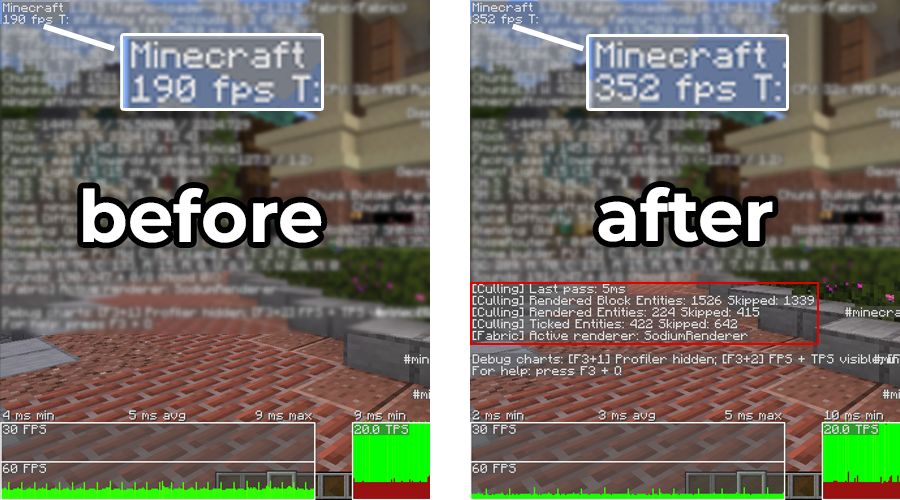
A direct comparison with and without EntityCulling active. Testing was conducted in Scarland (Hermitcraft Season 9) with render distance set to 16 chunks. The mods Sodium, Iris and ImmediatelyFast were used alongside EntityCulling, running on Minecraft 1.21.5 with the Fabric mod loader.

Client-side entities, commonly used by magic mods for animations, may not behave as expected. Whitelist the relevant entities via the config screen for tick culling and/or entity culling.
You’ll also need to whitelist block entities that render well beyond their normal bounds. Examples include the vanilla beacon, pulleys from Create, and certain Botania blocks.

Does this need to be installed on the server?
No. This is a fully client-side mod and does not need to be installed on the server.
Will this affect mob behavior or farms?
No. The mod only skips rendering—not simulation. Mobs will continue to spawn, move, and drop items as expected. Your farms and other gameplay mechanics will remain unaffected.
I have "Use Entity Culling" enabled in Sodium - does this still help?
Yes! While Sodium performs basic visibility checks based on loaded chunks, this mod goes further. It analyzes the actual line-of-sight visibility, skipping entities that are within visible chunks but not actually visible to the player. It’s a much more aggressive and accurate approach.

👤 Thanks to RoboTricker for his Transport-Pipes plugin, which created the foundation for this mod.
👤 Thanks to vicisacat for the Babric Beta 1.7.3 backport.
👤 Thanks to Pelotrio for the Forge 1.7.10 backport.
👤 Thanks to the awesome translators and contributors on GitHub!

📄 License: tr7zw Protective License
Feel free to use this mod in your Modrinth and CurseForge-hosted modpacks or YouTube videos without asking for permission. Do not redistribute the JAR files anywhere else!
The Ultimate Guide to Entity Culling Fabric/Forge
If you are exploring the vast world of Minecraft modifications, Entity Culling Fabric/Forge by tr7zw is a standout mod that deserves your attention. With over 213,736,830 downloads, it has become a staple for players looking to enhance their experience. As the creator describes it, this project is "Using async path-tracing to hide Tiles/Entities that are not visible". Whether you are a veteran builder constructing massive cities, or simply a casual player looking to upgrade your survival world, this guide will provide you with all the essential details on how Entity Culling Fabric/Forge alters the game.
What Makes It Special?
Unlike standard mods that simply alter superficial elements, Entity Culling Fabric/Forge introduces a wide array of visual and mechanical features designed to seamlessly blend into the vanilla aesthetic. tr7zw has clearly spent significant time refining the project to ensure that every aspect feels polished and responsive for version 1.21.4.
Installation Guide
Getting Entity Culling Fabric/Forge up and running is straightforward. Follow these step-by-step instructions:
- Verify Your Version: Ensure your Minecraft launcher is set to version 1.21.4.
- Install Mod Loader (if required): If this is a mod, download the compatible loader (Forge, Fabric, NeoForge).
- Download the File: Click the secure download button above to retrieve the official file from CurseForge.
- Move the File: Place the downloaded file into your `mods`, `shaderpacks`, or `resourcepacks` folder depending on the mod type.
- Launch and Enjoy: Open Minecraft, navigate to the respective settings menu, and activate Entity Culling Fabric/Forge.
Compatibility & Performance
Compatibility is robust. Entity Culling Fabric/Forge is designed specifically for version 1.21.4, taking full advantage of the latest engine optimizations. During typical gameplay, this addition maintains a stable frame rate, though lower-end laptops might experience slight stuttering. We recommend pairing this with performance boosters like Sodium or Iris to guarantee a silky-smooth experience.



