Why Chloride (Previously Embeddium++/Sodium++) is a top-tier mod mod for Minecraft 1.21.1
Gives Embeddium/Sodium additional Performance and Quality features for a tasteful experience
⚙️ Quick Resource Specs
| Mod Creator | SrRapero720 |
| Latest Version | 1.21.1 |
| Supported Game Versions | 1.21.1, 1.20.1 |
| File Size | 306.97 KB |
| Last Updated | |
| Total Downloads | 35,335,168 downloads |



🧂 CHLORIDE MOD
Chloride is a performance addon/mod for Sodium that aims to improve
the performance of the game and the quality of sodium itself.
Offers a lot of features to customize and improve your experience with sodium, making it
a tasteful experience (NaCl).

🔧 FEATURES
⚡ PERFORMANCE
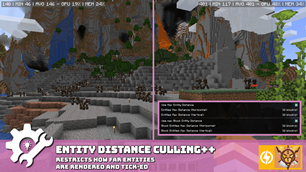
🐄 ENTITY DISTANCE CULLING
- 📐 Avoid rendering/ticking Entities and Block Entities from far away.
- 📋 Features a whitelist, letting important entities (such as ender dragon or ghast)
- ✨ Example:
minecraft:batculls bats,alexsmobs:allculls all Alex's Mobs entities.
[🌿] LEAVES CULLING
- 📐 Reduce the number of rendered faces in a group of the same type of leaves
- 📋 Features a slider to set how many leaves you want to cull
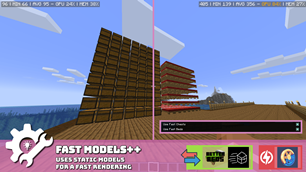
[👟] FAST MODELS
- 📐 Replaces suboptimal animated Chest and Bed (below mc26.2) models to use solid models
- 📋 Toggle each individually
[🔦] HIDE JEI/REI/EMI OVERLAY
- 📐 Hides JEI/REI/EMI overlays until you type anything in their search bars
- ✨ Show a small meessag indicating you must search something to show the overlay
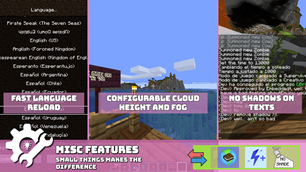
[🌎] FAST LANGUAGE RELOAD
- 📐 Reload quick as possible the language (less than 1 second).
[🔁] [26.2] ENGINE HOTSWAP (VK/GL)
- 📐 Enables hotswap of rendering engines (GL/VK) in-game.
- 📋 Disabled by default, can be enabled, compatible with sodium, incompatible with iris.
- ✨ No need to restart the game, perfect to compare instantly the game perf.
🛠️ VISUAL UTILITY
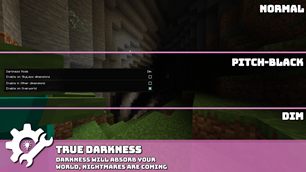
[🕯️] TRUE DARKNESS
- 📐 Adds MANY darkness levels to the game, making it more realistic (and darker)
- 📋 Toggles between DIM, DARK, DARKNESS, BLACK and BLACKNESS
- ✨ Moonlight and blocklights can affect the darkness level
[🏷️] NAMETAG HIDING
- 📐 Removes nametag rendering for everyone like players, entities and item frames. (what's your name?)
- 📋 Toggle each individually
[🔍] ZOOM KEY
- 📐 Adds a simple immediate zoom key to the game, allowing you to zoom in and out
- 📋 Can configure min and max distance and can be disabled
- ✨ You can scroll to zoom in and out while zooming
👓 QUALITY
[🌁] FOG/BLUEBAND SETTINGS
- 📐 Configure the distance (start, end), and the visibility of the fog and the blueband.
- 📋 Toggle each individually
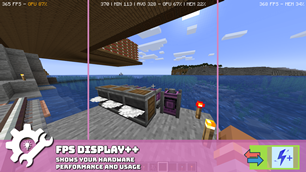
[🧮] FPS DISPLAY
- 📐 Shows your average, min and current FPS, Memory usage percent and GPU usage percent.
- ✨ You can place it anywhere on the screen, even above your hotbar
[🖥️] BORDERLESS FULLSCREEN:
- 📐 Adds borderless fullscreen to the game, adding quick-tab switching, image-in-imag support and no more black screen
- ✨ Fullscreen key (F11) can also switch to Borderless FullScreen (can be disabled or override)
[🔳] TEXT SHADOWS TOGGLE
- 📐 Disables font shadows, sometimes increases the FPS on screens with a lot of text
[👁️] CHUNK FADE IN- Will be back in future updates
✨ MISC
- [🔒] SETTINGS LOCKER
- 📐 Hides all visual utility settings, making it impossible to change them
👥 SUPPORT AND QUESTIONS
Join to my community in Discord to ask anything about the mod, ask me permission to do odd things with the mod or do fancy suggestion to improve in the mod.
The Ultimate Guide to Chloride (Previously Embeddium++/Sodium++)
If you are exploring the vast world of Minecraft modifications, Chloride (Previously Embeddium++/Sodium++) by SrRapero720 is a standout mod that deserves your attention. With over 35,335,168 downloads, it has become a staple for players looking to enhance their experience. As the creator describes it, this project is "Gives Embeddium/Sodium additional Performance and Quality features for a tasteful experience". Whether you are a veteran builder constructing massive cities, or simply a casual player looking to upgrade your survival world, this guide will provide you with all the essential details on how Chloride (Previously Embeddium++/Sodium++) alters the game.
What Makes It Special?
Unlike standard mods that simply alter superficial elements, Chloride (Previously Embeddium++/Sodium++) digs deep into the game's engine to provide a cohesive, performance-focused experience. SrRapero720 has clearly spent significant time refining the project to ensure that every aspect feels polished and responsive for version 1.21.1.
Installation Guide
Getting Chloride (Previously Embeddium++/Sodium++) up and running is straightforward. Follow these step-by-step instructions:
- Verify Your Version: Ensure your Minecraft launcher is set to version 1.21.1.
- Install Mod Loader (if required): If this is a mod, download the compatible loader (Forge, Fabric, NeoForge).
- Download the File: Click the secure download button above to retrieve the official file from CurseForge.
- Move the File: Place the downloaded file into your `mods`, `shaderpacks`, or `resourcepacks` folder depending on the mod type.
- Launch and Enjoy: Open Minecraft, navigate to the respective settings menu, and activate Chloride (Previously Embeddium++/Sodium++).
Compatibility & Performance
Compatibility is robust. Chloride (Previously Embeddium++/Sodium++) is designed specifically for version 1.21.1, taking full advantage of the latest engine optimizations. Since this is heavily focused on optimization, you can expect significant frame rate improvements on both low-end and high-end hardware.