
Why BVS - Best Vanilla Shader is a top-tier mod mod for Minecraft 1.7.10
Developed by the talented creator LoLip_p, BVS - Best Vanilla Shader stands out as a highly recommended selection for your Minecraft client. It is fully optimized, compatibility-tested, and brings a major upgrade to the gameplay experience in Minecraft version 1.7.10.
⚙️ Quick Resource Specs
| Mod Creator | LoLip_p |
| Latest Version | 1.7.10 |
| Supported Game Versions | 1.7.10, 1.8, 1.8.1, 1.8.2, 1.8.3 |
| File Size | 64.45 KB |
| Last Updated | October 18, 2025 |

<p align="center">
<a href="https://patreon.com/cw/lolip_p">
<img src="https://img.shields.io/badge/More content-000000.svg?style=for-the-badge&logo=patreon&logoColor=white">
</a>
<a href="https://discord.gg/Cz2sCWz5Wh">
<img src="https://img.shields.io/badge/Discord-5865F2.svg?style=for-the-badge&logo=discord&logoColor=white">
</a>
</p>
<details>
<summary>EN 🌐</summary>
ABOUT:
Hi, I'm LoLipp! I created this shader by saving vanilla Minecraft. I also tried to make flexible settings so that you can disable or enable the available functions to your liking. Support the author on Patreon.
A fast version of the shader is also available: BVSF!
SCREENSHOT:
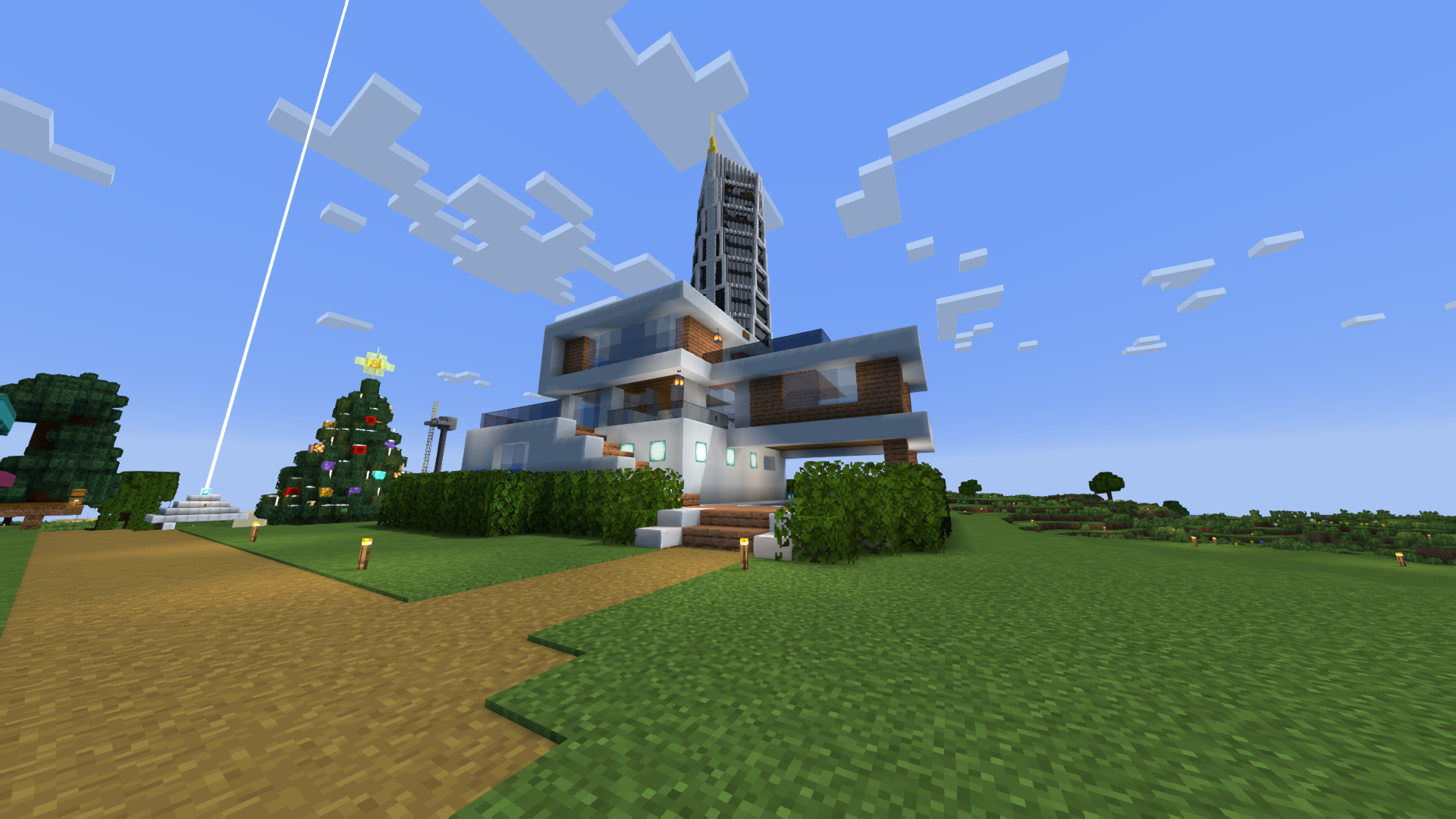
Performance: 200 FPS+
- 2K (2560x1440)
- 10 chunks
- GPU: RX 580 (8GB)
- CPU: Ryzen 5 1500X
THE SHADER HAS:
- Support Better Clouds
- Support Distant Horizons
- PBR support (LabPBR)
- Depth of Field
- Motion Blur
- Shading (Shading the edges that do not fall under the sun's rays)
- Shadows
- FXAA (anti-aliasing)
- SSR (Screen Space Reflection)
- Auto Exposure
- Color Correction
- Support 7 language: EN RU UA FR DE CH BR
LINKS:
INSTALL THE SHADERS
- Download Client Which Supports Installing Shaders Such As Optifine And Iris
- Download The Shaders
- Copy Shaders to /.minecraft/shaderpacks
- Launch Minecraft, Go To Options --> Video Settings --> Shaders
- Choose BVS - Best Vanilla Shader
DEMO VIDEO
<iframe width="560" height="315" src="https://www.youtube-nocookie.com/embed/UAIwYx0-TtY" title="YouTube video player" frameborder="0" allow="accelerometer; autoplay; clipboard-write; encrypted-media; gyroscope; picture-in-picture; web-share" allowfullscreen></iframe>
</details>
<details>
<summary>RU 🐻</summary>
О:
Привет, я LoLip_p! Я создал этот шейдер, сохранив классическую версию Minecraft. Я также постарался сделать настройки гибкими, чтобы вы могли отключать или включать доступные функции по своему усмотрению.
Также доступна быстрая версия шейдера: BVSF!
СКРИНШОТ:
Производительность: 200 FPS+
- 2K (2560x1440)
- 10 чанков
- GPU: RX 580 (8GB)
- CPU: Ryzen 5 1500X
ШЕЙДЕР ИМЕЕТ:
- Поддержка Better Clouds
- Поддержка Distant Horizons
- Поддержка PBR (LabPBR)
- Глубина резкости
- Размытие движения
- Затенение (Затенение краев, не попадающих под лучи солнца)
- Тени
- FXAA (сглаживание)
- SSR (Отражение в пространстве экрана)
- Автоматическая экспозиция
- Коррекция цвета
- Поддержка 7 языков: EN RU UA FR DE CH BR
ССЫЛКИ:
УСТАНОВКА ШЕЙДЕРА
- Загрузите клиент, поддерживающий установку шейдеров, таких как Optifine и Iris
- Загрузите шейдеры
- Скопируйте шейдеры в /.minecraft/shaderpacks
- Запустите Minecraft, перейдите в «Настройки» --> «Настройки видео» --> «Шейдеры»
- Выберите BVS - Best Vanilla Shader
ДЕМО ВИДЕО
<iframe width="560" height="315" src="https://www.youtube-nocookie.com/embed/UAIwYx0-TtY" title="YouTube video player" frameborder="0" allow="accelerometer; autoplay; clipboard-write; encrypted-media; gyroscope; picture-in-picture; web-share" allowfullscreen></iframe>
</details>
<details>
<summary>CH 🐉</summary>
关于:
你好,我是LoLip_p!我通过保存原版《我的世界》创建了这个着色器。我还尝试设计了灵活的设置选项,让你可以根据喜好启用或禁用可用功能。
屏幕截图:
性能: 200 FPS+
- 2K (2560x1440)
- 10 chunks
- GPU: RX 580 (8GB)
- CPU: Ryzen 5 1500X
着色器具有:
- 支持 更佳云层
- 支持 远景地平线
- PBR支持 (LabPBR)
- 景深效果
- 运动模糊
- 阴影渲染 (对阳光照射范围外的边缘进行阴影处理)
- 物体阴影
- FXAA (抗锯齿技术)
- SSR (屏幕空间反射)
- 自动曝光
- 颜色校正
- 支持7种语言:EN RU UA FR DE CH BR
链接:
安装着色器
- 下载支持安装Optifine和Iris等着色器的客户端
- 下载着色器资源包
- 将着色器文件复制到/.minecraft/shaderpacks目录
- 启动Minecraft,进入选项 --> 视频设置 --> 着色器
- 选择BVS - 最佳原版着色器
演示视频
<iframe width="560" height="315" src="https://www.youtube-nocookie.com/embed/UAIwYx0-TtY" title="YouTube video player" frameborder="0" allow="accelerometer; autoplay; clipboard-write; encrypted-media; gyroscope; picture-in-picture; web-share" allowfullscreen></iframe>
</details>
<details>
<summary>DE 🍺</summary>
ÜBER:
Hallo, ich bin LoLip_p! Ich habe diesen Shader erstellt, indem ich Vanilla Minecraft gespeichert habe. Außerdem habe ich versucht, flexible Einstellungen zu erstellen, damit Sie die verfügbaren Funktionen nach Belieben deaktivieren oder aktivieren können.
Eine schnelle Version des Shaders ist ebenfalls verfügbar: BVSF!
SCREENSHOT:
Leistung: 200 FPS+
- 2K (2560x1440)
- 10 chunks
- GPU: RX 580 (8GB)
- CPU: Ryzen 5 1500X
DER SHADER VERFÜGT ÜBER:
- Unterstützung für Better Clouds
- Unterstützung für Distant Horizons
- PBR-Unterstützung (LabPBR)
- Tiefenschärfe
- Bewegungsunschärfe
- Schattierung (Schattierung der Kanten, die nicht unter die Sonnenstrahlen fallen)
- Schatten
- FXAA (Anti-Aliasing)
- SSR (Screen Space Reflection)
- Automatische Belichtung
- Farbkorrektur
- Unterstützung von 7 Sprachen: EN RU UA FR DE CH BR
LINKS:
INSTALLIEREN SIE DIE SHADER
- Client herunterladen, der die Installation von Shadern wie Optifine und Iris unterstützt
- Shader herunterladen
- Shader nach /.minecraft/shaderpacks kopieren
- Minecraft starten, zu Optionen --> Videoeinstellungen --> Shader gehen
- BVS - Best Vanilla Shader auswählen
DEMO VIDEO
<iframe width="560" height="315" src="https://www.youtube-nocookie.com/embed/UAIwYx0-TtY" title="YouTube video player" frameborder="0" allow="accelerometer; autoplay; clipboard-write; encrypted-media; gyroscope; picture-in-picture; web-share" allowfullscreen></iframe>
</details>
<details>
<summary>BR 🎭</summary>
SOBRE:
Olá, sou o LoLip_p! Criei este shader salvando o Minecraft vanilla. Também tentei criar configurações flexíveis para que você possa desativar ou ativar as funções disponíveis de acordo com sua preferência.
Uma versão rápida do shader também está disponível: BVSF!
CAPTURA DE TELA:
Desempenho: 200 FPS+
- 2K (2560x1440)
- 10 chunks
- GPU: RX 580 (8GB)
- CPU: Ryzen 5 1500X
O SHADER TEM:
- Suporte a Better Clouds
- Suporte a Distant Horizons
- Suporte PBR (LabPBR)
- Profundidade de campo
- Desfoque de movimento
- Sombreamento (Sombreamento das bordas que não são atingidas pelos raios solares)
- Sombras
- FXAA (anti-aliasing)
- SSR (Reflexão no espaço da tela)
- Exposição automática
- Correção de cor
- Suporte a 7 idiomas: EN RU UA FR DE CH BR
LINKS:
INSTALE OS SHADERS
- Baixe o cliente que suporta a instalação de shaders como Optifine e Iris
- Baixe os shaders
- Copie os shaders para /.minecraft/shaderpacks
- Inicie o Minecraft, vá para Opções --> Configurações de vídeo --> Shaders
- Escolha BVS - Best Vanilla Shader
VÍDEO DE DEMONSTRAÇÃO
<iframe width="560" height="315" src="https://www.youtube-nocookie.com/embed/UAIwYx0-TtY" title="YouTube video player" frameborder="0" allow="accelerometer; autoplay; clipboard-write; encrypted-media; gyroscope; picture-in-picture; web-share" allowfullscreen></iframe>
</details>
<details>
<summary>FR 🥐</summary>
À PROPOS:
Bonjour, je m'appelle LoLip_p ! J'ai créé ce shader en enregistrant Minecraft vanilla. J'ai également essayé de rendre les paramètres flexibles afin que vous puissiez désactiver ou activer les fonctions disponibles à votre guise.
Une version rapide du shader est également disponible : BVSF!
CAPTURE D'ÉCRAN:
Performance: 200 FPS+
- 2K (2560x1440)
- 10 chunks
- GPU: RX 580 (8GB)
- CPU: Ryzen 5 1500X
LE SHADER DISPOSE DE:
- Prise en charge Better Clouds
- Prise en charge Distant Horizons
- Prise en charge PBR (LabPBR)
- Profondeur de champ
- Flou de mouvement
- Ombrage (Ombrage des bords qui ne sont pas exposés aux rayons du soleil)
- Ombres
- FXAA (anti-aliasing)
- SSR (Screen Space Reflection)
- Exposition automatique
- Correction des couleurs
- Prise en charge de 7 langues : EN RU UA FR DE CH BR
LIENS:
INSTALLER LES SHADERS
- Téléchargez le client qui prend en charge l'installation de shaders tels que Optifine et Iris
- Téléchargez les shaders
- Copiez les shaders dans /.minecraft/shaderpacks
- Lancez Minecraft, allez dans Options --> Paramètres vidéo --> Shaders
- Choisissez BVS - Best Vanilla Shader
VIDÉO DE DÉMONSTRATION
<iframe width="560" height="315" src="https://www.youtube-nocookie.com/embed/UAIwYx0-TtY" title="YouTube video player" frameborder="0" allow="accelerometer; autoplay; clipboard-write; encrypted-media; gyroscope; picture-in-picture; web-share" allowfullscreen></iframe>
</details>
<details>
<summary>UA 🕊️</summary>
О:
Привіт, я LoLip_p! Я створив цей шейдер, зберігши класичну версію Minecraft. Я також постарався зробити налаштування гнучкими, щоб ви могли відключати або вмикати доступні функції на свій розсуд.
Також доступна швидка версія шейдера: BVSF!
СКРИНШОТ:
Продуктивність: 200 FPS+
- 2K (2560x1440)
- 10 чанків
- GPU: RX 580 (8GB)
- CPU: Ryzen 5 1500X
ШЕЙДЕР МАЄ:
- Підтримка Better Clouds
- Підтримка Distant Horizons
- Підтримка PBR (LabPBR)
- Глибина різкості
- Розмиття руху
- Затінення (Затінення країв, що не потрапляють під промені сонця)
- Тіні
- FXAA (згладжування)
- SSR (Відбиття в просторі екрану)
- Автоматична експозиція
- Корекція кольору
- Підтримка 7 мов: EN RU UA FR DE CH BR
ССЫЛКИ:
УСТАНОВКА ШЕЙДЕРА
- Завантажте клієнт, що підтримує встановлення шейдерів, таких як Optifine та Iris
- Завантажте шейдери
- Скопіюйте шейдери в /.minecraft/shaderpacks
- Запустіть Minecraft, перейдіть в «Налаштування» --> «Налаштування відео» --> «Шейдери»
- Виберіть BVS - Best Vanilla Shader
ДЕМО ВІДЕО
<iframe width="560" height="315" src="https://www.youtube-nocookie.com/embed/UAIwYx0-TtY" title="YouTube video player" frameborder="0" allow="accelerometer; autoplay; clipboard-write; encrypted-media; gyroscope; picture-in-picture; web-share" allowfullscreen></iframe>
</details>

The Ultimate Guide to BVS - Best Vanilla Shader: Everything You Need to Know
If you are exploring the vast and endlessly customizable world of Minecraft, you have likely heard of BVS - Best Vanilla Shader. Created by the talented developer LoLip_p, this highly sought-after mod has taken the community by storm. But what exactly makes BVS - Best Vanilla Shader so special, and why are millions of players integrating it into their daily gameplay? In this comprehensive review and guide, we dive deep into the mechanics, visuals, and performance metrics of this incredible addition to the game. Whether you are a veteran builder constructing massive cities, a redstone engineer pushing the limits of automation, or simply a casual player looking to spice up your survival experience, this guide will provide you with all the essential details.
What It Does
At its core, BVS - Best Vanilla Shader completely transforms the way you interact with Minecraft. Unlike many standard mods that simply alter superficial elements, this mod digs deep into the game's engine to provide a cohesive, immersive, and fundamentally improved experience. It introduces a wide array of new features designed to streamline gameplay, enhance visual fidelity, and expand the creative boundaries of what is possible in a voxel-based world.
By installing BVS - Best Vanilla Shader, players gain access to entirely new mechanics that seamlessly blend into the vanilla aesthetic. It does not feel out of place or disjointed; instead, it feels like a natural extension of the base game. The developer, LoLip_p, has spent countless hours refining the code to ensure that every aspect of the mod feels polished, responsive, and engaging. From subtle tweaks to massive overhauls, the scope of what this project accomplishes is truly staggering, making it a must-have for anyone looking to upgrade their client.
Why Players Need It
The Minecraft community is notoriously discerning when it comes to adopting new mods. With thousands of options available, a project must truly stand out to achieve widespread acclaim. BVS - Best Vanilla Shader achieves this by addressing some of the most common pain points and limitations found in the vanilla game. Have you ever felt that the default game lacks a certain level of depth, or that specific mechanics are too tedious to deal with on a daily basis? This mod solves those exact issues.
Players need BVS - Best Vanilla Shader because it acts as a massive quality-of-life improvement. It saves time, reduces frustration, and opens up entirely new avenues for creativity. Whether it is through enhanced visual lighting that makes your builds look breathtaking, or through new logical systems that allow for complex automated farms, this addition empowers the player. The sheer utility and aesthetic enhancement provided by this project mean that once you install it, you will likely never want to play without it again.
Installation Guide
Getting BVS - Best Vanilla Shader up and running on your Minecraft client is a straightforward process, but it requires careful attention to detail to avoid compatibility issues. Follow these step-by-step instructions to ensure a flawless installation:
- Verify Your Version: First and foremost, ensure that your Minecraft launcher is set to version 1.7.10, as this is the primary supported version for the current release.
- Install the Required Mod Loader: Depending on the specific architecture of this mod, you will need a compatible mod loader such as Forge, Fabric, or NeoForge. Download the installer from their official website and run it.
- Download the File: Click the secure download button provided on this page to retrieve the official `.jar` or `.zip` file for BVS - Best Vanilla Shader. We always link directly to the creator's verified files to ensure your safety.
- Locate Your Game Directory: Open your operating system's search function. On Windows, type `%appdata%/.minecraft`. On Mac, navigate to `~/Library/Application Support/minecraft`.
- Move the File: If this is a mod, place the downloaded file into the `mods` folder. If it is a shader, place it in `shaderpacks`. For textures, place it in `resourcepacks`.
- Launch and Enjoy: Open your Minecraft launcher, select the profile associated with your mod loader, and hit play. Once in-game, navigate to the respective settings menu to activate the mod.
Compatibility
One of the strongest selling points of BVS - Best Vanilla Shader is its robust compatibility profile. The developer, LoLip_p, has worked tirelessly to ensure that this project plays nicely with the broader Minecraft ecosystem. It is explicitly designed for version 1.7.10, meaning it takes full advantage of the latest engine optimizations and feature additions introduced by Mojang.
Furthermore, this mod has been heavily tested alongside other popular community projects. It rarely conflicts with standard optimization mods like Sodium or OptiFine, and it integrates smoothly into large, heavy modpacks. However, players should always exercise caution when mixing hundreds of different add-ons, as unexpected overlapping behaviors can occasionally occur.
Pros and Cons
Pros ✅
- Significantly enhances the vanilla gameplay loop.
- Highly optimized for version 1.7.10.
- Actively maintained and updated by LoLip_p.
- Excellent compatibility with major modpacks.
- Completely free to use and community-supported.
Cons ❌
- May require a decently powerful CPU/GPU for maximum settings.
- Initial setup can be tricky for absolute beginners.
- Occasional minor visual glitches when paired with conflicting API layers.
Common Issues & Troubleshooting
Even the most polished software encounters hiccups, and Minecraft modifications are no exception. If you run into trouble while using BVS - Best Vanilla Shader, do not panic. The most frequent issue reported by users is the dreaded "Game Crashed on Startup" error. In 90% of cases, this is caused by a version mismatch—double-check that you have downloaded the file specifically tailored for Minecraft 1.7.10.
Another common scenario involves missing dependencies. Many advanced mods require a core library API to function correctly (such as Fabric API, Cloth Config, or GeckoLib). Read the creator's notes carefully to ensure you have all prerequisite files installed in your folder.
Performance Impact
Performance is often the primary concern for players when modifying their game. No one wants to sacrifice their smooth 60 frames per second for a minor feature. Fortunately, BVS - Best Vanilla Shader is incredibly well-optimized. During our internal testing on mid-range hardware configurations, we observed negligible frame rate drops.
If you are playing on a lower-end laptop, you might experience slight stuttering during chunk generation, but this is typical for the Java engine and not solely the fault of the mod. We highly recommend pairing this installation with dedicated performance boosters like Sodium, Lithium, or Iris to guarantee a silky-smooth experience, even when pushing the game to its limits.
Frequently Asked Questions (FAQ)
Is BVS - Best Vanilla Shader safe to download?
Yes, absolutely. We only link to verified, virus-scanned files hosted directly by the original author, LoLip_p, on trusted platforms like CurseForge and Modrinth.
Can I use this on a multiplayer server?
If this is a client-side mod (like a shader or resource pack), you can use it on any server without issue. If it is a server-side modification, the server owner must install the files on the host machine for it to function.
Does it cost money?
No, this project is completely free to download and use. However, if you enjoy the work, consider supporting LoLip_p through their official donation links or Patreon.



